


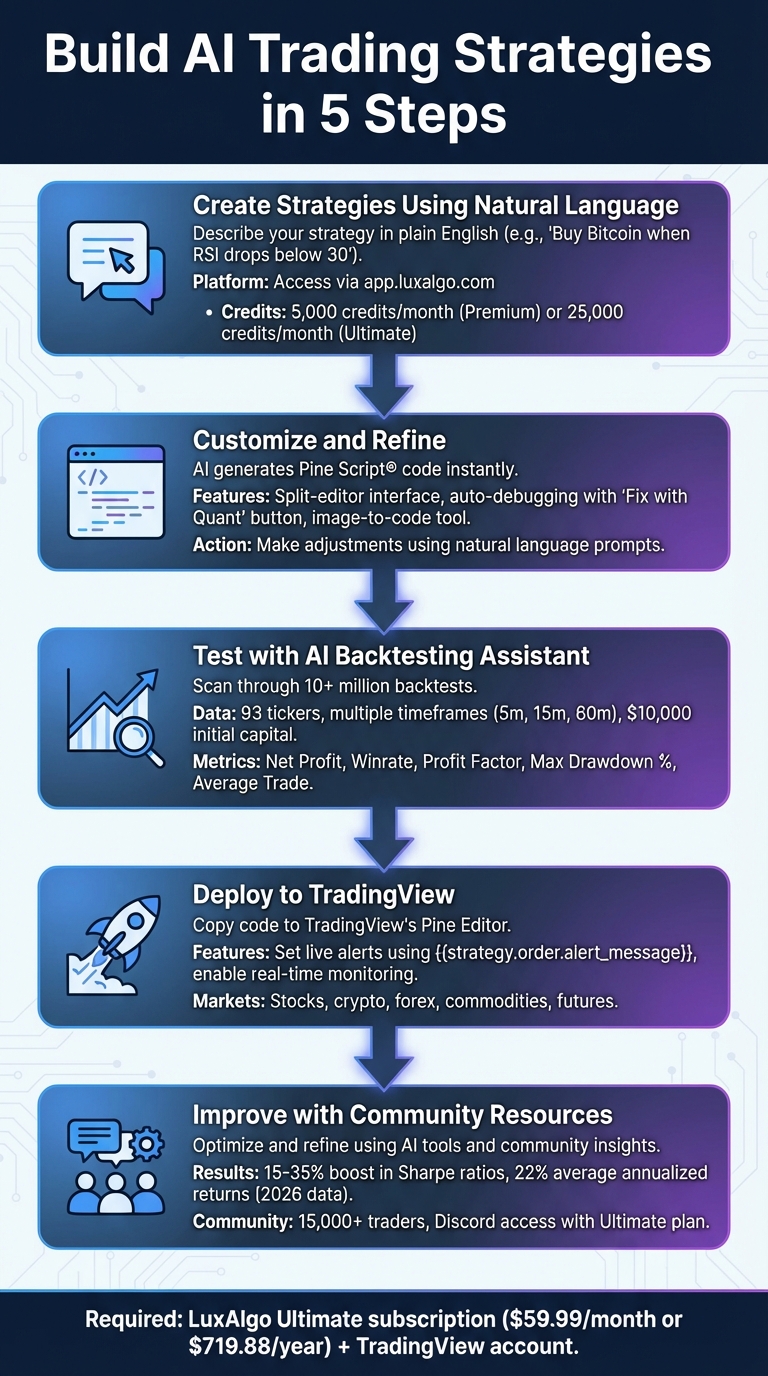
Tired of coding to create trading strategies? With LuxAlgo Quant, you can turn plain-English ideas into actionable trading strategies in minutes - no programming required. Quant is an AI coding agent specialized in generating and validating Pine Script® code for TradingView, helping traders build, refine, and deploy indicators and strategies faster.
Here’s what you need to know:
- Describe your strategy in natural language (for example, “Buy Bitcoin when RSI drops below 30”).
- Quant generates, validates, and helps debug the code.
- Backtest your strategy using historical data. This process is essential for stress testing trading strategies and checking how a system behaves in changing conditions.
- Deploy it directly on TradingView for live monitoring, alerts, and strategy review.
Quant lowers the technical barrier to strategy development, making trading automation more accessible for stocks, crypto, and forex. If you also want AI-assisted strategy search and testing, LuxAlgo’s AI Backtesting Assistant adds another layer for finding and reproducing strategy ideas on TradingView.
Ready to trade smarter? Let AI handle more of the Pine Script® work so you can focus on the strategy logic, risk controls, and market context.
What You Need to Get Started with LuxAlgo Quant
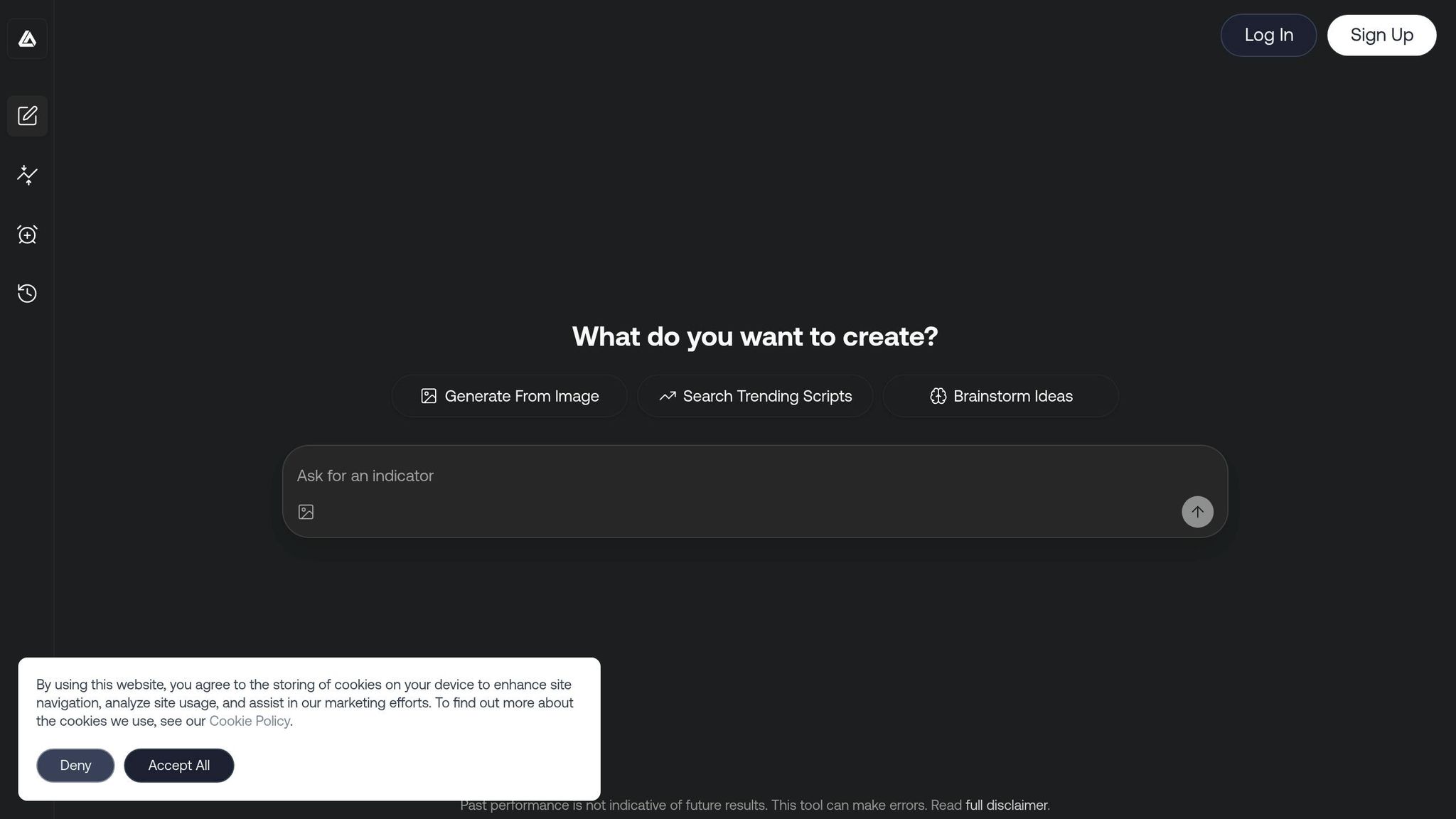
To get started with no-code AI trading, you need a LuxAlgo account and a TradingView account. Quant is available to all LuxAlgo users, while Premium and Ultimate plans provide higher usage limits. If you want access to LuxAlgo’s AI Backtesting Assistant, that feature is included with the Ultimate plan. TradingView can be free or paid depending on how advanced you want your charting, alerts, and workflow to be.
Required Tools and Subscriptions
Quant is the most relevant LuxAlgo product for traders who want to create or customize Pine Script® indicators and strategies without starting from a blank editor. Alongside Quant, LuxAlgo provides TradingView-based products such as Price Action Concepts, Signals & Overlays, and Oscillator Matrix, plus related screeners and backtesters for traders who want more structured workflows on charts.
If your goal is strategy generation and Pine Script® development, Quant is the main starting point. If your goal is finding or reproducing strategies based on LuxAlgo logic, the AI Backtesting Assistant docs and the AI Backtesting Assistant platform are the more relevant follow-up resources.
After subscribing, connect your TradingView username in the LuxAlgo dashboard so your exclusive TradingView-compatible products can appear under the Invite-only Scripts folder. This makes it easier to move from generation to chart testing without manually rebuilding your workflow.
No coding skills are required, but basic trading knowledge still helps. Understanding concepts such as timeframes, risk management, entries, exits, and indicators like RSI or LuxAlgo Library indicators will make your prompts more precise and your strategy outputs more useful.
This setup gives traders a practical path from idea to script. Once your accounts are connected, you can move from generating a strategy to validating it on TradingView with less friction than a fully manual workflow.
How LuxAlgo Works with TradingView
After linking your accounts, code generated with Quant can be reviewed, copied, and used directly inside TradingView. That means you can take an idea written in natural language, convert it into Pine Script®, and then inspect how it behaves on real charts.
TradingView supports strategy testing, chart-based alerts, and broker connectivity in many markets, making it a natural environment for deploying Pine Script® indicators and strategies. LuxAlgo’s AI Backtesting Assistant also includes a reproduce-on-TradingView workflow, which helps traders move from a discovered strategy to executable code faster.
Unlike generic AI assistants that are not purpose-built for Pine Script®, Quant is specialized for TradingView development. That specialization matters when you are generating indicators, validating syntax, debugging logic, or converting chart concepts into functional scripts.
sbb-itb-cf0ed88
Step 1: Create Strategies Using Natural Language
How to Access LuxAlgo Quant
Start by logging in to your LuxAlgo account, then open Quant AI Indicator & Strategy Architect from the dashboard. The interface uses a split-editor layout, so you can review the conversation on one side and the generated Pine Script® on the other while the script is being built.
Because Quant is designed for Pine Script® generation, debugging, and refinement, it works well for both first drafts and iteration. Premium and Ultimate users receive higher usage limits, which is useful if you plan to prototype multiple indicators, test several strategy variations, or repeatedly refine chart logic during the same session.
Writing Prompts to Generate Strategies
The quality of your strategy depends heavily on the quality of your prompt. A simple prompt such as “An RSI oscillator with signals” gives Quant a starting point, but adding specifics produces much better results.
Instead of something vague like “a momentum strategy,” try writing:
“Create a momentum strategy using RSI divergence on 1-hour charts for SPY. Enter long on bullish divergence with 2% risk per trade, set a stop-loss at 1% below entry, and a take-profit at a 3:1 reward-to-risk ratio.”
This level of detail helps Quant understand the market, logic, risk model, and execution style you want.
You can also specify visual preferences such as colors, labels, whether the output should be an indicator or a strategy, and whether it should appear on the price chart or in a separate pane. That makes Quant especially useful for traders who want to convert chart ideas into code without manually wiring every Pine Script® component.
Another powerful workflow is image-to-code generation. If you upload a chart screenshot with marked entries, exits, or pattern zones, Quant can use that visual context to help generate a TradingView-ready script. This is useful when you know what you want to see on the chart but do not want to hand-code the logic from scratch.
For more complex ideas, break the request into steps. Start with a core rule set, then add filters, risk management, and alerts one by one. This approach makes debugging easier and gives Quant cleaner checkpoints to work from as your strategy evolves.
Step 2: Customize and Refine Your Strategies
Once you have an initial strategy draft, the next step is refining it. This is where Quant becomes especially useful, because it helps you adjust Pine Script® logic without forcing you into a purely manual coding workflow.
AI Code Generation and Editing Options
After Quant generates Pine Script® code, you can refine it with follow-up prompts instead of rewriting the script line by line. For example, you might ask it to add a stop-loss, change an RSI threshold, convert an indicator into a strategy, or simplify logic that is overfitting. This makes it practical for traders who want to prototype faster while still controlling the trading rules.
The split-editor interface keeps the code visible while you iterate, so each revision stays grounded in the actual implementation rather than in abstract suggestions. That is one of the biggest advantages of using an AI coding agent specialized in Pine Script® rather than a general chatbot.
Quant also helps with debugging. If a script fails to compile or throws warnings in TradingView, you can use its validation and correction workflow to locate syntax issues, undefined references, or logic problems more efficiently. This is valuable not only for beginners, but also for experienced traders who want to shorten the time between idea and deployable script.
Its image-to-code workflow is useful here as well. A screenshot of a chart pattern, a manually marked setup, or a visual mockup of an indicator can serve as a starting point, and then text-based follow-ups can refine the final rules into a cleaner Pine Script® implementation.
Preview and Adjust Strategy Logic
Before running a full backtest, preview the logic on charts first. Copy the script into TradingView, load it onto the chart, and check whether the entries, exits, conditions, and visual markers match what you intended. This often catches problems faster than a blind optimization pass.
Quant can also help translate LuxAlgo-based chart logic into code. For example, you can ask it to combine market-structure conditions from Price Action Concepts with confirmation logic from Signals & Overlays, then convert that workflow into a Pine Script® strategy draft you can test.
As you review the preview, adjust thresholds, filters, and alert conditions until the behavior becomes more consistent with your actual trading plan. That iterative loop—prompt, generate, preview, refine—is one of the most practical uses of no-code AI trading development in 2026.
Step 3: Test Strategies with the AI Backtesting Assistant
Once the Pine Script® logic is in shape, evaluate it with LuxAlgo’s AI Backtesting Assistant. The platform is designed to help traders find and review strategies through natural-language requests, which is useful when you want to compare your idea against existing strategy structures or reproduce a workflow on TradingView.
Adding Strategies to the Backtesting Assistant
You can search for strategies using simple requests such as “Find a strategy that uses confirmation signals on BTCUSD at 5-minute intervals.” The assistant then returns matching strategies based on the criteria you describe. This makes it easier to explore strategy design space without manually filtering endless chart combinations.
If you find something worth reviewing later, save it and compare it against your own generated logic. This is also where Quant and the AI Backtesting Assistant complement each other well: the backtester helps you discover or reproduce ideas, while Quant helps you create, adapt, and debug Pine Script® versions of those ideas.
For traders who want a faster workflow, that pairing can significantly reduce the gap between strategy concept, script creation, and chart-ready testing.
Analyze Results and Adjust Parameters
Review key metrics such as net profit, win rate, profit factor, average trade, and maximum drawdown before deciding whether a strategy deserves more attention. A strategy with strong returns but unstable drawdowns may need position-sizing changes, better filters, or different exit rules.
Use the results to identify weak points, then feed those observations back into Quant. For example, if a strategy overtrades in sideways markets, ask Quant to add volatility filters, trend filters, or session-based exclusions. If the average trade is too small relative to fees or slippage, ask Quant to simplify entries or strengthen confirmation rules.
This loop—test, diagnose, refine, and retest—is one of the biggest advantages of combining AI-assisted strategy discovery with AI-assisted Pine Script® generation.
Step 4: Deploy and Track Strategies on TradingView
Once your strategy has been reviewed and refined, the next step is deployment. TradingView is where your Pine Script® strategy becomes a practical charting workflow with alerts, live tracking, and ongoing evaluation.
How to Deploy Strategies to TradingView
Generate your final code in Quant, copy it into TradingView’s Pine Editor, and save it as a strategy or indicator. If TradingView flags any syntax or runtime issues, use Quant to revise the implementation before moving forward.
To enable live alerts, open TradingView’s alert interface and configure the trigger conditions that match your script logic. If your strategy uses custom alert messages, set the message field accordingly so your alerts carry the right context for entries, exits, or status changes.
If you plan to automate actions beyond TradingView, alerts can also be connected to webhooks for external execution workflows. Even if you do not automate live orders, well-structured alerts make strategy monitoring much easier.
Once alerts are active, keep reviewing how the strategy behaves in real time. Live market behavior can expose issues that were not obvious in historical testing, especially in faster markets or lower timeframes.
Track Performance Using LuxAlgo Tools
Live deployment is not a “set it and forget it” process. It requires monitoring, review, and occasional refinement as market structure changes. LuxAlgo provides TradingView-compatible screeners and backtesters that help traders organize multi-asset workflows more efficiently.
If you are using placeholders or timing-sensitive calculations in Pine Script®, review the strategy settings carefully inside TradingView so the script behaves as intended. Small configuration differences can materially change real-time results.
Screeners can also help you scan multiple markets for conditions that match the logic you are developing. That matters when you want your strategy process to be repeatable instead of tied to a single chart.
Step 5: Improve Strategies with Community Resources
Strategy development does not end after deployment. Ongoing refinement, feedback, and new ideas from other traders can help you spot weaknesses, improve clarity, and adapt to changing conditions.
Refine Strategies with Optimization Tools
The most effective optimization process starts with the right questions. Which variables matter most? Which filters improve results without making the system too rigid? Which rules are creating noise instead of edge? The AI Backtesting Assistant can help you inspect strategy variants, while Quant can help you implement the changes you want to test in Pine Script®.
That combination is useful because optimization is not only about finding better numbers. It is also about improving the logic behind the strategy. A strong workflow is to identify a weakness from testing, ask Quant to modify the code, then compare the new version against the previous one instead of blindly searching for better settings.
This keeps the strategy grounded in understandable rules rather than turning it into an overfit model that only looks good on historical data.
Learn from Community-Shared Strategies
Community examples can be useful starting points for new ideas, especially when they show how other traders structure entries, exits, filters, or alert workflows. A shared strategy can often be improved by asking Quant to adapt it to your preferred market, timeframe, or risk profile.
"The Community is also is very active tons of people willing to help share new strategies they have come up with or to help possibly refine one of your own." - Kevin Ortega
Still, community strategies should be treated as research inputs rather than finished systems. Validate them with out-of-sample testing, compare them across multiple conditions, and paper trade before committing real capital. That process is much easier when Quant can quickly convert feedback into Pine Script® revisions you can test again.
Conclusion
AI-driven trading development is more accessible in 2026 than it was just a few years ago, and traders no longer need to start with manual coding just to test a strategy idea. With LuxAlgo Quant, you can describe an idea, generate Pine Script® from natural language, refine the output, and correct issues faster than with a generic AI assistant.
A practical workflow looks like this: describe the strategy, refine the generated script with Quant, evaluate or compare ideas with the AI Backtesting Assistant, deploy the final script on TradingView, and continue improving it as results come in. For traders exploring AI-assisted financial analysis or TradingView automation, that shortens the path from concept to chart-ready strategy considerably.
Whether you trade stocks, crypto, or forex, this workflow reduces the technical friction of Pine Script® development. Quant helps with generation, debugging, and iteration, while TradingView gives you the charting and alert environment needed for practical use.
"LuxAlgo exactly allows me to see the market faster and confirm entries / exits and it's amazing! In the first week I started I earned 25% of my capital." - Çağrı Güler, Forex Trader
Ready to get started? Quant makes it easier to build data-driven indicators and strategies without needing to code everything manually. You can begin with a simple concept, test it on TradingView, and expand it into a more complete system over time.
For traders who want a more modern Pine Script® workflow, Quant is one of the most natural starting points because it is built specifically for TradingView indicator and strategy development rather than general-purpose chat.
FAQs
How many AI credits are needed to create and backtest one strategy?
The exact credit cost depends on the task and the workflow you use. Quant is available to all LuxAlgo users, while Premium and Ultimate plans provide higher usage limits. If you need larger-scale AI-assisted strategy work, those higher limits matter more than trying to estimate a single universal credit cost per strategy.
Can I automate live trades from TradingView using these strategies?
Yes. TradingView strategies can be used with alerts, and those alerts can be connected to external platforms or broker workflows through webhooks. The exact setup depends on the broker or automation service you use, so it is important to test the full chain in a safe environment before going live.
What should I include in my prompt to get better strategy results?
If you want better results from Quant, the most important thing is clarity. A good prompt usually includes:
- Market and symbol: what you want to trade.
- Timeframe: such as 5-minute, 1-hour, or daily.
- Strategy type: trend-following, mean reversion, breakout, scalping, and so on.
- Entry and exit logic: the exact conditions that should trigger actions.
- Risk management rules: stop-loss, take-profit, position sizing, or session restrictions.
- Output type: whether you want an indicator, strategy, alerts, or chart visuals.
The clearer the prompt, the easier it is for Quant to generate Pine Script® that actually matches your trading idea. For more involved builds, start with the core logic first and then refine the script in smaller steps.
References
LuxAlgo Resources
- LuxAlgo Quant
- Quant Introduction
- Quant Features
- Quant Prompting Tips
- AI Backtesting Assistant
- AI Backtesting Assistant Introduction
- LuxAlgo Pricing
- LuxAlgo Library
- How To Setup LuxAlgo
- The Key to Understanding RSI (Relative Strength Index)
- Stress Testing for Trading Strategies
External Resources
Embedded JavaScript