Code Pine Script® Indicators with Quant, Our Coding Agent

Quant by LuxAlgo is our coding agent, built into Vela, our next-generation charting platform. It writes Pine Script® indicators and strategies, checks and repairs its own code, runs it on your chart, and backtests it. It also works the chart itself: it sets up the symbol, timeframe, and layout, draws its analysis as real, editable drawings, and reads exact prices from the chart's own bars.
Why build it? Pine Script®, TradingView’s scripting language, was never designed to feel effortless for non-developers. Even for developers, it has its own rules, its own execution model, and its own traps. That’s why so many traders try to use AI to speed things up. But most traders who try this with a general-purpose chatbot like ChatGPT or Gemini hit the same wall: the code looks convincing but it isn’t reliably usable. It might not compile. It might compile and behave incorrectly. And the ideas are often so generic that you might as well have used someone else’s indicator.
That’s not a prompting issue. General-purpose AI models weren’t built to write Pine Script® with precision, and they never see how the code behaves on a chart. If you’re searching for the best way to code indicators with AI, you’re not just looking for code generation. You’re looking for something purpose-built: an agent that writes the code, runs it on real market data, checks the result, and fixes what breaks.
Quant draws on five years of published trading logic from LuxAlgo and reads the Pine Script® documentation as it works. It builds indicators and strategies from a request, rebuilds them from a screenshot, and auto-debugs its own code. Quant code repair is included with Premium and above.
Quant: Our Coding Agent for Pine Script®, Built Into Vela
Most AI coding tools follow a simple loop: you ask, they reply, and you do the testing. Quant works differently. You say what you want to build, and Quant writes it, validates it, runs it on your chart, and fixes what breaks.
Because Quant lives inside Vela, it isn’t guessing how a script will behave. It sees the chart, the scripts already on it, and how each new script ran, including runtime errors and, for a strategy, the backtest’s headline numbers. Every script is real Pine Script® you can open, edit, and run in Vela’s Pine editor, ready for backtesting on the same chart.
Quant’s advantage comes down to five capabilities:
- Built on LuxAlgo’s trading logic
- The Auto-Debugging Engine
- Vision-to-Code
- Chart work: it sees, sets up, and marks up your chart
- Backtesting on the same chart
Built on Five Years of LuxAlgo Trading Logic
Indicators aren’t just calculations. They’re design patterns.
Where should signals trigger? How should confirmation work? How should the script handle edge cases? How do you prevent misleading behaviors? How do you blend concepts like smart money structure with momentum, volume, or volatility filtering without producing a mess? How do you make sure it all looks clean, modern, & highly actionable?
Quant draws on five years of published trading logic: the LuxAlgo Library, the largest indicator library in trading, which it searches and reads as reference, and from which it can add indicators straight to your chart. That matters because the difference between “code that runs” and “a script you’d actually use” is usually architecture. For traders already using LuxAlgo’s TradingView algorithms, that same emphasis on structure and repeatable logic is the standard they expect when they move from “idea” to “deployable script.”
The Auto-Debugging Engine
Quant validates every script before it reaches your chart. If the code doesn’t compile, nothing changes on the chart and Quant fixes the errors first. Once the script runs, Quant sees any runtime error and fixes it in code it wrote, so you get a working script on the chart, not a list of errors to fix by hand.
This is why Quant is a coding agent rather than a chatbot that writes code: it isn’t just outputting text that looks like Pine Script®. It writes, runs, checks, and repairs scripts you can actually use.
Benchmarking AI Pine Script® Accuracy
Once you understand what Quant is designed to do, the most important question becomes simple: how often does it actually deliver a usable implementation?
Because for Pine Script®, the definition of success isn’t “it wrote code.” The definition of success is: it produced an implementation that works as intended.
In this test, an implementation is considered failed if it contains syntax or runtime errors, returns NaN values, outputs constant unexpected values, or fails to comply with the request due to infeasibility. The benchmark was run across 100 indicator evaluations of varying complexity, with the benchmark dated 02/21/2026.
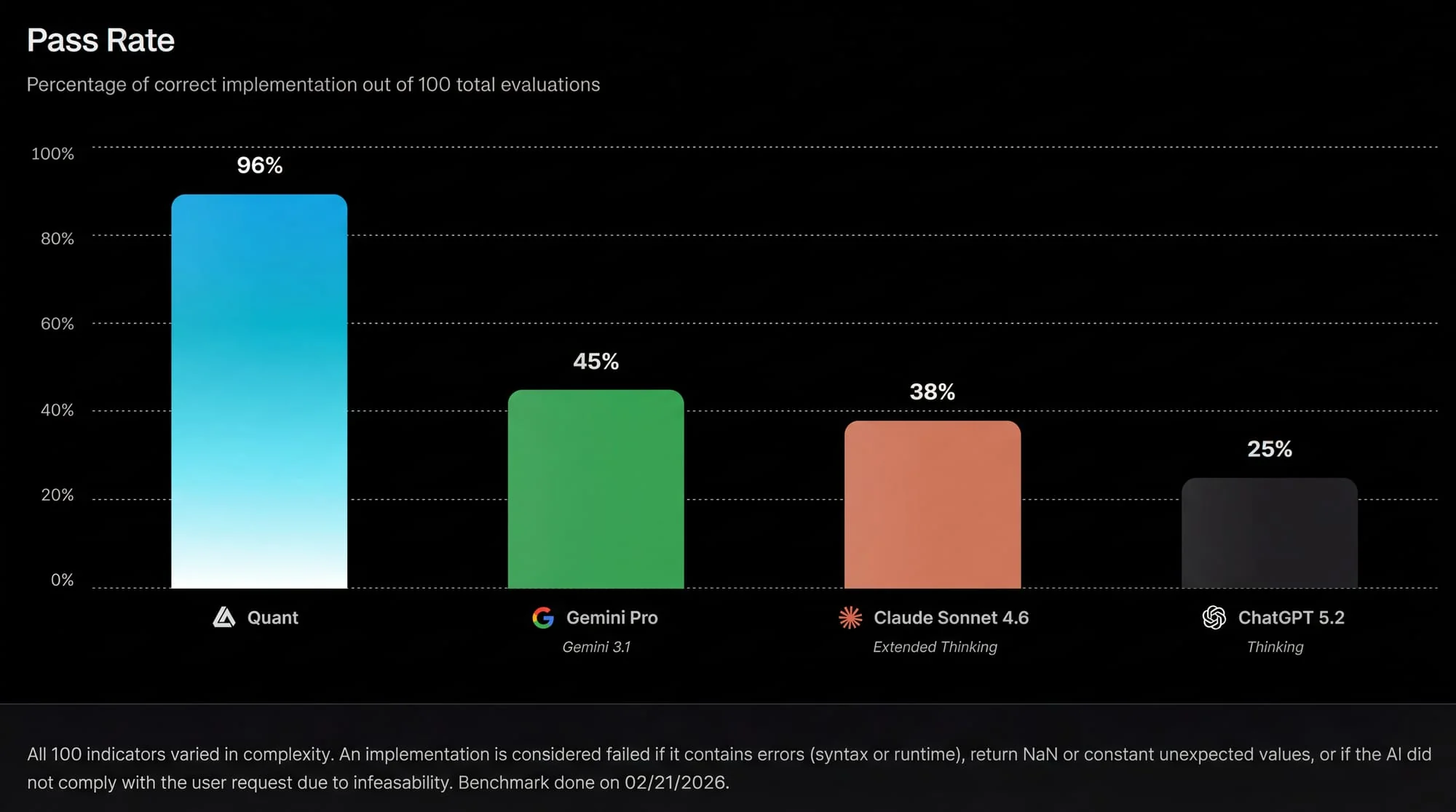
The results shown are stark: a low pass rate means you’ll spend most of your time fixing AI output, not shipping indicators. And in trading, the most dangerous failures aren’t always obvious errors. Silent failures, wrong logic, repainting behavior, constant outputs can give you false confidence.
Quant’s validation-first approach and auto-correction loop are exactly the kind of systems you’d expect to produce a pass rate advantage in Pine Script® tasks, because it reduces the probability of “confidently wrong” outputs reaching the user compared to general-purpose models like ChatGPT and Gemini.
The Auto-Debugging Engine: The Difference Between “Generated” and “Deployable”
If you’ve ever tried to code TradingView indicators with a generic AI like ChatGPT or Gemini, you already know the pain pattern:
You ask for an indicator. You get code. You paste it into TradingView. You get errors. You paste errors back into the AI. You get revised code. You paste again. You fix one error and discover the next. Eventually, if it compiles, you still have to verify that it behaves correctly.
That workflow makes the trader the test harness. Quant’s auto-debugging engine removes that burden: it validates and corrects the code as it works and runs the result on your chart, so what you receive already compiles and runs.
Edit With Precision
A common weakness of chat-only coding tools like ChatGPT and Gemini is that they don’t feel like development environments. Quant works beside Vela’s Pine editor, so every script is code you can open, edit, and run yourself. One chat can create, edit, and remove several indicators and strategies, and everything Quant writes is saved to My Scripts. That matters because most real indicators take a few cycles to refine.
Even if the AI generates a working script, you might want to adjust sensitivity, add a filter, modify how signals plot, change confirmation logic, or introduce alert conditions. In practice, that’s also where a lot of “almost correct” Pine Script® breaks because edits can accidentally introduce series-type issues, confirmation mistakes, or edge cases across symbols. When you only want different numbers, ask Quant to try new settings (“try length 21”) and it changes the script’s inputs without touching the code.
Vision-to-Code: Turning Chart Screenshots Into Pine Script®
Most traders learn visually. They see a pattern, they see a setup, they see an indicator someone posted, they see a combination of signals and want to replicate it.
Traditionally, this creates an immediate gap: understanding a chart visually does not automatically translate into being able to code it. Quant changes the direction of that translation. Upload a screenshot of a chart pattern, trading indicator, or setup, or drag a box around part of your Vela chart, and Quant analyzes the visual data to reconstruct the underlying logic and translate it into structured indicator code that can be iterated and deployed.
This unlocks a few practical use cases traders constantly ask for: if you see a tool on social media and want to rebuild your own version, you can start from the visual. If you have an indicator concept sketched visually, you can turn it into code without needing to formalize everything up front. If you’re trying to replicate a proprietary-looking signal style – like how a marker triggers, how a zone is drawn, or how structure is detected you can begin from what you see and refine from there.
The key is that vision-to-code is not meant to “steal indicators.” It’s meant to convert visual trading logic into something you can own, understand, and customize.
Quant vs. ChatGPT (and Other AI Models) for Pine Script®
A lot of comparisons between AI tools are vague. They focus on abstract “intelligence” or subjective experience. For Pine Script®, the comparison becomes practical quickly.
Generic AI (Chat-Only) Workflow
When you use a general-purpose chatbot like ChatGPT or Gemini for TradingView coding, you’re relying on a conversational model that has no guarantee of Pine-native correctness. You can get lucky, especially with simple indicators – but as complexity rises, failure probability rises with it.
Even if you eventually get a working script, you often spend the majority of time debugging and verifying. If you’ve tried this route already, LuxAlgo’s guide on using ChatGPT for TradingView scripts outlines many of the real-world friction points traders run into when they move from “generated code” to “tradeable logic.”
Quant Workflow
Quant is built around Pine Script®, validation, and auto-correction, inside the charting platform where the script runs. Its workflow is designed to produce working scripts more consistently. That means fewer cycles wasted on syntax fixes and more time spent on meaningful iteration: refining logic, tuning signals, and building features.
The benchmark pass rate gap reinforces what many traders experience intuitively: specialized systems outperform generic systems in narrow domains where correctness matters. If your goal is the best way to code TradingView indicators with AI, “best” usually means: less debugging, more deployment, more trust.
That’s the category Quant is trying to own.
Quant Works the Chart, Not Just the Code
Because Quant is built into Vela, it can do more than write code. Ask it to set up the chart, for example “put BTC and SOL side by side on the 4h,” and it changes the symbol, timeframe, chart type, session, price scale, visible range, or multi-chart layout. It looks at the chart to check its own work.
Ask it to analyze the chart and it marks it up as real, editable drawings: fair value gaps, liquidity, market structure, order blocks, dealing ranges, killzones, key levels, support and resistance, trendlines, and chart patterns. Quant picks the concepts; the prices come from code that reads the chart’s own closed candles, so the levels it quotes are exact. It can also draw its own scenarios: projected paths, targets, Fibonacci retracements, notes, and long or short positions. Your own drawings are never touched.
For exact numbers, Quant reads the chart’s data directly: prices, a script’s plot values, and a strategy’s trades. And when a concept should update on every new bar or be backtested, Quant writes it as an indicator or strategy instead of drawing it. The Quant documentation covers every capability.
From Idea to Backtest on the Same Chart
Ask for a strategy and Quant writes it, runs it over the chart’s history, and reports the headline numbers: net P&L, profit factor, trades, and max drawdown. The Backtest Viewer breaks the run down into performance, trade analysis, and a full trade log, and its Simulation tab replays the closed trades many times to show how much of the result depends on the order and mix of trades.
Backtesting is research, not prophecy. It tells you, with data, how an idea behaved on the history it ran on, not how it will behave next.
Who Quant Is For
Quant is useful for every kind of trader, because “building indicators” isn’t a niche developer task anymore.
Some traders want to build simple scripts: signals, filters, overlays, alerts. Others want to build complex systems: smart money structures, multi-factor confirmations, strategy logic, backtestable rule sets.
Quant fits across that spectrum because it isn’t a “coding tutor.” It’s a coding agent for indicators and strategies, focused on reliability and iteration.
For non-coders, it lowers the barrier to entry. For advanced traders, it speeds up experimentation and iteration. For coders, it compresses development time and reduces the tedium of debugging and refactoring, especially if you’re already familiar with best practices like the ones covered in this guide to debugging Pine Script® indicators.
And for traders who live in the smart money and institutional logic world, the ability to build complex structure-based scripts reliably is one of the strongest value propositions, because that’s exactly where generic AI tools like ChatGPT and Gemini tend to break. Quant draws on five years of published trading logic, including LuxAlgo’s price action and smart money tools.
How to Get Access to Quant
Start for free today at vela.luxalgo.com/chart. Quant is beside the chart in Vela, on every plan including Free, so you can start building indicators and strategies immediately, with no extra setup.
Frequently Asked Questions
How do I get access to Quant?
Quant is on every plan, including Free, with more monthly credits on each paid plan: Essential, Premium, Ultimate, and AI Ultra. Open Vela and Quant is beside the chart. For plan guidance and access troubleshooting, the LuxAlgo FAQ covers the most common setup issues and plan comparisons.
Can Quant write complete Pine Script® indicators?
Yes. Quant writes complete, working indicators and strategies, from simple concepts to larger multi-feature builds. It validates each script, runs it on your chart, and fixes errors in its own code, so the result is ready to use.
Do I need to know how to code in Pine Script®?
No. Quant handles the coding from your requests, so you can focus on the concept and how it should behave rather than on syntax. That said, understanding the basics still helps when you want to customize or verify logic, especially confirmation rules, alert conditions, or multi-timeframe behavior. If you want a fast foundation, LuxAlgo’s guide to Pine Script® coding essentials is a practical starting point.
How does Quant differ from ChatGPT, Gemini, or generic AI?
Quant is specialized for Pine Script® indicators and strategies and built into Vela. It reads the Pine Script® documentation, draws on five years of published trading logic from the LuxAlgo Library, validates and repairs its own code, and runs it on your chart, where it can also see the result, set up the chart, and mark it up. The goal is not just code that compiles, but code that behaves correctly on a real chart.
Can I convert an image of a chart into an indicator?
Yes. Paste or upload a screenshot, or drag a box around part of your Vela chart, and Quant translates what it sees into indicator logic you can run and refine.
Can Quant draw on my chart?
Yes. Ask it to mark up fair value gaps, liquidity, structure, key levels, or a trade scenario, and it draws them on your Vela chart as real drawings you can move, edit, or delete. The prices come from the chart’s own bars. Clear Quant’s drawings removes only Quant’s markup; your own drawings stay.
Can Quant backtest a strategy?
Yes. A strategy runs over the chart’s history, Quant reports the headline numbers, and the Backtest Viewer shows performance, trade analysis, every trade, and a Simulation tab. A backtest is history, not a forecast.
References
LuxAlgo Resources
- LuxAlgo
- Quant Features
- Vela
- Quant Documentation
- LuxAlgo Pricing
- LuxAlgo Library
- LuxAlgo Algos for TradingView
- Strategy Screener
- Strategy Screener Documentation
- Pine Script®: Coding Essentials for Traders
- Debugging Pine Script® Indicators: Guide
- Trading Indicators with ChatGPT (Step-by-Step Guide)
- A Beginner’s Guide to Technical Indicators
- Backtesting Limitations: Slippage and Liquidity Explained
- Intro | Price Action Concepts Toolkit
- Intro | Signals & Overlays Toolkit
- Intro | Oscillator Matrix Toolkit
- FAQ | Answers to Frequent Questions
External Resources
Read next