Multi-Chart Widget
 By LuxAlgoMay 28, 2024
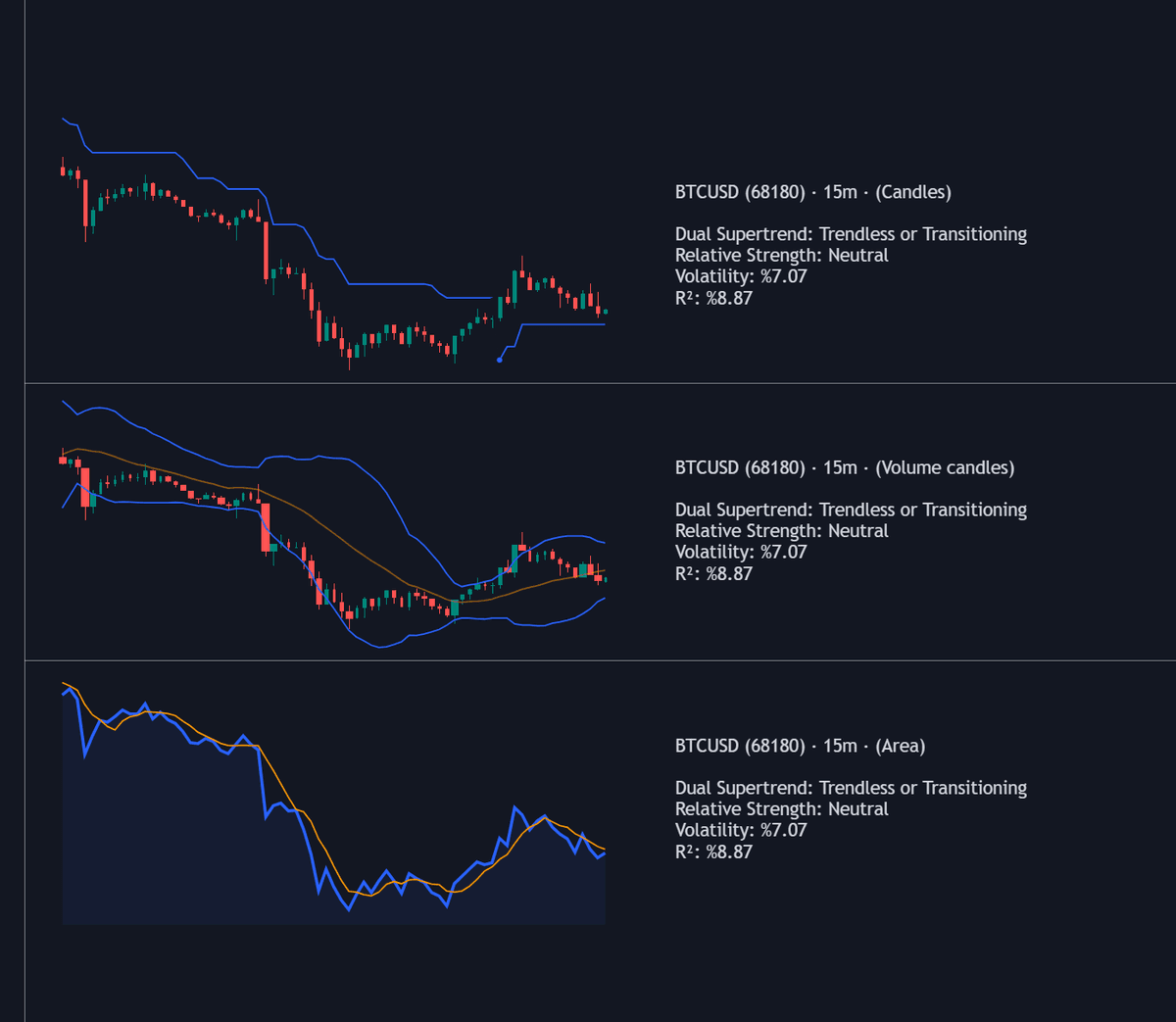
Multi-Chart Widget places up to three additional mini charts beside your primary chart, each with its own symbol, timeframe, chart type, and technical overlay — part of LuxAlgo's meta-composition family of dashboard-style tools for watching several markets in one layout. A statistics panel completes the picture, tracking each instrument's Dual Supertrend state, RSI, volatility, and R-squared at a glance.
How to Trade the Multi-Chart Widget?
- Cross-market watch: load instruments that lead or confirm your main market and compare their behavior without leaving the chart.
- Higher-timeframe context: point a mini chart at the same symbol on a higher timeframe to keep the bigger picture in view while executing on the lower one.
- Statistics panel: RSI beyond 70 or under 30 flags stretched conditions, the Dual Supertrend row gives a two-parameter trend verdict, and volatility plus R-squared describe how fast and how cleanly each market is moving.
Chart types span candles, volume candles, line, area, columns, high-low, and Heikin Ashi, so each slot can take the form that suits its job.
Multi-Chart Widget Settings
- Mini Charts Separator: shows or hides the divider lines between charts.
- Number Of Bars: how many bars each mini chart renders.
- Horizontal Offset: pushes the mini charts away from the primary price action.
- Symbol / Timeframe / Chart Type / Chart Size: per-chart choice of instrument, resolution, drawing style, and relative size; a blank symbol falls back to the chart's instrument, and lower timeframes default to the chart's timeframe.
- Technical Indicator: overlays Supertrend (ATR Length, Factor), a moving average (SMA, EMA, RMA, HMA, WMA, VWMA), or Bollinger Bands (Length, StdDev) on a mini chart.
- Mini Chart(s) Panel: toggles the panel and its Dual Supertrend, RSI, Volatility, and R-Squared rows.
Frequently Asked Questions
What is the Dual Supertrend in the statistics panel?
It evaluates two classic Supertrend calculations with distinct parameter sets and reports their combined verdict, reading trend reversals more responsively than a single instance — a panel reading rather than extra lines on the chart.
Can the mini charts show different asset classes?
Yes — each slot accepts any symbol while the primary chart's market is active. When it is not, mini-chart instruments must belong to the same exchange and type as the primary chart.
Is the Multi-Chart Widget included free?
It is — the widget is included with the free LuxAlgo Library, and you can spin it up in Quant, LuxAlgo's AI, without leaving the page to arrange your first layout.
Free indicator
Get free access to this indicator on the platforms below.

The Library is free. Quant makes it yours.
Pull any concept or indicator into Quant: rebuild it, retune it, or turn it into a backtested strategy of your own.