Arbitrage Detector

Dec 17, 2025

Static chart image
Volume Based
Correlation
Dashboard
Works on the following platforms:
tradingviewSymbolTradingView
For free use on the TradingView platform
ninjatraderNinjaTrader
For free use on the NinjaTrader platform
metatrader4MetaTrader 4/5
For free use on the MetaTrader 4/5 platform
thinkorswimThinkorswim
For free use on the Thinkorswim platform

The Arbitrage Detector is a powerful trading indicator designed to uncover hidden price inefficiencies in both crypto and forex markets. By comparing the same asset across multiple crypto exchanges and forex brokers, it highlights where spreads exist, how large they are, and whether they are unusual, high, typical, or low relative to historical behavior. This makes it a valuable trading tool for anyone interested in arbitrage trading strategies, spread analysis, and market inefficiencies.

Built for flexibility and performance, this trading indicator automatically selects crypto or forex sources depending on the asset on your chart. It combines a real-time dashboard with historical spread analysis using a percentile-based histogram, giving traders a complete view of both current and past arbitrage conditions.

How to Trade With the Arbitrage Detector Trading Indicator?

indicator image

Arbitrage trading is the practice of profiting from price differences of the same asset across different markets. For example, if an asset is priced lower on one exchange and higher on another, traders can potentially buy low and sell high to capture the spread.

This trading indicator simplifies that process by continuously monitoring prices and volumes across up to 19 crypto exchanges and 13 forex brokers, then presenting the information in an easy-to-read visual format.

  • For beginners, it provides a clear educational view of how prices differ between markets, helping avoid poor trade execution due to unfavorable pricing.
  • For advanced traders, it acts as a fast arbitrage detection tool, allowing them to spot inefficiencies and potential profit opportunities before they disappear.

Because arbitrage opportunities are often short-lived, having a real-time and historical view of spreads can be a decisive advantage.

This trading strategy tool helps traders:

  • Understand and monitor market inefficiencies
  • Avoid entering trades at unfavorable prices
  • Identify potential arbitrage and spread-based opportunities

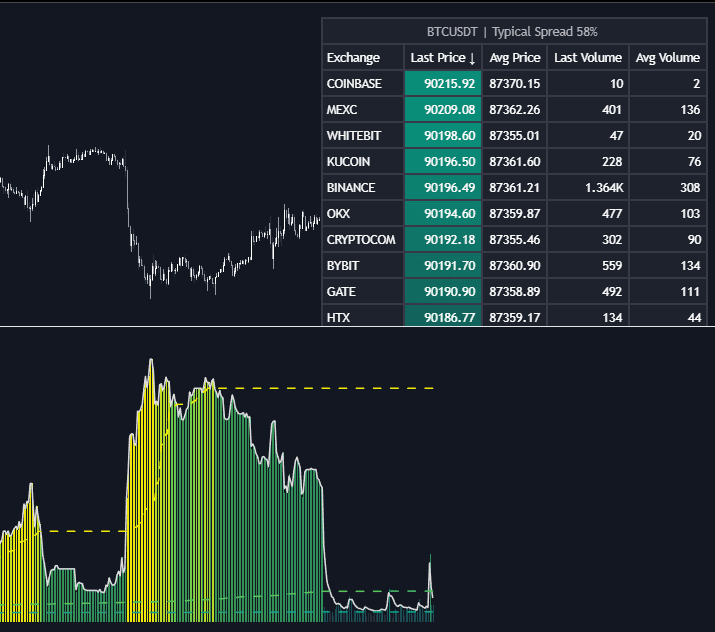
The indicator is built around two core visual components: a dashboard on the main chart and a historical histogram in a lower pane, both working together to provide context and actionable insight.

Crypto or Forex Source Detection

indicator image

The Arbitrage Detector intelligently determines whether to use crypto exchanges or forex brokers based on the asset applied to the chart. Traders can also manually override this behavior if desired.

As shown in the example, prices and volumes for assets like Bitcoin or the Euro are displayed across major sources, sorted by average price over a configurable lookback period. This makes it easy to immediately see where pricing discrepancies exist.

Arbitrage Dashboard Explained

indicator image

The dashboard provides a sortable comparison table of all available sources, with four key data columns:

  • Last Price
  • Average Price
  • Volume
  • Total Volume

Each column can be sorted in ascending or descending order, or left unsorted. When sorting is enabled, a background gradient highlights the active column, improving visual clarity.

Optional price and volume delta values show how each exchange or broker differs from the chart’s primary asset, making it easier to quantify inefficiencies at a glance.

Spread Histogram and Percentile Analysis

indicator image

The histogram visualizes historical spread behavior and compares it directly with price action. This is especially useful for identifying periods of abnormal activity.

In the EUR/USD daily example, unusually high spread readings (such as values above the 98th percentile) often coincide with heightened trading activity. These areas can act as key zones where price reactions or reversals may occur, making the histogram a useful contextual tool for broader trading strategies.

indicator image

By default, both gradient coloring and automatic smoothing are enabled:

  • The top example uses an adaptive moving average that reacts more strongly to unusual spread activity.
  • The bottom example uses a fixed EMA with a length of 9.

Gradient colors dynamically reflect spread intensity, shifting toward yellow during high values and green during low values. Solid colors, by contrast, simply differentiate data above or below the selected percentiles.

Trading Indicator Settings Overview

General Settings

  • Sources: Select crypto exchanges, forex brokers, or automatic detection based on the chart asset.
  • Average Length: Define the lookback period for average price and volume calculations.

Percentile Configuration

  • Percentile Length: Choose the lookback length for percentile calculations, or use the full dataset (may increase resource usage).
  • Unusual % >: Threshold for detecting unusually large spreads.
  • High % >: Threshold for high spread conditions.
  • Typical % >: Threshold for normal or typical spread behavior.

Dashboard Controls

  • Dashboard: Enable or disable the dashboard display.
  • Sorting: Choose which column to sort and in which direction.
  • Position: Set the dashboard location on the chart.
  • Size: Adjust the dashboard size.
  • Price Delta: Show or hide price differences versus the chart asset.
  • Volume Delta: Show or hide volume differences versus the chart asset.

Style & Visualization

  • Unusual / High / Typical: Enable percentile plots and customize their colors.
  • Low: Select the color for low spread values.
  • Percentiles Auto Color: Automatically color percentile levels based on values.
  • Histogram Gradient: Enable or disable gradient coloring.
  • Histogram Smoothing: Apply EMA smoothing or enable the Auto mode, which uses an adaptive moving average based on the data’s percent rank.

FAQ

What is the Arbitrage Detector used for?

The Arbitrage Detector is a trading indicator designed to identify price inefficiencies and spread opportunities across crypto exchanges and forex brokers. It helps traders understand market behavior and spot potential arbitrage setups.

Is this trading indicator suitable for beginners?

Yes. Beginners can use it to learn how prices vary between markets and avoid poor trade execution, while advanced traders can integrate it into professional arbitrage or spread-based trading strategies.

How do I access the Arbitrage Detector?

You can get access on the LuxAlgo Library for charting platforms like TradingView, MetaTrader (MT4/MT5), and NinjaTrader for free.

Trading & investing are risky and many will lose money in connection with trading and investing activities. All content on this site is not intended to, and should not be, construed as financial advice. Decisions to buy, sell, hold or trade in securities, commodities and other investments involve risk and are best made based on the advice of qualified financial professionals. Past performance does not guarantee future results.

Hypothetical or Simulated performance results have certain limitations. Unlike an actual performance record, simulated results do not represent actual trading. Also, since the trades have not been executed, the results may have under-or-over compensated for the impact, if any, of certain market factors, including, but not limited to, lack of liquidity. Simulated trading programs in general are designed with the benefit of hindsight, and are based on historical information. No representation is being made that any account will or is likely to achieve profit or losses similar to those shown.

Testimonials appearing on this website may not be representative of other clients or customers and is not a guarantee of future performance or success.

As a provider of technical analysis tools and strategies, we do not have access to the personal trading accounts or brokerage statements of our customers. As a result, we have no reason to believe our customers perform better or worse than traders as a whole based on any content, tool, or platform feature we provide.

Charts used on this site are by TradingView in which the majority of our technical indicators are built on. TradingView® is a registered trademark of TradingView, Inc. www.TradingView.comTradingView® has no affiliation with the owner, developer, or provider of the Services described herein.

Market data is provided by CBOE, CME Group, BarChart, CoinAPI. CBOE BZX real-time US equities data is licensed from CBOE and provided through BarChart. Real-time futures data is licensed from CME Group and provided through BarChart. Select cryptocurrency data, including major coins, is provided through CoinAPI. All data is provided “as is” and should be verified independently for trading purposes.

This does not represent our full Disclaimer. Please read our full disclaimer.

© 2026 LuxAlgo Global, LLC.