Candlestick Channels
 By LuxAlgoSep 7, 2022
Candlestick Channels is an indicator on Vela, our next-generation charting platform, written in Pine Script®.
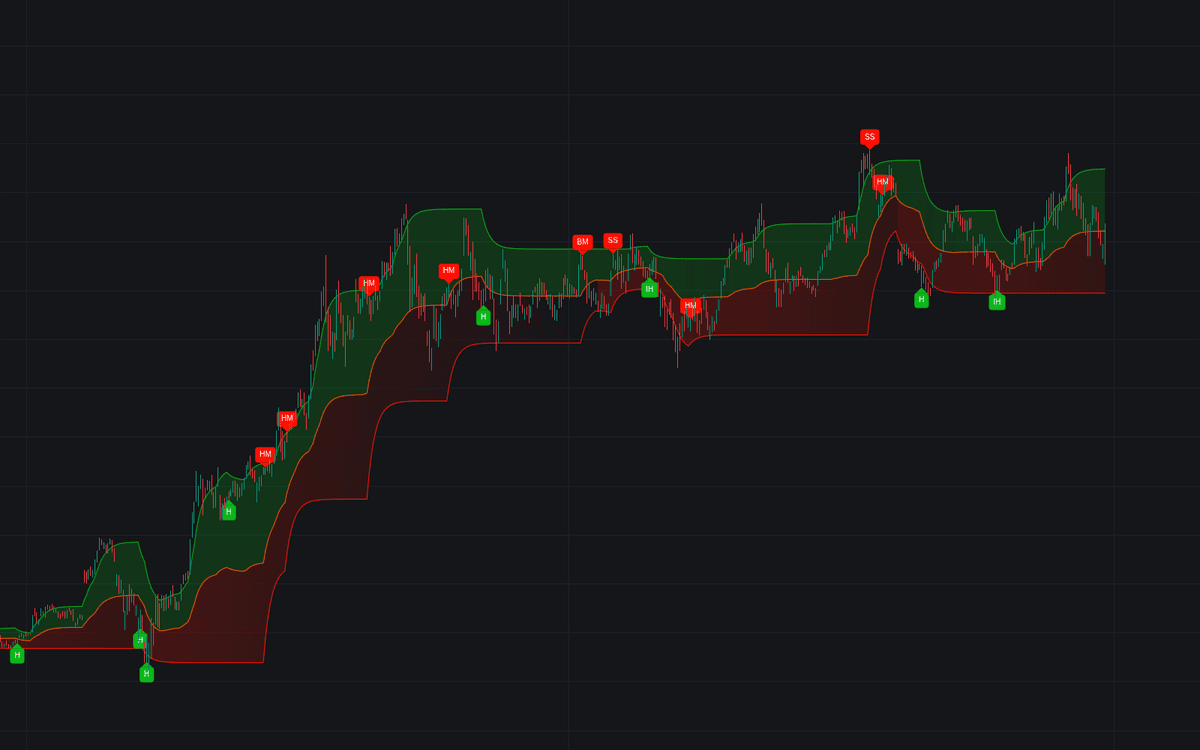

Candlestick Channels draws a price channel that listens to candlesticks: when a formation such as an engulfing pattern is detected, the relevant channel extremity converges toward price, and clusters of patterns pull it in faster. A stochastic-based trend read decides which formations count in context, detected patterns are highlighted on the chart, and any pattern you disable simply stops influencing the channel.
How to Trade the Candlestick Channels?
- Cross above the upper extremity: uptrend indication, in line with classic channel logic.
- Cross below the lower extremity: downtrend indication.
- Average-line crosses: the orange center line fires earlier and more often: quicker signals, more noise.
- Pattern plus extremity: treat formations (from hammers to shooting stars) as entries and the converging extremity as the confirmation zone, favoring bullish patterns above the average line and bearish ones below it.
Because bullish formations draw the upper extremity toward price, intersections become more likely exactly where pattern evidence accumulates. Lower Convergence values demand more patterns before the extremity closes in, which effectively raises the bar for a signal.
Candlestick Channels Settings
- Trend Length: period of the stochastic oscillator used to gauge trend sentiment, which drives pattern identification.
- Convergence: how quickly extremities move inward when a pattern appears; lower values converge more gradually.
- Smooth: smoothness of the channel boundaries.
- Patterns: individual toggles for each detectable formation; disabled patterns no longer affect the channel.
Frequently Asked Questions
Free to use
Run it on Vela. Go further with a paid plan.
- Up to 500 Custom Alerts, with webhook automation
- Up to 10× the chart history of Free
- Orderflow lookback up to full history
- More Quant usage to customize it, plus extra usage when you need it
- Futures data alongside crypto, stocks, forex and commodities
Also works on

Related indicators
All 4 Bullish/bearish Engulfing indicators
Run it on Vela. Make it yours with Quant.
Open this indicator free on Vela, our next-generation charting platform. Then ask Quant, our coding agent built into Vela, to retune it or turn it into a backtested strategy of your own.