Internal Pivot Pattern
 By LuxAlgoJul 30, 2025
Internal Pivot Pattern is an indicator on Vela, our next-generation charting platform, written in Pine Script®.
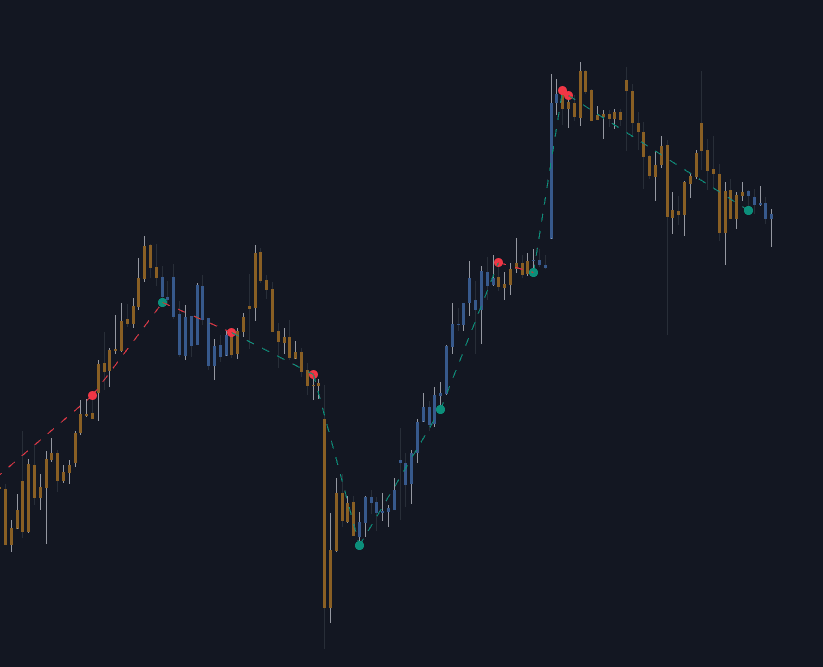
Internal Pivot Pattern confirms pivot highs and lows the moment a candle closes, reading the bar's lower-timeframe data instead of waiting for neighbors to finish forming. Classic detection asks the middle bar of a window to prove itself against several bars on each side, which builds in lag; this build inspects the swing inside the current candle and calls it immediately.
How to Trade the Internal Pivot Pattern?
- Pivot low detected: a potential bullish turn or continuation. Candles print blue while the latest pivot is a low.
- Pivot high detected: a potential bearish shift. Candles print orange while the latest pivot is a high.
- Zigzag lines: successive pivots are connected so the developing structure stays readable at a glance.
- Accuracy Dashboard: a pivot low counts as accurate when the next pivot's candle closes above the pivot low candle's close, a pivot high when it closes below the pivot high candle's close. Tune settings until the percentage earns your trust.
The Timeframe input controls sensitivity. A much lower timeframe than the chart produces fewer, stronger detections; one close to the chart timeframe fires more often but admits more noise, so scalpers and swing traders will land on different values.
Internal Pivot Pattern Settings
- Timeframe: the lower timeframe scanned for internal swings.
- Accuracy Dashboard: toggles the real-time reliability panel.
- Style: colors for Internal Pivot High, Internal Pivot Low, the Zig-Zag connector, and trend-based Candle Coloring.
Frequently Asked Questions
Free to use
Run it on Vela. Go further with a paid plan.
- Up to 500 strategy alerts, with webhook automation
- Up to 10× the chart history of Free
- Orderflow lookback up to full history
- More Quant usage to customize it, plus extra usage when you need it
- Futures data alongside crypto, stocks, forex and commodities
Also works on

Related indicators
All 26 Swing High/low indicators
Run it on Vela. Make it yours with Quant.
Open this indicator free on Vela, our next-generation charting platform. Then ask Quant, our coding agent built into Vela, to retune it or turn it into a backtested strategy of your own.