Market State Matrix
 By LuxAlgoApr 1, 2026
Market State Matrix is an indicator on Vela, our next-generation charting platform, written in Pine Script®.
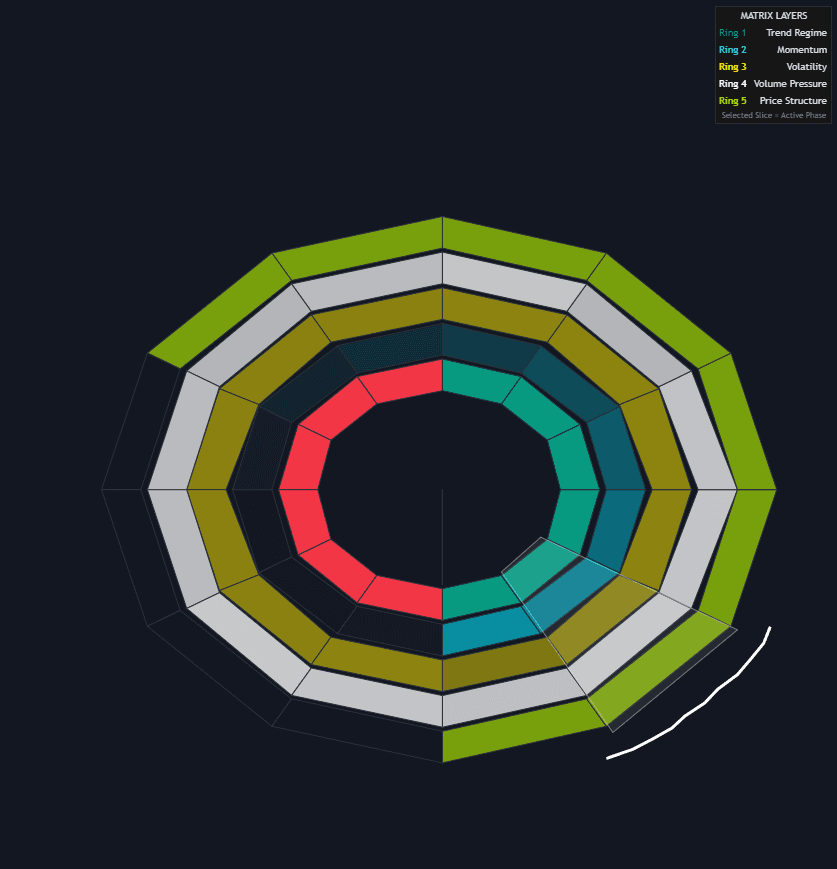
Market State Matrix renders market conditions as a radar drawn on the price chart, to the right of the latest bar: five concentric rings (EMA-based trend regime, RSI-driven momentum intensity, an ATR volatility glow, volume pressure, and higher-high/lower-low price structure) cut into twelve radial slices with lookbacks from 8 to 220 bars. It works like a trend/range classifier you read at a glance, answering whether the environment supports continuation, reversal, or consolidation without juggling five separate panes.
How to Trade the Market State Matrix?
- Full alignment: a solid path of matching colors from inner to outer ring is confluence: trend, momentum, volatility, volume, and structure backing one bias.
- Internal conflict: mixed colors inside a slice expose disagreement, such as bullish structure with fading momentum, a caution flag for continuation and a hint of exhaustion or mean reversion.
- Volatility ignition: when the gold ring brightens and volume pressure lights up alongside it, the market may be entering a more explosive phase.
- Regime core: the center reflects the fastest regime layer, an anchor for direction when the outer rings turn mixed.
Short slices react first to momentum shifts; long slices move with the broader regime. Weak fast slices against aligned slow ones can read as a pullback within trend, while conflict spreading into the stable slices may mark a more meaningful change of state. The Dominant Phase Highlighter arcs over one of four fixed positions on the wheel, chosen from the fastest (8-bar) slice's trend regime and whether its RSI is above or below 50; it draws no text label.
Market State Matrix Settings
- Horizontal Offset: repositions the Matrix for readability.
- Core Radius: size of the central directional anchor.
- Ring Width and Ring Gap: thickness and spacing of the concentric layers.
- Show Dashboard Legend: toggles the "Matrix Layers" reference table.
Frequently Asked Questions
Free to use
Run it on Vela. Go further with a paid plan.
- Up to 500 strategy alerts, with webhook automation
- Up to 10× the chart history of Free
- Orderflow lookback up to full history
- More Quant usage to customize it, plus extra usage when you need it
- Futures data alongside crypto, stocks, forex and commodities
Also works on

Related indicators
Run it on Vela. Make it yours with Quant.
Open this indicator free on Vela, our next-generation charting platform. Then ask Quant, our coding agent built into Vela, to retune it or turn it into a backtested strategy of your own.