Omni-Flow Consensus

Mar 19, 2026

Static chart image
Oscillators
Cycle
Works on the following platforms:
tradingviewSymbolTradingView
For free use on the TradingView platform
ninjatraderNinjaTrader
For free use on the NinjaTrader platform
metatrader4MetaTrader 4/5
For free use on the MetaTrader 4/5 platform
thinkorswimThinkorswim
For free use on the Thinkorswim platform

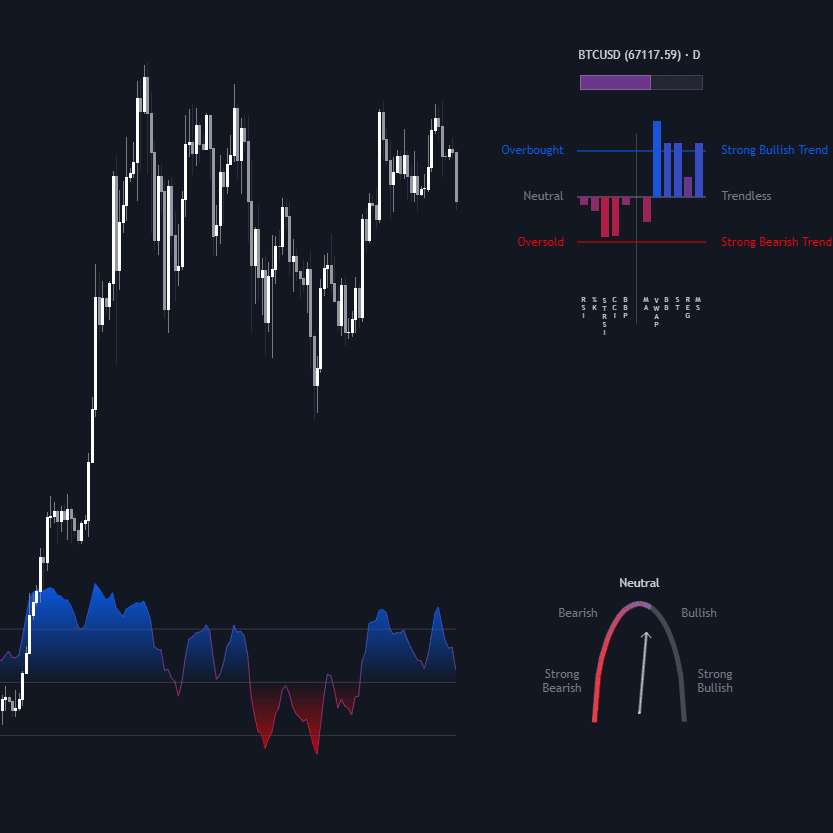
The Omni-Flow Consensus [LuxAlgo] indicator is a momentum and liquidity trading indicator built to help traders measure the real pressure behind price moves, not just the direction of price alone. By combining candle structure, directional flow, volume-weighted aggression, and adaptive smoothing, it highlights whether bullish or bearish momentum is actually backed by conviction. The result is a cleaner market regime tool that can help traders confirm trends, avoid low-quality chop, and spot strong continuation phases earlier than many traditional oscillators.

How to Trade the Omni-Flow Consensus Trading Indicator

The indicator is designed to function as a primary trend-confirmation oscillator and market regime filter. While many momentum indicators only react to price changes, Omni-Flow goes further by evaluating whether those price changes carry enough force to matter. This makes it useful for traders who want more confidence before entering a trend-following trade, breakout setup, or continuation strategy.

Because the oscillator blends directional movement with volume-aware logic and smoothing, it can help separate meaningful market expansion from random fluctuation. In practical terms, this means traders can use it to identify when buyers or sellers are actually in control, when the market is compressing, and when the probability of noisy price action is elevated.

Reading Bullish, Bearish, and Neutral Momentum Regimes

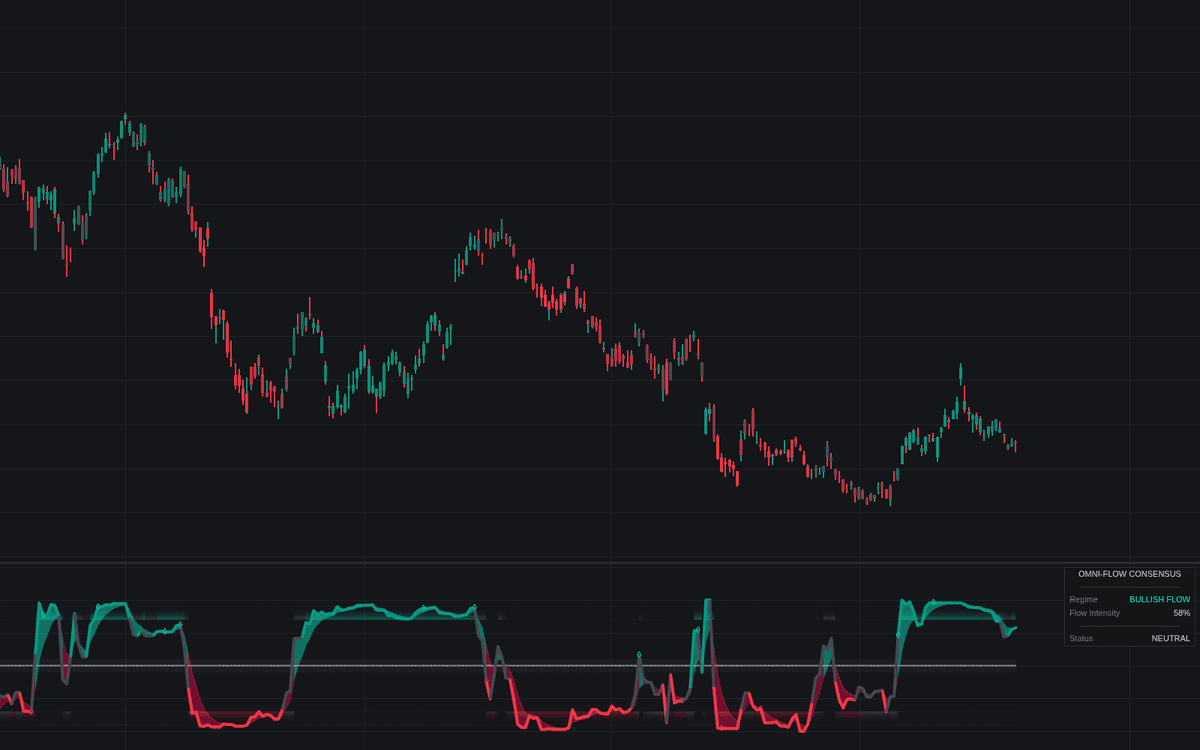
  • Bullish Flow (Cyan): When the main flow line is above zero and expanding into the upper region, the market is showing aggressive buying pressure. This often supports bullish trend continuation, breakout trades, and long-biased setups.
  • Bearish Flow (Red): When the main flow line is below zero and expanding into the lower region, the indicator reflects aggressive selling pressure. This can support short trades, bearish continuation strategies, or downside momentum confirmation.
  • Accumulation / Neutral (Gray): When the flow line remains inside the Zero Zone (±10), the market is in a contraction or indecision phase. This environment is often less favorable for momentum-based trading strategies and may signal that traders should wait for stronger directional confirmation.

These momentum regimes make the indicator especially effective as a trading strategy filter. Rather than taking every signal from price alone, traders can use Omni-Flow Consensus to align with periods where capital flow and directional pressure are more clearly established.

High-Conviction Impulse Injections

The small diamond markers plotted inside the oscillator pane represent Flow Injections. These are moments when momentum has passed the script’s confirmation logic, exceeded the neutral threshold, and shown enough persistence to qualify as a higher-quality impulse.

For traders, these injections can be especially useful in a few scenarios:

  • Confirming a breakout that might otherwise look uncertain
  • Identifying a fresh trend expansion after consolidation
  • Re-entering an existing trend after a shallow pullback
  • Filtering out early crosses that do not yet have enough strength behind them

Instead of treating every oscillator turn as actionable, Omni-Flow Consensus focuses attention on moments where momentum and confirmation align. This can make it valuable for both discretionary traders and traders building systematic trading strategies.

Gradient Candle Coloring for Visual Trend Analysis

The script includes gradient-based candle coloring on the main chart to help traders visualize momentum intensity without needing to stare at the oscillator pane constantly. Rather than flipping between simple bullish and bearish colors, the candles transition smoothly between bullish, neutral, and bearish states depending on the strength of the flow.

This design can help traders read momentum intuitively:

  • Stronger bullish pressure becomes easier to spot as bars shift deeper into the bullish gradient
  • Weakening momentum often appears visually before a major crossover
  • Neutral phases become clearer during contraction and sideways price action
  • Trend exhaustion can sometimes be recognized earlier as the color intensity fades

For many traders, this makes the indicator easier to use in fast-moving markets because the chart itself begins to reflect the state of the oscillator.

How to Use Omni-Flow Consensus in a Trading Strategy

Traders can use the Omni-Flow Consensus trading indicator in several ways depending on whether they prefer trend-following, breakout, pullback, or market regime analysis.

  • Trend Confirmation: A move above the Zero Axis suggests a shift toward bullish control, while a move below zero suggests bearish control. Many traders will use this as a directional filter before taking trades from price action, structure, or another entry signal.
  • Injection Confirmation: Diamond markers can be treated as confirmation events that support continuation entries. When these appear after a consolidation or pullback, they may signal the start of an expansion leg.
  • Volatility and Regime Filtering: If the flow line stays flat and near zero while the dashboard shows accumulation, it usually signals low conviction. This can help traders avoid forcing trades during choppy conditions.
  • Exhaustion Awareness: When the oscillator pushes into the glow bands (±70 to ±90), the market is in an extreme momentum state. Strong trends can continue in these zones, but a signal-line crossover inside them may warn of exhaustion, a pullback, or mean reversion risk.

A common way to apply the indicator is to combine it with structure, support and resistance, or breakout levels. For example, a trader may wait for price to reclaim a key level, then use a bullish zero-line cross or injection marker as confirmation that the move has real participation behind it.

Indicator Logic and Technical Breakdown

Smart-Flow Engine

To keep the indicator useful across multiple asset classes, the script uses a flexible Smart-Flow engine. When volume data is available, it calculates directional aggression using:

(Close - Open) / (High - Low) * Volume

This framework helps measure not just whether price moved, but how forcefully it moved relative to the candle’s range and how much participation supported that move.

When centralized volume is unavailable, such as on some Forex charts, the indicator automatically switches to a volatility-based proxy using True Range. This allows Omni-Flow Consensus to remain functional across markets while preserving its ability to estimate pressure and expansion behavior.

This cross-market adaptability makes it a practical trading indicator for traders who switch between crypto, stocks, indices, futures, and Forex.

Adaptive Spectral Filter (ASF)

The main flow line is smoothed using an Adaptive Spectral Filter, which dynamically adjusts responsiveness based on the current market environment. In stronger or more volatile conditions, the filter can become more reactive, helping reduce lag when the market begins to expand quickly. In slower or more sideways conditions, it becomes smoother to reduce whipsaws.

This matters because one of the biggest problems with traditional oscillators is that they are often either too slow in trending environments or too noisy in rangebound ones. The ASF is designed to strike a better balance by adapting rather than using static smoothing alone.

For traders, this can mean:

  • Faster recognition of legitimate expansion phases
  • Cleaner signals during choppy conditions
  • Better trend-following behavior without excessive sensitivity
  • More confidence when using the indicator as a confirmation layer

Stochastic Normalization

The oscillator is normalized to a fixed -100 to +100 range using a double-lookback process. This improves consistency and makes extreme conditions easier to interpret visually.

Compared to standard oscillators that can compress or behave unevenly across different assets, this normalization helps Omni-Flow maintain a usable scale regardless of market context. It also improves the readability of overbought and oversold-style regions, making the glow bands more actionable as a context tool.

For traders, this means the pane is easier to interpret at a glance, and the distinction between weak momentum, normal trend behavior, and extreme flow becomes more obvious.

Best Settings for Omni-Flow Consensus

Core Logic Settings

  • Flow Sensitivity: Controls the main lookback for calculating directional flow. Lower values increase responsiveness, while higher values create a slower and broader market read. Traders focused on short-term momentum may prefer lower settings, while swing traders may prefer higher values for cleaner regime identification.
  • Spectral Smoothing: Adjusts how reactive or smooth the Adaptive Spectral Filter behaves. Increasing smoothing can reduce false fluctuations, while decreasing it can make the indicator quicker to react.
  • Signal Boost: Applies a non-linear amplification effect near the zero line. This makes early directional shifts more visible and can help traders identify regime transitions more clearly.

These settings are especially important when adapting the indicator to different timeframes. Lower timeframe traders may want a faster configuration, while higher timeframe traders may prefer more smoothing and a wider sensitivity window.

Signal Filtering Settings

  • Smooth Signals: Enables additional filtering logic designed to reduce false positives and low-quality crossovers.
  • Signal Strictness: Defines how many bars the flow must maintain its condition before a move is confirmed as an impulse. Higher strictness can improve selectivity but may reduce signal frequency.
  • Momentum Threshold: Sets the minimum breakout level the flow must exceed before a signal is considered valid. This can help traders ignore weaker fluctuations near neutral territory.

These inputs give traders control over how aggressive or conservative the indicator should be. A lower threshold and lower strictness can produce earlier signals, while higher confirmation requirements may better suit traders who value quality over frequency.

Aesthetic and Dashboard Settings

  • Gradient Candle Coloring: Turns the dynamic bar-coloring system on or off for the price chart.
  • Glow Intensity: Controls the visual brightness of the momentum fill between the main and signal lines.
  • Flow Dashboard: Displays a real-time HUD with the current regime, flow intensity percentage, and signal status.

While these settings are visual, they can improve usability significantly. Many traders benefit from being able to see the regime context directly on the chart instead of constantly interpreting raw oscillator values.

Why Traders Use Omni-Flow Consensus

Omni-Flow Consensus is useful because it bridges the gap between a standard momentum oscillator and a practical market participation filter. It does not only ask whether price is moving. It asks whether price is moving with enough aggression, consistency, and pressure to justify a bullish or bearish trading bias.

That makes it relevant for traders who want a trading indicator that can support:

  • Trend confirmation
  • Breakout validation
  • Pullback continuation setups
  • Chop avoidance
  • Regime classification
  • Momentum exhaustion awareness

Used correctly, it can help traders avoid low-conviction environments and focus on the parts of the chart where momentum and participation are aligned.

FAQ

What is the Omni-Flow Consensus [LuxAlgo] indicator?

Omni-Flow Consensus [LuxAlgo] is a momentum and liquidity oscillator that measures directional pressure using volume-aware flow logic, adaptive smoothing, and normalized momentum regimes. It is designed to help traders confirm bullish or bearish trends, spot high-conviction impulse moves, and avoid low-quality ranging conditions.

How do traders use Omni-Flow Consensus in a trading strategy?

Most traders use it as a trend-confirmation and market regime filter. A move above zero can support bullish setups, a move below zero can support bearish setups, and injection markers can help confirm expansion phases or continuation entries. It can also be combined with support and resistance, breakouts, or price action strategies.

What does the Zero Zone mean?

The Zero Zone represents a neutral or accumulation phase where directional conviction is limited. When the flow line stays near zero, the market is often consolidating, and trend-following strategies may be less reliable until momentum expands again.

What are Flow Injections?

Flow Injections are confirmed momentum bursts shown as diamond markers in the oscillator pane. They highlight moments where the indicator detects that directional pressure has broken out of neutral conditions with enough confirmation to qualify as a stronger signal.

Can Omni-Flow Consensus be used on Forex, crypto, stocks, and futures?

Yes. The indicator is built with a Smart-Flow engine that uses volume when available and switches to a volatility proxy when volume is missing. This helps it adapt across multiple asset classes and charting environments.

How do I access Omni-Flow Consensus [LuxAlgo]?

You can get access on the LuxAlgo Library for charting platforms like TradingView, MetaTrader (MT4/MT5), and NinjaTrader for free.

Trading & investing are risky and many will lose money in connection with trading and investing activities. All content on this site is not intended to, and should not be, construed as financial advice. Decisions to buy, sell, hold or trade in securities, commodities and other investments involve risk and are best made based on the advice of qualified financial professionals. Past performance does not guarantee future results.

Hypothetical or Simulated performance results have certain limitations. Unlike an actual performance record, simulated results do not represent actual trading. Also, since the trades have not been executed, the results may have under-or-over compensated for the impact, if any, of certain market factors, including, but not limited to, lack of liquidity. Simulated trading programs in general are designed with the benefit of hindsight, and are based on historical information. No representation is being made that any account will or is likely to achieve profit or losses similar to those shown.

Testimonials appearing on this website may not be representative of other clients or customers and is not a guarantee of future performance or success.

As a provider of technical analysis tools and strategies, we do not have access to the personal trading accounts or brokerage statements of our customers. As a result, we have no reason to believe our customers perform better or worse than traders as a whole based on any content, tool, or platform feature we provide.

Charts used on this site are by TradingView in which the majority of our technical indicators are built on. TradingView® is a registered trademark of TradingView, Inc. www.TradingView.comTradingView® has no affiliation with the owner, developer, or provider of the Services described herein.

Market data is provided by CBOE, CME Group, BarChart, CoinAPI. CBOE BZX real-time US equities data is licensed from CBOE and provided through BarChart. Real-time futures data is licensed from CME Group and provided through BarChart. Select cryptocurrency data, including major coins, is provided through CoinAPI. All data is provided “as is” and should be verified independently for trading purposes.

This does not represent our full Disclaimer. Please read our full disclaimer.

© 2026 LuxAlgo Global, LLC.