Range Average Retest Model
 By LuxAlgoMay 7, 2024
Range Average Retest Model is an indicator on Vela, our next-generation charting platform, written in Pine Script®.
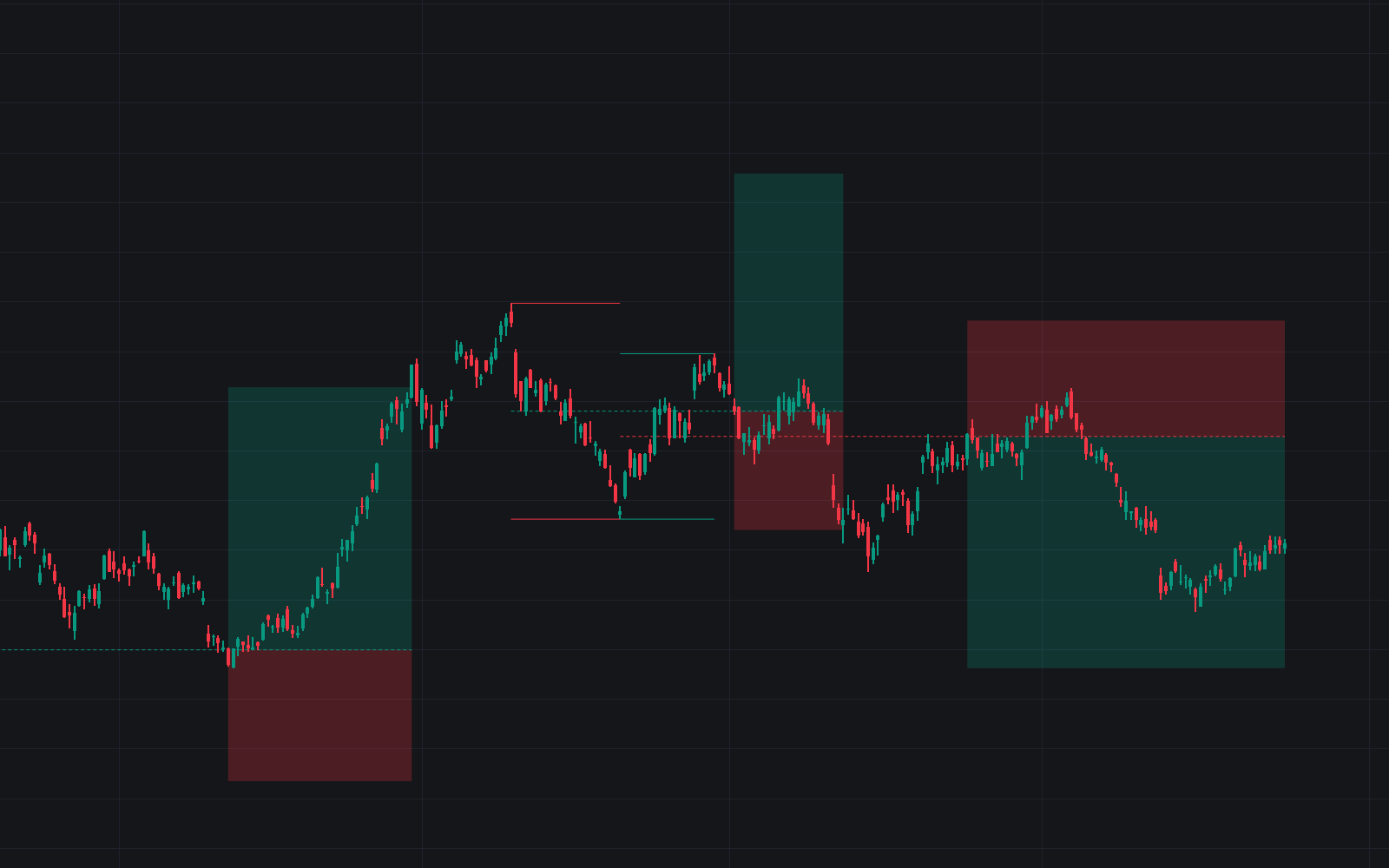

Range Average Retest Model maps the area between consecutive swing points and watches how price treats its midline. Each swing area works like a compact trading range: the model draws the average between the two swings, and when price closes back across that average it prints a setup, complete with take-profit and stop-loss zones scaled from long-term volatility, an average true range over the last 200 bars. Up to 165 swing areas can be drawn and managed at once.
How to Trade the Range Average Retest Model?
- Long setups: triggered when the bar closes below the swing-area average after the prior bar closed above it.
- Short setups: the mirror, a close above the average following a close below it.
- Green and red zones: take-profit and stop-loss areas sized by user-defined multipliers on the volatility measure; each setup stays active until one side is hit.
- Area filters: Selection Mode restricts detection to bullish or bearish swings, and the distance bounds keep setups at sensible range from their area, the ingredients for studying asymmetric risk/reward.
The entry logic is a retest of the range average: rather than chasing the swing itself, the model waits for price to come back through the midpoint. Overlapping setups are hidden by default for readability and can be enabled for the full picture.
Range Average Retest Model Settings
- Pivot Length: bars used to confirm a swing point. The size and frequency of swing areas follow from it.
- Selection Mode: detect bullish swings, bearish swings, or both.
- Threshold: a volatility-based spacing rule so new areas are not detected on top of existing ones.
- Maximum Distance / Minimum Distance: bounds on how far from a swing area a setup may trigger.
- Take Profit / Stop Loss: volatility multipliers sizing the target and invalidation zones.
Frequently Asked Questions
Free to use
Run it on Vela. Go further with a paid plan.
- Up to 500 strategy alerts, with webhook automation
- Up to 10× the chart history of Free
- Orderflow lookback up to full history
- More Quant usage to customize it, plus extra usage when you need it
- Futures data alongside crypto, stocks, forex and commodities
Also works on

Related indicators
All 8 Trading Range indicators
.png&w=3840&q=75)
Run it on Vela. Make it yours with Quant.
Open this indicator free on Vela, our next-generation charting platform. Then ask Quant, our coding agent built into Vela, to retune it or turn it into a backtested strategy of your own.