Rolling Segment
Mar 17, 2026

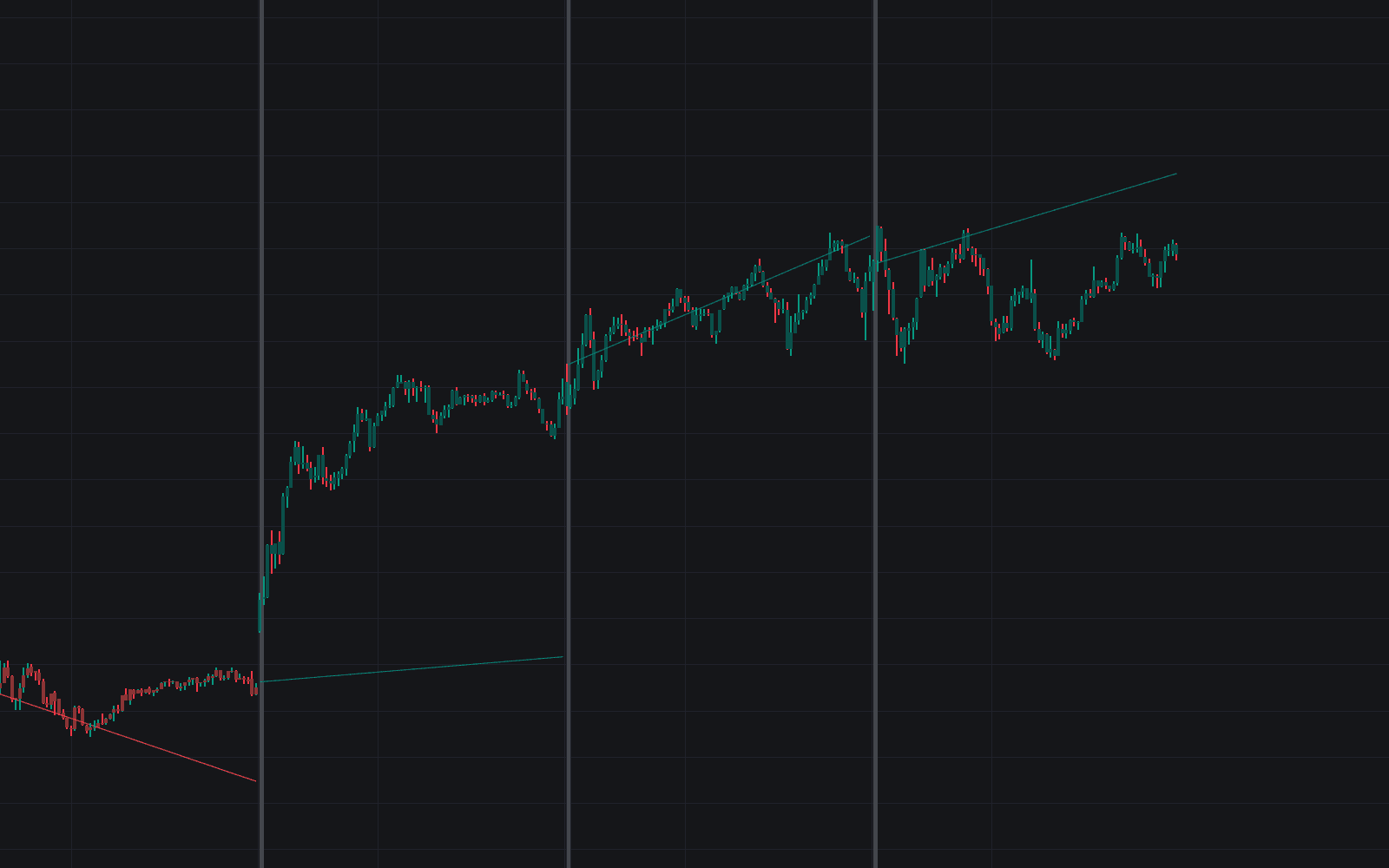
The Rolling Segment indicator is a volatility-adjusted trading indicator that plots a dynamic trend line designed to stay smooth during normal market conditions and react faster when momentum expands. Instead of behaving like a traditional moving average, it builds clean linear segments that hold their slope until the market state changes. This makes it easier for traders to read trend direction, spot momentum shifts, and identify when price is stretching too far from its current path. For traders looking for a simple but intelligent trend-following trading strategy, Rolling Segment offers a clean framework for following momentum while staying aware of exhaustion and reversal risk.
How to Trade the Rolling Segment Indicator
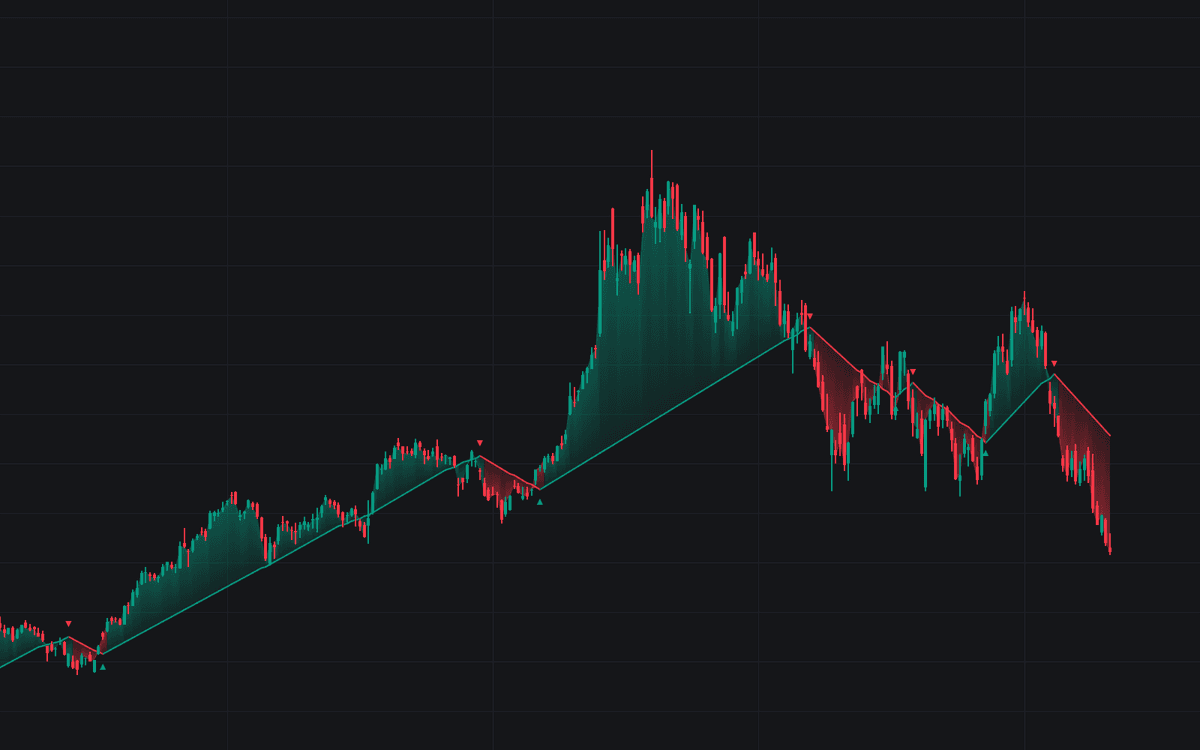
The indicator is built to reduce small price noise while still adapting to real changes in trend. On the chart, it appears as a continuous segmented line that changes color with market direction, typically green during bullish conditions and red during bearish conditions.
A gradient fill between price and the segment helps show how far the market has moved away from the reference line. This matters because the relationship between price and the segment can reveal whether a trend is healthy, accelerating, or becoming overextended.
Traders can use the Rolling Segment trading indicator in several ways:
- Follow the direction of the segment as a trend filter.
- Look for new reversal markers as potential early trend change signals.
- Monitor the distance between price and the segment to judge extension or possible mean reversion.
- Use the line as a dynamic reference for trend continuation setups, pullbacks, and risk management.
Because the line is volatility-based, it can adapt better than static trend tools across different assets and market environments.
Reversal Signals and Trend Changes
The indicator detects reversals when the gap between price and the segment exceeds a user-defined threshold based on the Average True Range (ATR). When that happens, it marks the chart with triangle labels to show that the trend state has changed.
- A bullish triangle (▲) appears below the segment when a new uptrend begins.
- A bearish triangle (▼) appears above the segment when a new downtrend begins.
These reversal markers can be useful for traders who want a more mechanical way to identify when market structure has shifted enough to justify a new directional bias. In practice, many traders will combine these signals with market structure, support and resistance, or other confirmation tools as part of a broader trading strategy.
Fast and Slow Speed Modes
One of the most useful features of this trading indicator is its two-speed behavior. The segment can operate in either Fast or Slow mode depending on how aggressively price is moving away from the line.
When price remains relatively close to the segment, the indicator uses the slower slope. This helps keep the line stable and reduces overreaction during choppy or consolidating conditions.
When price pushes far enough away from the segment and crosses the Fast Threshold, the indicator switches to a faster slope. This allows the line to catch up more quickly during strong trends or momentum bursts.
This two-speed logic gives the Rolling Segment a balance between stability and responsiveness:
- Slow mode helps smooth out minor fluctuations and keeps the trend readable.
- Fast mode allows the indicator to respond when momentum expands.
- The transition between modes can also help traders identify when a move is strengthening.
How to Read the Rolling Segment in Live Markets
The Rolling Segment can be used as a gauge of overall trend quality, not just trend direction. Since its movement is based on ATR, the slope is scaled to current market volatility rather than using a fixed distance or arbitrary rate.
Trend Momentum
When price holds above a green segment or below a red segment without constantly forcing the line into Fast mode, it often suggests a healthier and more controlled trend. In these conditions, the market is moving with direction and consistency rather than with unstable bursts.
This can be especially useful for traders who prefer trend-following setups and want a cleaner way to judge whether momentum remains intact.
Price Exhaustion
A sudden shift into Fast mode can highlight an increase in momentum, which is not always a bad thing. In many cases, it confirms that the trend is accelerating.
However, if price keeps stretching aggressively away from the segment even after the faster mode activates, that can signal a move that is becoming overheated. Traders may interpret this as a possible exhaustion condition where the market is more vulnerable to a pullback, pause, or mean reversion.
Consolidation and Neutral Conditions
When the segment becomes flatter or nearly horizontal, it usually reflects a market that lacks strong direction relative to recent volatility. This can help traders avoid forcing trend trades in conditions where price is compressing or ranging.
For traders using the indicator as a trend filter, these flatter periods can be a cue to stay patient until the market shows clearer expansion.
Why This Trading Indicator Looks Different From a Moving Average
At the core of the script is a state-machine model that controls how the segment behaves. This is what gives the indicator its distinct appearance and cleaner trend logic.
Traditional moving averages update on every bar using a rolling calculation, which can make them constantly reshape as new data comes in. The Rolling Segment works differently. It calculates a linear slope and then freezes that slope until a meaningful state change happens.
That state is defined by a combination of:
- Trend Direction
- Speed Mode
The ATR value used to define the slope is only refreshed when one of the following occurs:
- A trend reversal is detected because price crosses the Reverse Threshold.
- Price crosses the Fast Threshold and triggers a change in speed mode.
- The indicator begins its initial calculation.
This freezing process creates straight, clean segments instead of constantly curving lines. For traders, this has a few practical advantages:
- The trend line becomes easier to interpret visually.
- Momentum appears cleaner and less noisy.
- Price exhaustion stands out more clearly when the market pulls too far away from the constant rate of movement.
In simple terms, the indicator is measuring whether price is moving at, below, or beyond a volatility-adjusted pace. That makes it a useful tool for traders who want a trend indicator that is both systematic and visually intuitive.
Rolling Segment Settings Explained
Slope Settings
- Fast Slope Length: Controls how quickly the segment moves when the market is trending strongly. Lower values make the line steeper and more reactive, which can help aggressive traders track momentum more closely.
- Slow Slope Length: Controls the slope during more normal market conditions. Higher values create a flatter and smoother line, which can help reduce noise and prevent premature trend changes.
These inputs let traders decide how sensitive the indicator should be based on their market, timeframe, and trading style.
ATR Configuration
- ATR Length: Sets the lookback period for the Average True Range calculation. Since ATR is used to scale both the slope and thresholds, this setting affects how the indicator adapts to volatility.
A shorter ATR can make the indicator respond more quickly to changing market conditions, while a longer ATR may produce a more stable reading.
Threshold Controls
- Fast Slope Threshold (ATR Multiplier): Defines how far price must move away from the segment, measured in ATR units, before the indicator switches into Fast mode.
- Reverse Threshold (ATR Multiplier): Defines how far price must move against the active trend, also in ATR units, before the indicator confirms a reversal and changes direction.
These settings are important because they control the balance between responsiveness and stability. Lower thresholds will make the indicator react sooner, while higher thresholds can help filter out weaker moves.
How Traders Can Use Rolling Segment in a Trading Strategy
The Rolling Segment can fit into multiple trading styles, from discretionary chart reading to more rule-based trading systems.
Some common ways traders may use it include:
- Using segment color and direction as a trend bias filter.
- Entering on pullbacks toward the segment during established trends.
- Watching for reversal triangles to identify possible early trend changes.
- Monitoring Fast mode activation to detect momentum expansion.
- Using extreme distance from the segment as a warning sign for exhaustion or profit-taking.
Like any trading indicator, Rolling Segment works best when used with context. Many traders will pair it with support and resistance, volume analysis, higher timeframe structure, or momentum tools to build a more complete trading strategy.
FAQ
What is the Rolling Segment indicator?
The Rolling Segment is a trend-following trading indicator that plots a volatility-adjusted segmented line. It changes direction and speed based on ATR-scaled price movement, helping traders identify trend direction, momentum acceleration, and possible exhaustion.
Is Rolling Segment a moving average?
Not in the traditional sense. Unlike standard moving averages that recalculate continuously, Rolling Segment freezes its slope until a state change occurs. This creates straighter, cleaner segments that make trend behavior easier to read.
What does Fast mode mean?
Fast mode means price has moved far enough away from the segment to trigger a more aggressive slope. This usually happens during stronger momentum and helps the indicator catch up to fast-moving trends.
How can traders use Rolling Segment in a trading strategy?
Traders can use it as a trend filter, a reversal detection tool, or a way to monitor whether price is extended relative to current volatility. It can also be combined with other tools for confirmation in both swing trading and intraday trading strategies.
How do I access the Rolling Segment indicator?
You can get access on the LuxAlgo Library for charting platforms like TradingView, MetaTrader (MT4/MT5), and NinjaTrader for free.
Trading & investing are risky and many will lose money in connection with trading and investing activities. All content on this site is not intended to, and should not be, construed as financial advice. Decisions to buy, sell, hold or trade in securities, commodities and other investments involve risk and are best made based on the advice of qualified financial professionals. Past performance does not guarantee future results.
Hypothetical or Simulated performance results have certain limitations. Unlike an actual performance record, simulated results do not represent actual trading. Also, since the trades have not been executed, the results may have under-or-over compensated for the impact, if any, of certain market factors, including, but not limited to, lack of liquidity. Simulated trading programs in general are designed with the benefit of hindsight, and are based on historical information. No representation is being made that any account will or is likely to achieve profit or losses similar to those shown.
Testimonials appearing on this website may not be representative of other clients or customers and is not a guarantee of future performance or success.
As a provider of technical analysis tools and strategies, we do not have access to the personal trading accounts or brokerage statements of our customers. As a result, we have no reason to believe our customers perform better or worse than traders as a whole based on any content, tool, or platform feature we provide.
Charts used on this site are by TradingView in which the majority of our technical indicators are built on. TradingView® is a registered trademark of TradingView, Inc. www.TradingView.comTradingView® has no affiliation with the owner, developer, or provider of the Services described herein.
Market data is provided by CBOE, CME Group, BarChart, CoinAPI. CBOE BZX real-time US equities data is licensed from CBOE and provided through BarChart. Real-time futures data is licensed from CME Group and provided through BarChart. Select cryptocurrency data, including major coins, is provided through CoinAPI. All data is provided “as is” and should be verified independently for trading purposes.
This does not represent our full Disclaimer. Please read our full disclaimer.
© 2026 LuxAlgo Global, LLC.