Rolling Trendline

Feb 17, 2026

Static chart image
Dynamic Overlays
Support and Resistance
Signals
Works on the following platforms:
tradingviewSymbolTradingView
For free use on the TradingView platform
ninjatraderNinjaTrader
For free use on the NinjaTrader platform
metatrader4MetaTrader 4/5
For free use on the MetaTrader 4/5 platform
thinkorswimThinkorswim
For free use on the Thinkorswim platform

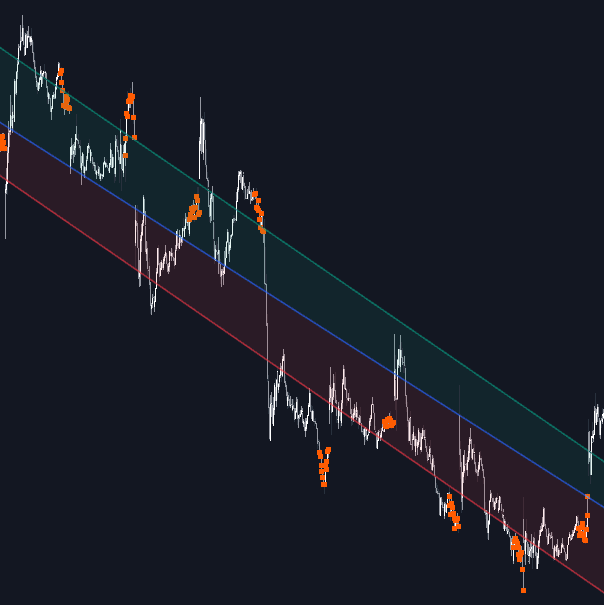
The Rolling Trendline indicator is a dynamic trading indicator that continuously adapts to price action by projecting a linear regression slope forward and automatically resetting when momentum meaningfully shifts. Unlike static trendlines or fixed regression channels, this tool “rolls” with the market, maintaining a real-time trend bias while accounting for volatility using ATR-based zones. It is designed for traders who want a responsive trend-following strategy that balances structure and flexibility across all market conditions.

How to Trade the Rolling Trendline Indicator

The Rolling Trendline functions as a self-adjusting trend filter and volatility-aware support/resistance framework. Instead of manually drawing lines or recalculating regression channels, the indicator automatically projects the prevailing slope and only recalibrates when price proves the trend has materially changed.

Because the line continuously extends forward based on its active slope, it provides a persistent directional bias without the traditional lag of static regression tools. This makes it suitable for:

  • Trend-following strategies
  • Pullback entries in established trends
  • Breakout confirmation
  • Volatility-adjusted stop placement
  • Intraday and swing trading

The inclusion of ATR-based volatility zones transforms the projected slope into a complete trading structure, helping traders assess whether price is trending cleanly or becoming unstable.

Interpreting the Trendline and Volatility Zones

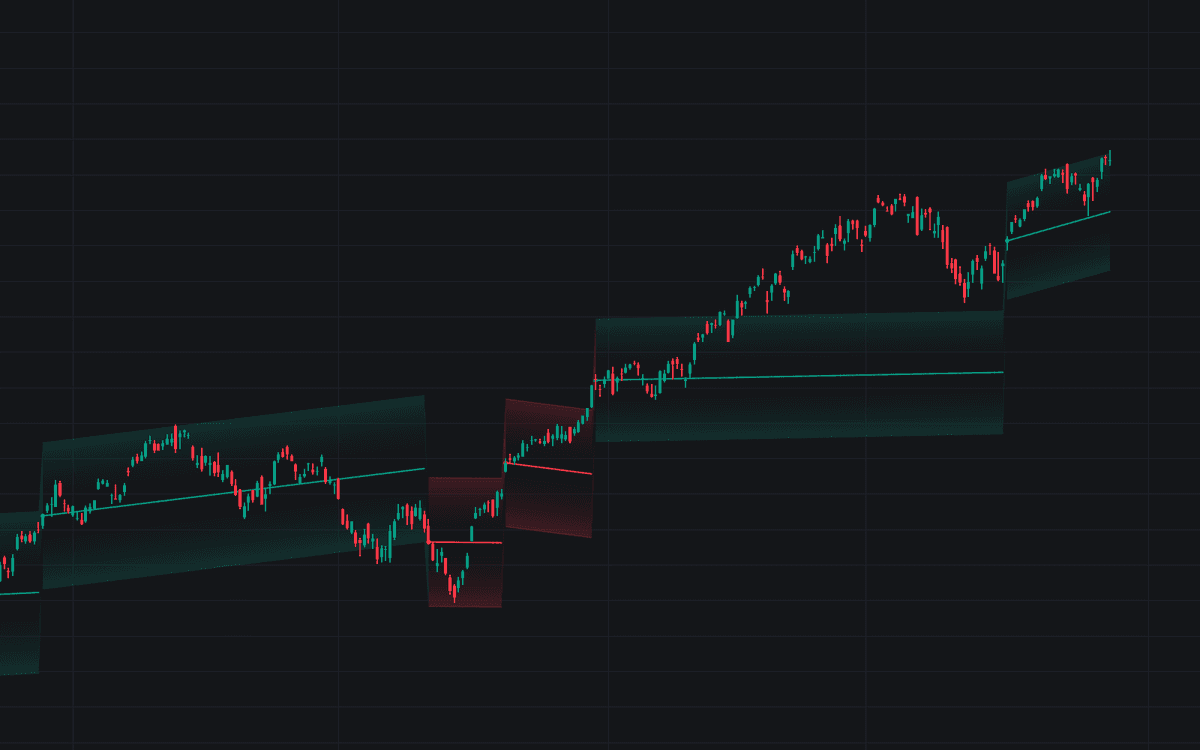
The indicator visually separates bullish and bearish environments, making trend direction immediately clear.

  • Bullish Phase (Green):
    An upward-sloping projection signals a bullish market structure. The trendline and ATR zones are colored green, reinforcing long-biased conditions. Traders often look for pullbacks toward the line or lower ATR zone as potential continuation entries.

  • Bearish Phase (Red):
    A downward-sloping projection signals bearish momentum. The line and zones turn red, supporting short-biased strategies. Rallies into the trendline or upper volatility zone can act as potential short setups.

  • ATR Zones:
    These shaded bands expand and contract based on current volatility. As long as price remains within the allowed deviation threshold, the trendline continues projecting forward without resetting. The zones act as dynamic support and resistance boundaries.

  • Reset Points:
    When price deviates too far from the projected path, the indicator triggers a reset. This is marked by a small circle and a break in the line. At this moment, the trendline re-anchors to current price and recalculates both slope and volatility bands. A reset often signals a regime shift or momentum transition.

Strategy Applications

The Rolling Trendline can be integrated into multiple trading strategies:

Trend Continuation Strategy

  • Identify the active slope direction.
  • Wait for price to retrace toward the trendline or ATR band.
  • Enter in the direction of the slope.
  • Place stops beyond the outer ATR zone.

Breakout Confirmation Strategy

  • Monitor for a reset event.
  • If the new slope aligns with breakout structure, use the reset as confirmation of a new directional move.
  • Manage risk using the newly recalculated volatility zones.

Volatility Expansion Analysis

Expanding ATR zones suggest increasing market volatility. Tightening zones suggest compression. Traders can anticipate larger moves when compression precedes a reset.

Indicator Logic and Technical Framework

The Rolling Trendline maintains its adaptive nature through a structured calculation flow:

  1. Slope Calculation:
    A Linear Regression slope is computed over a user-defined lookback period. This slope represents the average directional change in price.

  2. Forward Projection:
    On each new bar, the current slope is added to the previous trendline value, extending the line forward dynamically.

  3. Deviation Threshold Check:
    A Standard Deviation-based threshold determines how far price is allowed to stray from the projected path. If price exceeds this deviation, the current trend assumption is invalidated.

  4. Automatic Re-Anchoring:
    When a reset occurs, the trendline immediately re-anchors to the current price, adopts the latest regression slope, and recalculates the ATR-based volatility width. This preserves responsiveness while avoiding constant micro-adjustments.

Customizing the Rolling Trendline Settings

The indicator includes flexible settings so traders can adapt it to different assets, timeframes, and trading styles.

Trend Settings

  • Slope Lookback:
    Defines how much historical data is used to calculate the linear regression slope.

    • Higher values = smoother, slower-moving slope.
    • Lower values = faster, more reactive slope.
  • Deviation Multiplier:
    Controls how sensitive the indicator is to resets.

    • Higher values allow larger price swings before recalibration.
    • Lower values trigger resets more frequently.
  • Slope Divisor:
    Reduces the steepness of the projected slope. Larger values create flatter trendlines, which may be useful for highly volatile assets.

  • Source:
    Selects the price input (Close by default), allowing traders to experiment with alternative sources such as HLC3 or OHLC4.

ATR Zone Settings

  • ATR Length:
    Determines how volatility is measured. Shorter lengths respond faster to changing conditions.

  • ATR Multiplier:
    Adjusts the width of the shaded volatility zones.

    • Larger multipliers = wider buffers.
    • Smaller multipliers = tighter structure.

Visual Customization

  • Bullish/Bearish Trend Colors:
    Personalize the directional phases for better chart clarity.

  • Zone Color:
    Modify the base fill color of the ATR zones.

  • Line Width:
    Adjust the thickness of the primary rolling trendline for visual prominence.

Why Use the Rolling Trendline as a Trading Indicator?

This trading indicator solves a common problem: traditional trendlines and regression tools either lag too much or require constant manual updates. By combining slope projection, deviation filtering, and ATR volatility bands, the Rolling Trendline creates:

  • A persistent trend bias
  • Automatic structural recalibration
  • Volatility-adjusted context
  • Clear visual phase identification
  • Adaptability across forex, crypto, stocks, and futures

It functions both as a standalone trading strategy component and as a higher-timeframe trend filter for systematic traders.

FAQ

What makes the Rolling Trendline different from a standard regression line?

A standard linear regression line recalculates on every bar and can shift dramatically. The Rolling Trendline projects its slope forward and only resets when a statistically meaningful deviation occurs, making it more stable and strategy-friendly.

Is this indicator suitable for scalping and swing trading?

Yes. By adjusting the slope lookback and ATR settings, the indicator can be optimized for short-term intraday trading or longer-term swing trading.

How do I access the Rolling Trendline indicator?

You can get access on the LuxAlgo Library for charting platforms like TradingView, MetaTrader (MT4/MT5), and NinjaTrader for free.

Trading & investing are risky and many will lose money in connection with trading and investing activities. All content on this site is not intended to, and should not be, construed as financial advice. Decisions to buy, sell, hold or trade in securities, commodities and other investments involve risk and are best made based on the advice of qualified financial professionals. Past performance does not guarantee future results.

Hypothetical or Simulated performance results have certain limitations. Unlike an actual performance record, simulated results do not represent actual trading. Also, since the trades have not been executed, the results may have under-or-over compensated for the impact, if any, of certain market factors, including, but not limited to, lack of liquidity. Simulated trading programs in general are designed with the benefit of hindsight, and are based on historical information. No representation is being made that any account will or is likely to achieve profit or losses similar to those shown.

Testimonials appearing on this website may not be representative of other clients or customers and is not a guarantee of future performance or success.

As a provider of technical analysis tools and strategies, we do not have access to the personal trading accounts or brokerage statements of our customers. As a result, we have no reason to believe our customers perform better or worse than traders as a whole based on any content, tool, or platform feature we provide.

Charts used on this site are by TradingView in which the majority of our technical indicators are built on. TradingView® is a registered trademark of TradingView, Inc. www.TradingView.comTradingView® has no affiliation with the owner, developer, or provider of the Services described herein.

Market data is provided by CBOE, CME Group, BarChart, CoinAPI. CBOE BZX real-time US equities data is licensed from CBOE and provided through BarChart. Real-time futures data is licensed from CME Group and provided through BarChart. Select cryptocurrency data, including major coins, is provided through CoinAPI. All data is provided “as is” and should be verified independently for trading purposes.

This does not represent our full Disclaimer. Please read our full disclaimer.

© 2026 LuxAlgo Global, LLC.