RSI Divergence: Out-of-Sample Optimizer

by LuxAlgo · Jun 9, 2026

Static chart image
Signals
Divergences
Patterns

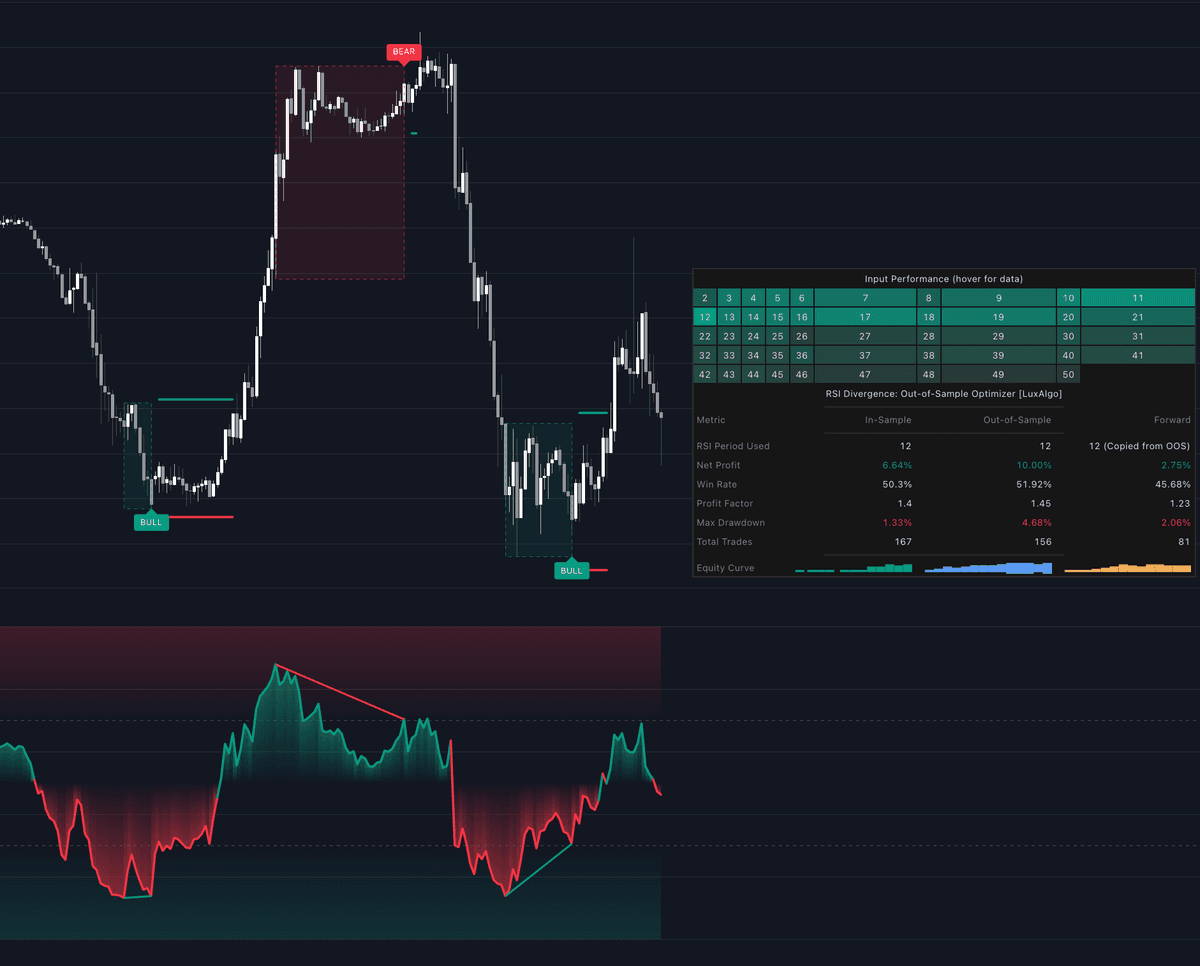
The RSI Divergence: Out-of-Sample Optimizer indicator is a comprehensive backtesting and optimization tool designed to identify the most effective RSI period for trading price-RSI divergences within a specified historical window and validate those results through out-of-sample and forward testing.

USAGE

The script is divided into three distinct chronological phases to simulate a professional quantitative workflow:

In-Sample (IS) Optimization

During this period (highlighted by the first background gradient), the script simulates dozens of RSI periods simultaneously. It calculates divergence signals and trade outcomes for every period within the user-defined range (e.g., RSI 2 to 50). The "best" period is selected based on your chosen Optimization Metric, such as Net Profit or Profit Factor.

Out-of-Sample (OOS) Validation

Once the best RSI period is identified in the IS phase, the script "locks" that parameter and applies it to the next segment of data (the OOS period). This tests whether the strategy’s performance was due to genuine market alpha or simply "curve-fitting" to historical noise.

Forward Testing

The Forward period represents the most recent data leading up to the current bar. The script continues using the parameter validated during the OOS phase to show how the strategy is performing in the current market environment.

DETAILS

Divergence Detection

The script identifies regular bullish and bearish divergences. A bullish divergence occurs when price makes a lower low while the RSI makes a higher low. A bearish divergence occurs when price makes a higher high while the RSI makes a lower high. The script uses pivot lookback settings to confirm these peaks and troughs.

Trade Execution Logic

Trades are entered on the bar following a confirmed divergence. Stop loss and take profit levels are calculated using an ATR (Average True Range) multiplier to account for market volatility. Users can also enable "Exit on Opposite Signal" to close trades if a contrary divergence appears before hitting a price target.

Sensitivity Analysis (Heatmap)

The dashboard includes a "Sensitivity Table" that acts as a heatmap. It displays every RSI period tested during the In-Sample phase. Darker green cells indicate superior performance, while darker red cells indicate poorer performance based on the selected optimization metric. This allows you to see if your "best" setting is an outlier or part of a robust cluster of profitable periods.

SETTINGS

Optimization & Backtest Ranges

  • In-Sample Start/End: Defines the historical window used to find the best performing RSI period.
  • Out-of-Sample Start/End: Defines the validation window where the best IS period is tested on unseen data.
  • Min/Max RSI Period: The range of RSI lengths the script will simulate (e.g., 2 to 50).
  • Optimization Metric: The primary KPI used to rank RSI periods (e.g., Sharpe Ratio, Win Rate, Net Profit).

Divergence Settings

  • Pivot Left/Right Bars: The number of bars required on either side of a point to confirm a local high or low in the RSI.
  • Max Divergence Bars: The maximum distance allowed between two pivots to qualify as a divergence.

Trade Rules

  • Stop Loss/Take Profit ATR Multiplier: Controls the distance of exit levels based on recent volatility.
  • Exit on Opposite Signal: When enabled, a long trade will close immediately if a bearish divergence is detected.

Dashboard

  • Extra Dashboard Metric 1/2: Allows you to add two additional performance statistics to the dashboard (e.g., Z-Score or Average Trade) alongside the default metrics.
  • Dashboard Position/Size: Adjusts the UI elements to fit your screen resolution and preference.
Free access on the following platforms
tradingviewSymbolTradingView
Open in your browser

This in-app browser is not compatible with Get Access from the library.

Tap the menu (...) at the top of your screen and select "Open in Browser", "Open in Safari", or "Open in Chrome" to continue.

ninjatraderNinjaTrader
Open in your browser

This in-app browser is not compatible with Get Access from the library.

Tap the menu (...) at the top of your screen and select "Open in Browser", "Open in Safari", or "Open in Chrome" to continue.

metatrader4MetaTrader 4/5
Open in your browser

This in-app browser is not compatible with Get Access from the library.

Tap the menu (...) at the top of your screen and select "Open in Browser", "Open in Safari", or "Open in Chrome" to continue.

thinkorswimThinkorswim
Open in your browser

This in-app browser is not compatible with Get Access from the library.

Tap the menu (...) at the top of your screen and select "Open in Browser", "Open in Safari", or "Open in Chrome" to continue.

Trading & investing are risky and many will lose money in connection with trading and investing activities. All content on this site is not intended to, and should not be, construed as financial advice. Decisions to buy, sell, hold or trade in securities, commodities and other investments involve risk and are best made based on the advice of qualified financial professionals. Past performance does not guarantee future results.

Hypothetical or Simulated performance results have certain limitations. Unlike an actual performance record, simulated results do not represent actual trading. Also, since the trades have not been executed, the results may have under-or-over compensated for the impact, if any, of certain market factors, including, but not limited to, lack of liquidity. Simulated trading programs in general are designed with the benefit of hindsight, and are based on historical information. No representation is being made that any account will or is likely to achieve profit or losses similar to those shown.

Testimonials appearing on this website may not be representative of other clients or customers and is not a guarantee of future performance or success.

As a provider of technical analysis tools and strategies, we do not have access to the personal trading accounts or brokerage statements of our customers. As a result, we have no reason to believe our customers perform better or worse than traders as a whole based on any content, tool, or platform feature we provide.

Charts used on this site are by TradingView in which the majority of our technical indicators are built on. TradingView® is a registered trademark of TradingView, Inc. www.TradingView.com TradingView® has no affiliation with the owner, developer, or provider of the Services described herein.

Market data is provided by CBOE, CME Group, BarChart, Massive, CoinAPI. Select U.S. equities data is provided through Massive. CBOE BZX real-time U.S. equities data is licensed from CBOE and provided through BarChart. Real-time futures data is licensed from CME Group and provided through BarChart. Select cryptocurrency data, including major coins, is provided through CoinAPI. All data is provided “as is” and should be verified independently for trading purposes.

This does not represent our full Disclaimer. Please read our full disclaimer.

© 2026 LuxAlgo Global, LLC.