Rubber Band Liquidity Signals

by LuxAlgo · Jun 15, 2026

Static chart image
Signals
Liquidity

The Rubber Band Liquidity Signals indicator identifies high probability market opportunities by detecting liquidity sweeps occurring after distinct periods of trend and consolidation. This tool assists traders in filtering out market noise and pinpointing setups where institutional players likely engage in stop hunting before continuing the primary trend.

Usage

The Rubber Band Liquidity Signals indicator operates on a specific market cycle model: Trend, Consolidation, Liquidity Sweep, and Continuation. By identifying these stages, it provides visual cues to help traders anticipate potential breakouts.

Identifying Market Ranges

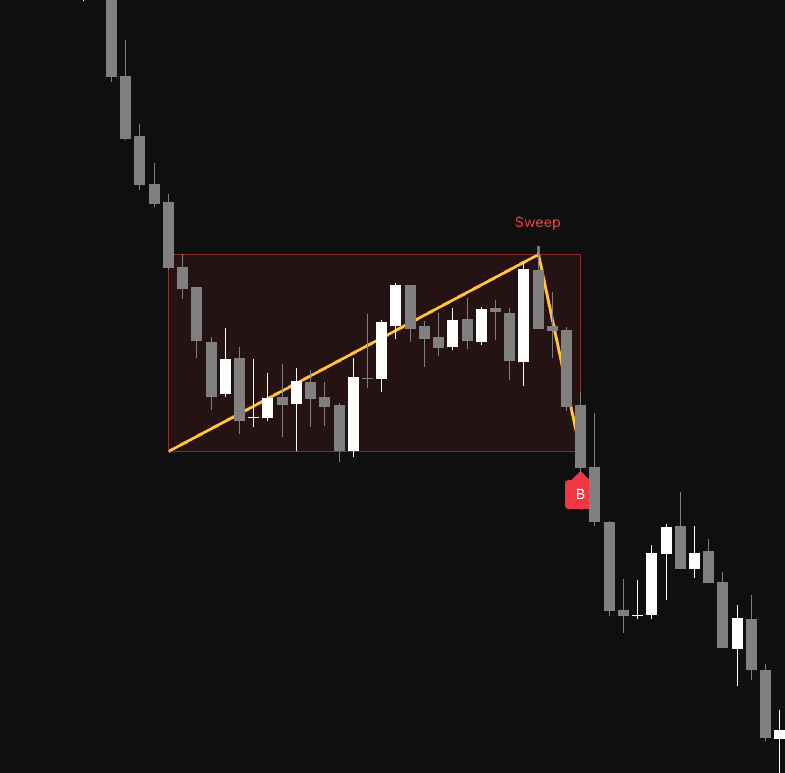
The indicator automatically draws a box when it detects a period of consolidation following a strong trend. The Bullish Color represents a consolidation after an uptrend, while the Bearish Color represents a consolidation after a downtrend. These boxes visualize the price range that the market is currently testing.

Interpreting Signals

  • Liquidity Sweep: When the price penetrates the range high or low but closes back inside the range, the indicator identifies a liquidity sweep. A line is drawn to highlight this grab, indicating that market participants are likely being cleared out of their positions.
  • Continuation Signal: Following a confirmed sweep, if the price breaks out of the range in the direction of the initial trend, the indicator plots a "B" label and a yellow V shape. This signals that the market has likely finished its "rubber band" compression and is ready to continue the primary trend.

Details

The logic behind the Rubber Band Liquidity Signals tool relies on volatility metrics, specifically the Average True Range (ATR), to ensure that the trend and consolidation phases are calculated based on current market conditions rather than static price levels.

The script measures the move size over a lookback period to confirm the strength of the preceding trend. If the price remains within a specific ATR multiplier width for a set number of bars, the consolidation phase is defined. The core strength of the indicator is its ability to differentiate between a simple range breakout and a liquidity sweep. By requiring the price to close back within the range after piercing it, the script effectively filters out false breakouts that often trap retail traders. The final yellow V shape serves as a visual confirmation of the price snapping back into the primary trend direction.

Settings

Trend & Range Settings

  • Trend Lookback: Determines the number of bars used to calculate the strength of the preceding trend.
  • Trend Move ATR Multiplier: Sets the minimum price move size relative to the ATR to validate a strong trend.
  • Consolidation Length: Defines the number of bars required to form a consolidation range.
  • Range Max ATR Multiplier: Sets the maximum allowed width of the consolidation range.
  • Max Range Duration: Limits the duration of the consolidation box to prevent stale signals.

Style

  • Bullish Color: Customizes the visual color of bullish ranges and sweep markers.
  • Bearish Color: Customizes the visual color of bearish ranges and sweep markers.

FAQ

How do I access Rubber Band Liquidity Signals? You can get access on the LuxAlgo Library for charting platforms like TradingView, MetaTrader (MT4/MT5), and NinjaTrader for free.

Free access on the following platforms
tradingviewSymbolTradingView
Open in your browser

This in-app browser is not compatible with Get Access from the library.

Tap the menu (...) at the top of your screen and select "Open in Browser", "Open in Safari", or "Open in Chrome" to continue.

ninjatraderNinjaTrader
Open in your browser

This in-app browser is not compatible with Get Access from the library.

Tap the menu (...) at the top of your screen and select "Open in Browser", "Open in Safari", or "Open in Chrome" to continue.

metatrader4MetaTrader 4/5
Open in your browser

This in-app browser is not compatible with Get Access from the library.

Tap the menu (...) at the top of your screen and select "Open in Browser", "Open in Safari", or "Open in Chrome" to continue.

thinkorswimThinkorswim
Open in your browser

This in-app browser is not compatible with Get Access from the library.

Tap the menu (...) at the top of your screen and select "Open in Browser", "Open in Safari", or "Open in Chrome" to continue.

Trading & investing are risky and many will lose money in connection with trading and investing activities. All content on this site is not intended to, and should not be, construed as financial advice. Decisions to buy, sell, hold or trade in securities, commodities and other investments involve risk and are best made based on the advice of qualified financial professionals. Past performance does not guarantee future results.

Hypothetical or Simulated performance results have certain limitations. Unlike an actual performance record, simulated results do not represent actual trading. Also, since the trades have not been executed, the results may have under-or-over compensated for the impact, if any, of certain market factors, including, but not limited to, lack of liquidity. Simulated trading programs in general are designed with the benefit of hindsight, and are based on historical information. No representation is being made that any account will or is likely to achieve profit or losses similar to those shown.

Testimonials appearing on this website may not be representative of other clients or customers and is not a guarantee of future performance or success.

As a provider of technical analysis tools and strategies, we do not have access to the personal trading accounts or brokerage statements of our customers. As a result, we have no reason to believe our customers perform better or worse than traders as a whole based on any content, tool, or platform feature we provide.

Charts used on this site are by TradingView in which the majority of our technical indicators are built on. TradingView® is a registered trademark of TradingView, Inc. www.TradingView.com TradingView® has no affiliation with the owner, developer, or provider of the Services described herein.

Market data is provided by CBOE, CME Group, BarChart, Massive, CoinAPI. Select U.S. equities data is provided through Massive. CBOE BZX real-time U.S. equities data is licensed from CBOE and provided through BarChart. Real-time futures data is licensed from CME Group and provided through BarChart. Select cryptocurrency data, including major coins, is provided through CoinAPI. All data is provided “as is” and should be verified independently for trading purposes.

This does not represent our full Disclaimer. Please read our full disclaimer.

© 2026 LuxAlgo Global, LLC.