Pine Script: Coding Essentials for Traders

Pine Script® is TradingView’s programming language for indicators, strategies and libraries. Learn its bar-by-bar execution model before adding complex rules: a calculation, an alert event and a simulated order are different things. A working script is a starting point for research, not proof of a profitable or deployable trading system.
This guide moves from variables and moving averages to confirmed-bar alerts and a strategy with explicit order assumptions. Examples use Pine Script v6. They are educational, source-reviewed examples; they have not been compiler- or runtime-verified in TradingView for this article. Compile and inspect each example in your own editor before using its output.
Pine Script® also no longer runs in one place. LuxAlgo charts execute it natively through PineTS, our open-source Pine Script® runtime, and the same engine puts it on Vela™, our open-source charting library, and in plain Node.js. Every example here runs on TradingView and on LuxAlgo; where a runtime detail differs, the text says so.
A Short History of Pine Script® (2013 to 2026)
Pine Script® started in 2013 as a small language for drawing custom indicators on a TradingView chart. Every version since has widened what a script can express, and each one changed the rules a beginner has to learn. Knowing the timeline explains why a tutorial from 2020 looks nothing like code written today, and why the version annotation at the top of a script matters.
| Version | Released | What it added | Why it mattered |
|---|---|---|---|
| v1 | 2013 | The language itself: series values, built-in indicators, plots | Traders could write an indicator without leaving the chart |
| v2 | 2015 | if statements, security requests | Logic stopped being a chain of ternaries |
| v3 | 2017 | String support, more technical-analysis functions, repainting fixes for requests | Scripts became readable programs rather than formulas |
| v4 | 2019 | var declarations, drawing objects (label, line), later arrays (2020) | Stateful scripts and on-chart drawings; the first real strategies at scale |
| v5 | October 2021 | Namespaces (ta., math., str.), libraries, switch; later user-defined types, methods, matrices and maps | Reusable code and structured data; the version most published scripts still run |
| v6 | November 2024 | Dynamic requests, enums, strict booleans with lazy evaluation, text formatting, negative array indexing | Scripts can request data inside loops and conditions; fewer silent na bugs |
v6 did not stop at launch. TradingView has shipped monthly updates since: bid and ask variables on tick charts and the removal of the scope limit in February 2025, an active parameter on inputs in March 2025, for-loop bounds that re-evaluate on every iteration, longer strings, new plot line styles, and request.footprint() with the footprint and volume_row types in January 2026. New scripts default to v6, and the Pine Editor offers a one-click converter for v5 code.
The language also stopped being tied to one runtime. Pine Script® v5 and v6 now execute natively outside TradingView through PineTS, our open-source Pine Script® runtime, which is what runs the scripts on LuxAlgo charts and on Vela™, our open-source charting library. The section below shows what that looks like.
What Changed in Pine Script® v6
If you learned on v5, these are the changes that will actually bite. Everything else in this guide is written against v6.
- Booleans are strictly
trueorfalse. Aboolcan no longer holdna. Code that relied on an undefined boolean being falsy now needs an explicit check, usuallynot na(value)on the underlying number. andandorshort-circuit. If the left side decides the result, the right side is not evaluated. A stateful function call hidden on the right side of anandmay stop running on some bars, which is exactly the "evaluate every historical function on every bar" rule this guide keeps repeating.- Dynamic requests.
request.security()and its siblings accept series strings and can run inside loops andifblocks. Scanning a list of symbols in one script is now possible. - Enums.
enumdeclares a fixed set of named values, andinput.enum()turns it into a dropdown. Use it where you would otherwise compare strings. - Text formatting. Labels, boxes and tables take
text_formatting(bold, italic) and a numeric point size. - Negative array indices.
array.get(a, -1)reads the last element. - Strategies. The
whenparameter is gone; wrap the call inif.strategy.exit()with both absolute and relative levels now uses whichever the market would hit first, and the 9,000-trade limit no longer stops a normal backtest.
//@version=6
indicator("v6 boolean hygiene", overlay = true)
float fast = ta.ema(close, 9)
float slow = ta.ema(close, 21)
// v5 habit: `bool bullish = fast > slow` could carry na during warm-up.
// v6: the comparison is only meaningful once both series are available.
bool ready = not na(fast) and not na(slow)
bool bullish = ready and fast > slow
plotshape(ready and ta.crossover(fast, slow), "Cross", shape.triangleup, location.belowbar, color.green, size = size.tiny)
bgcolor(bullish ? color.new(color.green, 92) : na)
Read the official v5 to v6 migration guide before converting anything that trades. Changing the version number and fixing compiler errors is not a migration; the boolean and evaluation rules change behavior without an error message.
Start With a Small Script
Open a TradingView chart, open the Pine Editor, create an indicator script and replace its contents with the example below. Add it to the chart and read any compiler messages. Account and plan features can affect access; follow the current interface rather than an old screenshot.
//@version=6
indicator("My first close plot", overlay = true)
plot(close, "Close", color.blue)
The version annotation selects the language version. The declaration identifies the script as an indicator. The plot displays the close series on the main price pane. A strategy can generate simulated orders, while a library exports reusable code; not every script must contain a plotting function.
Variables, Types and Missing Values
Distinguish the value’s type, its qualifier and its initialization mode. float, int, bool, string and color describe kinds of values. const is a qualifier, input.* creates configurable inputs, and var controls initialization and persistence. None is a substitute for understanding local and global scope.
//@version=6
indicator("Variables and persistent high", overlay = true)
const int DEFAULT_LENGTH = 14
int length = input.int(DEFAULT_LENGTH, "Length", minval = 1)
var float highestSeen = na
if not na(high)
    highestSeen := na(highestSeen) ? high : math.max(highestSeen, high)
float average = ta.sma(close, length)
plot(highestSeen, "High since loaded history", color.orange)
plot(average, "SMA", color.blue)
Use = to declare and := to reassign. Test missing values with na(value), not value == na or value != na. A variable initialized with na needs a resolvable type, such as var float. The persistent high above starts from the loaded dataset, not the instrument’s entire lifetime.
Ordinary var values persist across bars but remain subject to realtime rollback. They do not automatically preserve every intrabar update. Review TradingView’s execution model and variable declarations when historical and live behavior differ.
| Construct | Meaning | Common mistake |
|---|---|---|
| close[1] | Previous bar’s close | Treating unavailable history as zero |
| a > b | Comparison producing a condition | Confusing a condition with an order |
| and / or / not | Logical composition | Placing stateful calculations only in a conditionally evaluated branch |
| if / else | Conditional execution | Declaring a local value then expecting it globally |
| var | Initialize once in its scope | Assuming intrabar persistence without rollback |
Functions and a Manual Moving Average
A function groups a calculation. For positive prices, a geometric mean of two values can be written as math.sqrt(x * y); it is not the same as their arithmetic average. Define the input domain and missing-value policy rather than applying a formula to arbitrary values.
A manual SMA makes history references and warm-up visible. This example intentionally returns an unavailable result when its window contains unavailable values. It is a teaching implementation, not a faster replacement for ta.sma() or a promise of identical missing-data behavior.
//@version=6
indicator("Manual SMA for learning", overlay = true)
int length = input.int(20, "Length", minval = 1, maxval = 500)
manualSma(float source, int window) =>
    float total = 0.0
    for i = 0 to window - 1
        total += source[i]
    total / window
float result = manualSma(close, length)
plot(result, "Manual SMA", color.blue)
The first full window requires enough history. Do not use nz() simply to make the early plot appear: replacing unavailable prices with zero changes the calculation. For ordinary production calculations, prefer the documented built-in and compare its behavior on your actual data.
Add Settings and Confirmed-Bar Alerts
Group inputs, constrain sensible ranges and calculate historical functions on every bar. The following indicator offers SMA, EMA and WMA choices. The cross event is evaluated independently, then gated by bar confirmation for its marker and alert condition.
//@version=6
indicator("Configurable MA — confirmed alerts", overlay = true)

const string CALC = "Calculation"
const string STYLE = "Style"
int length = input.int(20, "Length", minval = 1, maxval = 500, group = CALC)
float source = input.source(close, "Source", group = CALC)
string kind = input.string("SMA", "Type", options = ["SMA", "EMA", "WMA"], group = CALC)
color lineColor = input.color(color.blue, "Color", group = STYLE)
int lineWidth = input.int(2, "Width", minval = 1, maxval = 4, group = STYLE)

// Evaluate every historical calculation on every bar.
float sma = ta.sma(source, length)
float ema = ta.ema(source, length)
float wma = ta.wma(source, length)
float average = switch kind
    "EMA" => ema
    "WMA" => wma
    => sma
bool crossed = ta.crossover(source, average)
bool confirmedCross = barstate.isconfirmed and crossed
plot(average, "Selected MA", color = lineColor, linewidth = lineWidth)
plotshape(confirmedCross, "Confirmed cross", shape.triangleup, location.belowbar, color.green, size = size.tiny)
alertcondition(confirmedCross, "Confirmed bullish cross", "Source crossed above the selected moving average on a completed bar")
This compares the selected source with the selected moving average. If you change the source from close, the signal changes too. Confirmation waits until the realtime bar closes; it does not prevent every source of repainting, such as a different data request or revised source history.
TradingView’s alerts documentation explains that code creates alert events, not a running alert in the interface. Create the alert yourself and choose an appropriate frequency, such as once per bar close. Alerts trigger in realtime; historical markers are not a record of messages that were sent.
A running alert uses a saved copy of the script, inputs, symbol and timeframe. Editing the chart or script does not update that copy. Recreate the alert when those settings change. A notification also does not establish that a broker accepted or filled an order.
Turn Conditions Into a Strategy Deliberately
A strategy declaration enables TradingView’s broker emulator. Under the ordinary bar-close calculation model, a market order created after one bar closes usually fills on the next bar’s open. The signal close therefore may differ from the entry price. Read the strategy documentation before interpreting fills.
Bollinger-Band Conditions and Stop Meaning
A lower-band condition can be constructed with a basis ta.sma(close, length), a deviation multiplier * ta.stdev(close, length), and a lower band equal to basis minus deviation. Calculate the band and crossover every bar. Crossing upward through the lower band is a specific hypothesis, not a universal entry signal.
Decide what the stop means before coding it. A stop saved from the signal bar’s lower band stays at that price unless updated. A stop recalculated from each new band moves over time and can loosen as well as tighten. A gap can also place the next-open entry beyond the planned stop. These are materially different strategies.
Dual Moving Averages With an RSI Filter
This sample takes a long crossover only when RSI is above 50 and a short crossover only when RSI is below 50. It enters only while flat. Opposite signals do not reverse an open position; the existing bracket manages its exit. Position size is one unit, not a percentage of account equity.
//@version=6
strategy("Dual MA and RSI — fixed tick brackets", overlay = true,
     initial_capital = 10000, default_qty_type = strategy.fixed,
     default_qty_value = 1, pyramiding = 0,
     commission_type = strategy.commission.percent, commission_value = 0.1,
     slippage = 1, process_orders_on_close = false,
     calc_on_every_tick = false, calc_on_order_fills = false)

int fastLength = input.int(11, "Fast MA", minval = 1, maxval = 500)
int slowLength = input.int(50, "Slow MA", minval = 2, maxval = 500)
int rsiLength = input.int(14, "RSI length", minval = 1, maxval = 500)
int targetTicks = input.int(100, "Target distance in ticks", minval = 1)
int stopTicks = input.int(100, "Stop distance in ticks", minval = 1)
if fastLength >= slowLength
    runtime.error("Fast MA length must be smaller than slow MA length")

float fast = ta.sma(close, fastLength)
float slow = ta.sma(close, slowLength)
float momentum = ta.rsi(close, rsiLength)
bool crossedUp = ta.crossover(fast, slow)
bool crossedDown = ta.crossunder(fast, slow)
bool ready = not na(slow) and not na(momentum)
bool longSignal = ready and crossedUp and momentum > 50
bool shortSignal = ready and crossedDown and momentum < 50

// Enter only while flat; opposite signals do not reverse open positions.
if strategy.position_size == 0
    if longSignal
        strategy.entry("Long", strategy.long)
        strategy.exit("Long bracket", "Long", profit = targetTicks, loss = stopTicks)
    else if shortSignal
        strategy.entry("Short", strategy.short)
        strategy.exit("Short bracket", "Short", profit = targetTicks, loss = stopTicks)

plot(fast, "Fast MA", color.orange)
plot(slow, "Slow MA", color.blue)
The bracket uses profit and loss distances in ticks relative to the entry price. They are not percentages. For an instrument with a $0.01 minimum tick, 100 ticks is a $1 price distance; contract value and account-currency profit still depend on the instrument. The example’s 0.1% commission and one-tick slippage are illustrative assumptions, not a broker quote.
Using signal-close percentages as limit and stop prices would instead set absolute levels around that earlier close. If you want percentages around the actual average fill, implement and test when that fill becomes available and when the protective orders become active. Enabling recalculation after fills changes strategy behavior and can produce unrealistic historical assumptions; it is not a universal repair.
Stops do not guarantee a maximum realized loss. Gaps, order sequencing and the emulator’s intrabar assumptions affect outcomes. Standard candles are the appropriate baseline for price-based testing. Review individual trades, the entry and exit times, and open positions at the end of the test rather than relying only on net profit.
Debug and Improve One Change at a Time
- Resolve the first compiler error before treating later messages as separate defects.
- Plot intermediate values and check missing history, lengths, conditions and execution timing.
- Evaluate moving averages, RSI, ATR and crossover functions consistently on each bar.
- Separate indicator events, alert events, order creation and simulated fills when diagnosing timing.
- Use fixed baseline parameters and compare later untouched data before optimizing.
- Include realistic costs and test sensitivity rather than choosing the best historical result.
An ATR filter such as ta.atr(14) > ta.sma(ta.atr(14), 20) asks whether current ATR exceeds its recent average. It does not establish trend direction or make a strategy profitable. Calculate the ATR series and its average separately on every bar, then measure what the filter changes: exposure, trade count, costs and outcomes.
Pine v6 changes some behavior from v5, including boolean rules and lazy evaluation. Use the official migration guide rather than changing only the version number. For performance, measure the actual script and reduce demonstrated bottlenecks; do not assume every loop or drawing is the cause.
Where Pine Script® Runs in 2026
For a decade, "learn Pine Script®" meant "learn to write indicators for one website". That is no longer true, and it changes what the language is worth learning. The same source now executes in four places:
- TradingView. The original runtime, the Pine Editor, the Public Library and alerts on the platform's plans.
- LuxAlgo charts. Paste a script, or pick one from the LuxAlgo Library, and it runs on state-of-the-art charts through PineTS. Quant, our coding agent, writes and repairs Pine Script® on the same charts.
- Your own app. Vela™ is our open-source charting library; the Vela-PineTS addon runs Pine Script® v5 and v6 on it, with every
input.*becoming a settings dialog. - Node.js and the browser. PineTS executes the script and hands back plain JavaScript values, for bots, research and webhooks with no alert cap.
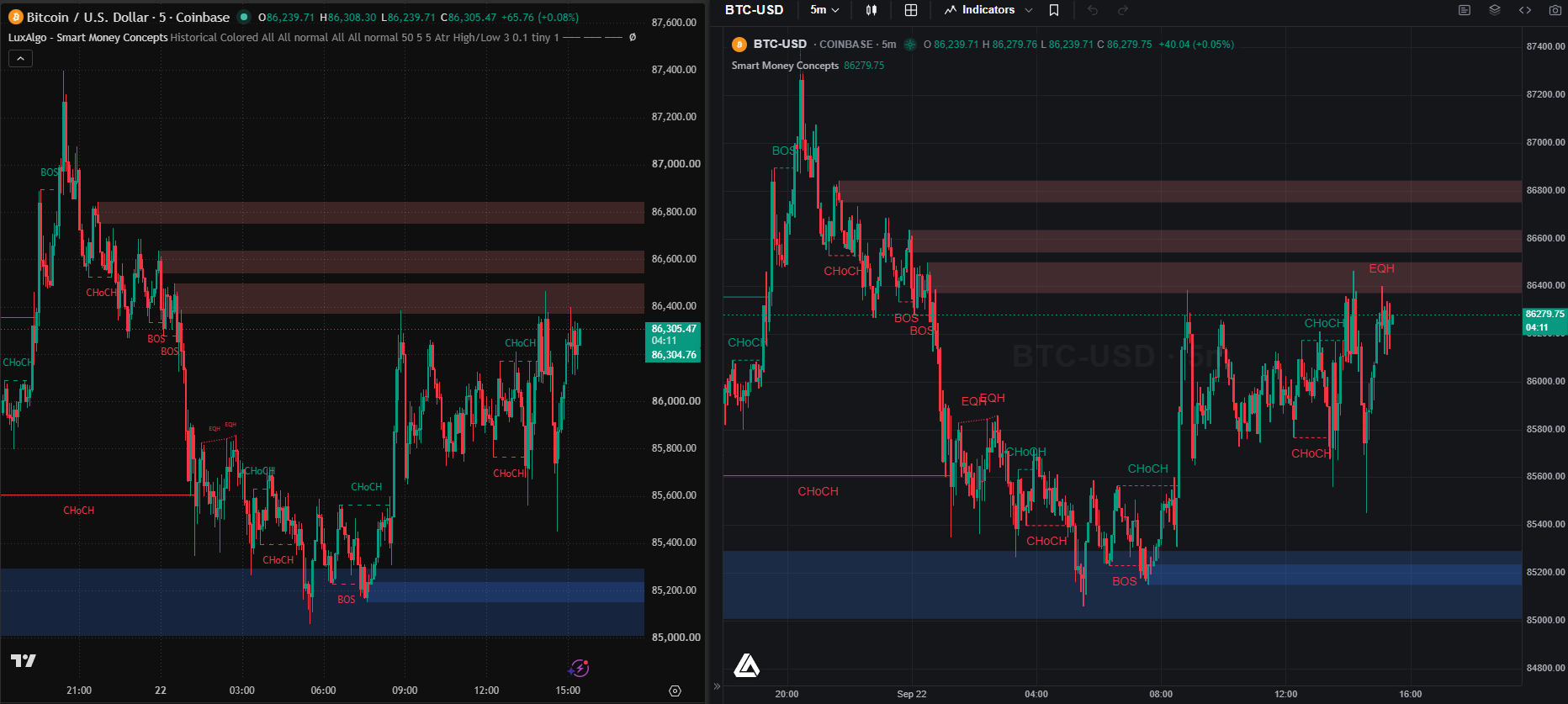
That screenshot is the proof most people are looking for. The LuxAlgo Library holds the most popular indicators ever published on TradingView, and every one of them runs unmodified through PineTS: hundreds of production scripts, bar by bar, on an independent engine, every day. The API coverage tables list more than 800 implemented and tested functions across the ta, math, array, matrix, map, str, request, strategy and drawing namespaces.
Running the configurable moving average from earlier in this guide outside TradingView is an install and a few lines:
npm install pinetsimport { PineTS, Provider } from 'pinets';
// 500 daily BTC bars from the built-in Binance provider, no API key
const pine = new PineTS(Provider.Binance, 'BTCUSDT', 'D', 500);
const { result, plots } = await pine.run(`//@version=6
indicator("Configurable MA", overlay = true)
int length = input.int(20, "Length", minval = 1)
float average = ta.sma(close, length)
plot(average, "SMA")`);
console.log(result.average.at(-1)); // the latest value, as a number
console.log(Object.keys(plots)); // ["SMA"]On a Vela™ chart the same script is one addIndicator() call, and the input.int renders as a settings field your users can change. The full walkthrough, including strategies, alerts and webhooks, is in How to Run Pine Script® Outside of TradingView.
Two honest caveats. Native execution of unusual functions is marked experimental in the coverage tables, so check anything exotic. And a runtime executing your code faithfully does not make the code correct: warm-up, confirmed-bar timing and fill assumptions are properties of the script, wherever it runs.
Watch the Official Beginner Walkthrough
TradingView published “Pine Script Basics: How To Get Started” on November 2, 2023. It is a useful introductory walkthrough, but its sample uses v5. Use the v6 examples and current documentation above for this article’s workflow; interface details may differ from the video.
Frequently Asked Questions
Should a beginner use Pine Script v5 or v6?
Use the current v6 documentation for new examples. Older v5 tutorials can still explain concepts, but review the migration guide and compile the actual script rather than assuming a version-number change is sufficient.
Why does comparing a value with na not work?
Missing values require the na(value) test. Use not na(value) when you need an available value, and give a variable an explicit type when initializing it from na.
Does alertcondition create a running alert?
No. It exposes an event that the user can select when creating an alert in TradingView. Running alerts use saved script and chart settings and must be recreated when those settings change.
Why can the strategy entry price differ from the signal close?
Under the ordinary bar-close model, a market order is created after the signal bar closes and fills on the next available tick, usually the following open. Gaps and configured execution assumptions can change the price.
Will the same script behave identically on every platform?
Not necessarily. Supported language features, data, settings and execution models can differ. Review the target runtime and validate the specific script instead of assuming universal compatibility.
Can Pine Script® run outside of TradingView?
Yes. PineTS, our open-source Pine Script® runtime, executes native v5 and v6 source in Node.js and the browser, on LuxAlgo charts, and on Vela™ charts through the Vela-PineTS addon. The LuxAlgo Library’s indicators, including the most-used community scripts on TradingView, already run through it unmodified.
What is the latest version of Pine Script®?
Pine Script® v6, released in November 2024, with monthly updates since. New scripts default to v6; the Pine Editor can convert v5 scripts. PineTS runs both v5 and v6.
Is Pine Script® harder to learn than Python?
It is smaller. Pine Script® has one job, so there is less language to learn, but its bar-by-bar execution model and series semantics are unusual and cause most beginner bugs. A trader with no programming background can read the examples in this guide in an afternoon; understanding why close[1] means what it means takes a little longer.
References
- Pine Script® User Manual and release notes, TradingView
- Pine Script® v6 has landed, TradingView, November 2024
- Migration guide to Pine Script® v6, TradingView
- PineTS, our open-source Pine Script® runtime, and its API coverage tables
- Vela™, our open-source charting library, and scripting engines
- How to Run Pine Script® Outside of TradingView, LuxAlgo
- The LuxAlgo Library
Pine Script® and TradingView are trademarks of TradingView, Inc. PineTS and Vela™ are independently developed by LuxAlgo and are not affiliated with or endorsed by TradingView.
Read next