Automated Broker Platforms Pros and Pitfalls
Automated broker platforms can turn trading rules into orders, but the quality of those rules and the reliability of the execution system still matter. Automation can reduce repetitive work and inconsistent order entry. It can also repeat a mistake across many trades before you notice.
Start by separating research from execution. LuxAlgo provides Vela, our charting platform, with built-in backtesting and Quant, our coding agent, for developing and testing trading ideas. Sending an alert or running a backtest is a different step from placing a live order through a supported broker connection.
What Are Automated Broker Platforms?
An automated trading setup monitors data, evaluates predefined conditions, and submits orders through a broker or exchange when those conditions are met. Some brokers provide this functionality themselves; other workflows connect separate charting, signal, and execution tools. A rules-based strategy does not need AI to operate.
For example, a moving-average crossover can generate an entry signal. The execution system must still resolve the correct instrument, check existing exposure, choose an order type, submit the order, and confirm its status. An accepted request is not proof of a fill.
| Layer | Purpose | What to verify |
|---|---|---|
| Charting and strategy research | Define conditions and test historical behavior | Data, trading costs, assumptions, and out-of-sample results |
| Alerts and webhooks | Send a message when a condition triggers | Timing, payload format, authentication, and duplicate handling |
| Execution connection | Submit supported orders to a broker | Account permissions, instrument support, order types, and paper versus live mode |
| Monitoring and reconciliation | Compare intended trades with actual orders and positions | Partial fills, rejections, outstanding orders, and recovery procedures |
Copy trading and robo-advisory services are different arrangements: they may follow someone else's decisions or manage an investment allocation. Compare their mandates, fees, and regulatory status separately from software that executes rules you control.
Build and Test the Strategy in LuxAlgo
Use Vela to inspect the market and define an idea before choosing how to automate it. Quant can help translate a written trading concept into code, explain the logic, and revise it. Review the generated rules and test them; code that runs successfully can still implement an unsuitable or unprofitable strategy.
- Make the rules explicit. Define the symbol, timeframe, entry trigger, exit logic, session, and conditions that prevent a trade. A phrase such as “buy a strong breakout” needs a measurable definition.
- Review the code with Quant. Check whether signals use completed bars, how positions are sized, and what happens when another signal arrives while a position is open.
- Test realistic assumptions. Set relevant commissions, slippage, sizing, and capital in the backtest. Inspect losing periods and individual trades, not only the headline return.
- Reserve data for evaluation. Compare performance on periods that did not guide your parameter choices. Repeatedly adjusting a strategy to improve the same test can overfit it.
- Test execution separately. Use a supported paper environment to verify that the external system interprets your signals correctly.
The Library’s market-structure, trend and momentum tools run on Vela. Their outputs are analytical inputs, not guarantees that an order will fill or a trade will succeed.
Understand alerts and plan limits
Native chart alerts and the legacy TradingView-based Strategy Alerts product are separate features. Paid native charting plans support webhook delivery; an external receiver must still understand the message and have a supported execution connection. Check the current platform FAQ and pricing page for alert limits, Quant credits, market-data access, and Orderflow history. Subscription fees are separate from brokerage and execution costs.
Connecting Alerts to a Broker
LuxAlgo maintains open-source tools for users who want to build a separate broker workflow. Their available capabilities differ by adapter and can change, so check the documentation for the version you deploy.
Broker SDK exposes read-only account, balance, position, and history capabilities through its main interface. A separate experimental orders module provides limited order-writing support: Alpaca paper trading, explicitly enabled Alpaca live trading, Tradier sandbox, and Binance Spot Testnet. The presence of a broker adapter does not mean it supports live orders, every instrument, or every account-history field.
Trade Relay is a self-hosted alert-to-order service with risk checks and an audit trail. Its documented execution coverage includes a simulator, Alpaca paper trading, explicitly enabled Alpaca live trading, and Tradier sandbox equity orders. Other listed connections can be watch-only. Do not assume that an order capability in Broker SDK is already available in Trade Relay.
For a live connection, validate the exact symbol mapping, order types, account permissions, and supported market. Keep credentials restricted to the capabilities the system needs. A charting subscription alone does not set up or authorize a live broker connection.
Benefits and Limitations of Automated Trading
| Potential benefit | Practical limitation | Useful check |
|---|---|---|
| Consistent rule application | Bad rules can execute consistently too; people still choose and override them | Review the strategy logic and record manual interventions |
| Less repetitive order entry | Latency, outages, and rejected orders remain possible | Measure the full signal-to-fill process |
| Monitoring during supported market hours | Data, hosting, broker maintenance, and market sessions constrain operation | Test stale-data handling and restart behavior |
| Several strategies running together | Strategies may hold correlated positions or compete for buying power | Check combined exposure and losses |
| Historical and paper testing | Simulated fills do not establish live performance | Compare assumptions with actual execution evidence |
A manual platform can still have advanced order types, analysis, and fast broker routing. An automated platform is not automatically faster or cheaper. Compare the actual workflow and instruments rather than applying a universal “milliseconds versus seconds” ranking.
Paper trading has useful limits
Alpaca's paper-trading documentation explains that orders are simulated rather than routed to an exchange. Its simulation does not account for factors such as market impact, latency-related slippage, or queue position. It also does not restrict a simulated fill to the displayed available quantity. Use paper trading to find integration and operational errors, while treating the resulting profit figures as simulated evidence.
Count the full cost
Add software subscriptions, hosting, market data, commissions, exchange and regulatory fees, spreads, slippage, borrowing charges, and financing costs where applicable. Percentage-of-assets advisory charges are a different service model from ordinary self-directed brokerage platform access. Review the broker's fee schedule and service disclosures for your account.
For a simple illustration, 200 monthly round trips with $1 in combined entry-and-exit fees cost $200 before software, spread, or slippage. If the strategy's estimated edge is small, modest execution differences can materially change its result.
Risk Controls and Emergency Procedures
Define a maximum order size, projected position limit, allowed instruments, and daily loss policy before enabling unattended execution. Account for open positions and outstanding orders together. Stops and size limits can constrain intended risk, but gaps, leverage, liquidity, and system failures can still produce larger losses.
Trade Relay's safety documentation makes an important distinction: its kill switch blocks order placement, including exit orders. It does not automatically flatten positions or cancel existing resting orders. You need a separate, tested way to access the broker and manage outstanding exposure.
- Prevent unintended repeats. Check duplicate detection and broker idempotency support rather than assuming a retried message is harmless.
- Reconcile before retrying. If a request times out, determine whether the broker accepted it before sending another order.
- Test partial fills and rejections. An exit quantity should reflect the actual position, not an assumed fully filled entry.
- Plan for disconnects. Decide which orders remain at the broker, which protections depend on your software, and who can intervene.
- Document recovery. Stopping new signals, canceling open orders, and closing positions are separate actions. A software rollback cannot undo an executed trade.
Be skeptical of services promising reliable profits because they use AI. FINRA warns about auto-trading services offered by unregistered entities, including misleading performance claims and risks associated with giving third parties account access. Check the actual broker or adviser and the role of each service; a software tool and a regulated brokerage are not interchangeable.
Review Actual Results Before Expanding
Keep the strategy version, signal time, intended order, broker response, fills, fees, and any manual intervention together. Compare actual trades with the conditions you tested. A missing trade may reflect a rejected order or delivery problem rather than a change in the strategy itself.
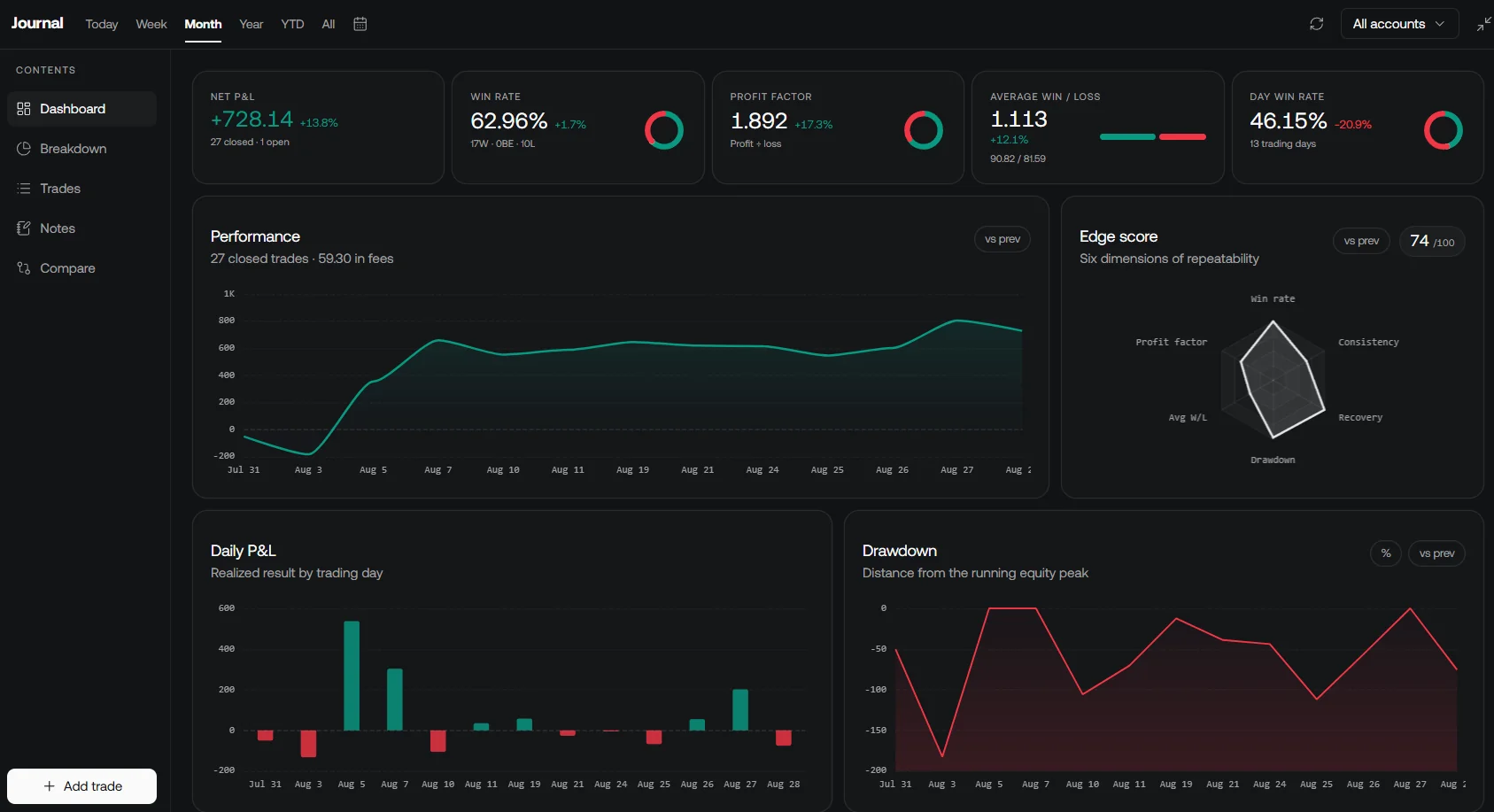
LuxAlgo's Journal supports trade review through manual entries, supported imports, and available broker connections. Confirm what your connection imports and when it refreshes. A journal is a review tool, not a replacement for monitoring live orders at the broker.
Start with a narrowly defined workflow and expand only after its research and operational checks hold up. Change one material rule at a time, retain earlier versions, and record why each change was made. More automation is useful when it makes a sound process more repeatable; it does not create an edge by itself.
FAQs
What are the risks of depending entirely on automated broker platforms for trading?
The main risks include flawed strategy rules, overfitting, data or connection failures, duplicate orders, partial fills, and losses larger than expected. Automated execution still needs monitoring, exposure limits, and a tested way to manage positions directly at the broker.
How can traders combine automation with manual strategies to improve their trading results?
Automate clearly defined, tested tasks and keep strategy approval, performance review, and emergency decisions under human oversight. Record manual interventions so they can be evaluated. This can improve process consistency, but it does not guarantee better returns.
What are the most important features to look for in an automated broker platform?
Check support for your exact account, instruments, and order types; paper and live separation; risk limits; duplicate handling; order and position reconciliation; audit logs; costs; and recovery procedures. Verify the broker or adviser independently and distinguish its regulated services from third-party software.
Read next