Liquidity Sweeps
 By LuxAlgoFeb 8, 2024
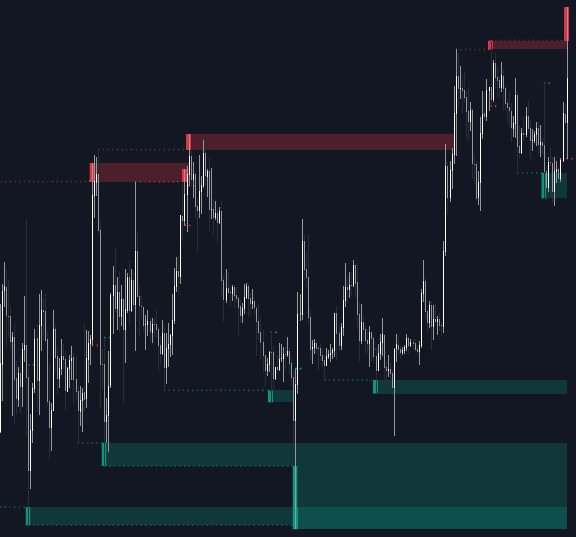
Liquidity Sweeps flags the moment price runs a prior level, grabs the stops beyond it, and snaps back. Every detected liquidity sweep is drawn on the level it raided, and the distance between that level and the wick's extreme is boxed as a Sweep Area — a zone that frequently goes on to act as support, resistance, or an entry window.
Two distinct events qualify. A wick can pierce a liquidity level before price closes back, drawn with a dotted line; or price can close through the level, retest it, and print a wick in the opposite direction, drawn with a dashed line. A Trigger label marks the bar where the crossing occurred.
How to Trade the Liquidity Sweeps?
- Dotted-line sweep: the level was pierced intrabar and rejected at once — a classic stop raid; look for reversal entries from the resulting Sweep Area.
- Dashed-line sweep: the level broke on a close, then failed on the retest — a trapped-breakout scenario that often precedes a turn.
- Sweep Area: treat the box as support or resistance for entries, targets, and stops until price mitigates it or its bar limit runs out.
Raise the swing period when you want levels built from longer-term swing highs and lows; shorter settings keep the focus on recent, faster liquidity.
Liquidity Sweeps Settings
- Swings: the period used for swing detection; increasing it identifies longer-term liquidity levels.
- Options: choose Only Wicks, Only Outbreaks & Retest, or Wicks + Outbreaks & Retest to control which sweep types are detected.
- Extend: turns the prolonging of Sweep Area boxes on or off.
- Max Bars: caps how many bars a Sweep Area keeps extending before it stops updating.
Frequently Asked Questions
What is a Sweep Area exactly?
It is the zone between the swept liquidity level and the tip of the sweeping wick. Because that range is where the raid was absorbed, price often reacts there on a revisit, making it a practical reference for entries and stop placement.
How does Liquidity Sweeps differ from Liquidity Swings?
Liquidity Swings builds the map — swing zones with their visit counts and accumulated volume — while Liquidity Sweeps waits for a level to actually be raided and boxes the reaction. Many traders run both: one for context, one for the trigger.
Is the Liquidity Sweeps indicator free?
Yes. It is a free LuxAlgo Library tool — add it to your chart from this page, and you can also load it into LuxAlgo's AI, Quant, right here to experiment with sweep-based ideas.
Free indicator
Get free access to this indicator on the platforms below.

The Library is free. Quant makes it yours.
Pull any concept or indicator into Quant: rebuild it, retune it, or turn it into a backtested strategy of your own.