Order Constructs
 By LuxAlgoJun 14, 2026
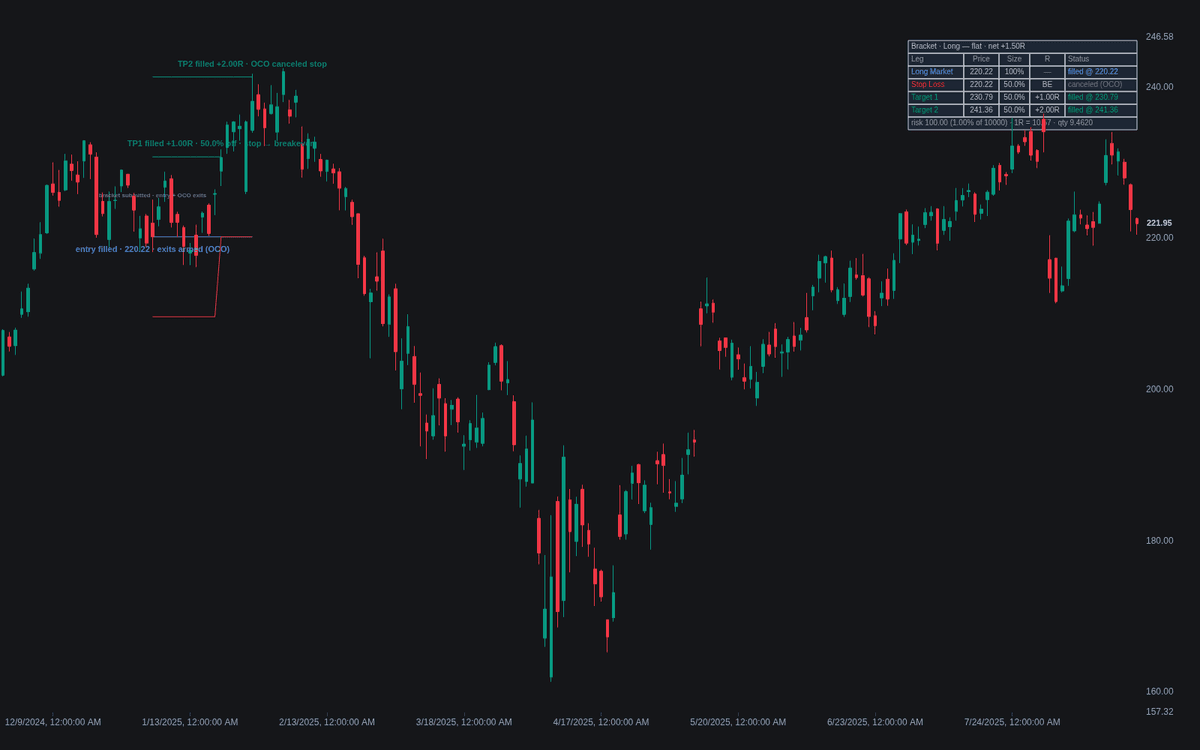
Order Constructs simulates the workhorse order constructs — bracket, OCO exit pair, and trailing stop order — from a placement bar set by clicking on the chart. A bracket's entry fill spawns a stop and up to two profit targets as OCO-linked legs; the exit pair protects a position assumed at the placement close; the trailing construct ratchets a stop at a fixed offset. A construct ticket lists each leg's price, size, R, and status; zones and event markers annotate the chart.
How to Trade the Order Constructs?
- Entry fill: the "exits armed" marker — from that bar the position is never without a resting exit.
- Target 1 fill: takes the configured share off, propagates the remainder to the surviving legs, and by default amends the stop to breakeven.
- Risk / Reward Zones: the risk zone shades entry-to-stop and turns green once the stop sits at or beyond entry.
Fills are gap-aware — a gapped-over level fills at the open — and exit legs activate the bar after placement. Alerts cover every event through to flat.
Order Constructs Settings
- Placement Time: set by clicking when the indicator is added.
- Construct (default Bracket), Direction (default Long), ATR Length (default 14).
- Entry Order (default Market), Entry Price / Trigger (0 = automatic), Auto Entry Distance (x ATR) (default 1).
- Stop Price (0 = automatic) and Auto Stop Distance (x ATR) (default 2): the risk unit defining 1R and position size.
- Target 1 (R) (default 1) with Exit % (default 50); Target 2 (enabled) at (R) (default 2); Breakeven After Target 1 (enabled).
- Account Equity (default 10000) and Risk per Trade (%) (default 1): quantity = risk amount / stop distance.
- Same-Bar Priority (default Stop First (conservative)).
- Style toggles — Risk / Reward Zones, Leg Tags, Event Markers, Construct Ticket — all enabled by default.
Frequently Asked Questions
How is this different from the Order Types build?
Order Types walks single instructions through their lifecycle; this build wires them together with management logic — OCO linkage, quantity propagation on partial fills, breakeven amendments.
Why does the same-bar setting matter?
A bar that reaches both stop and target hides the intrabar order of events on OHLC data, so the simulation must assume one. Stop First is the conservative convention; Target First the optimistic branch.
How does the trailing construct differ from the bracket's stop?
It ratchets with favorable movement at a fixed distance — the initial stop distance — and never backs away, with no target legs. The bracket's stop stays put unless breakeven moves it to entry.

The Library is free. Quant makes it yours.
Pull any concept or indicator into Quant: rebuild it, retune it, or turn it into a backtested strategy of your own.