Pyramiding
 By LuxAlgoMay 5, 2026
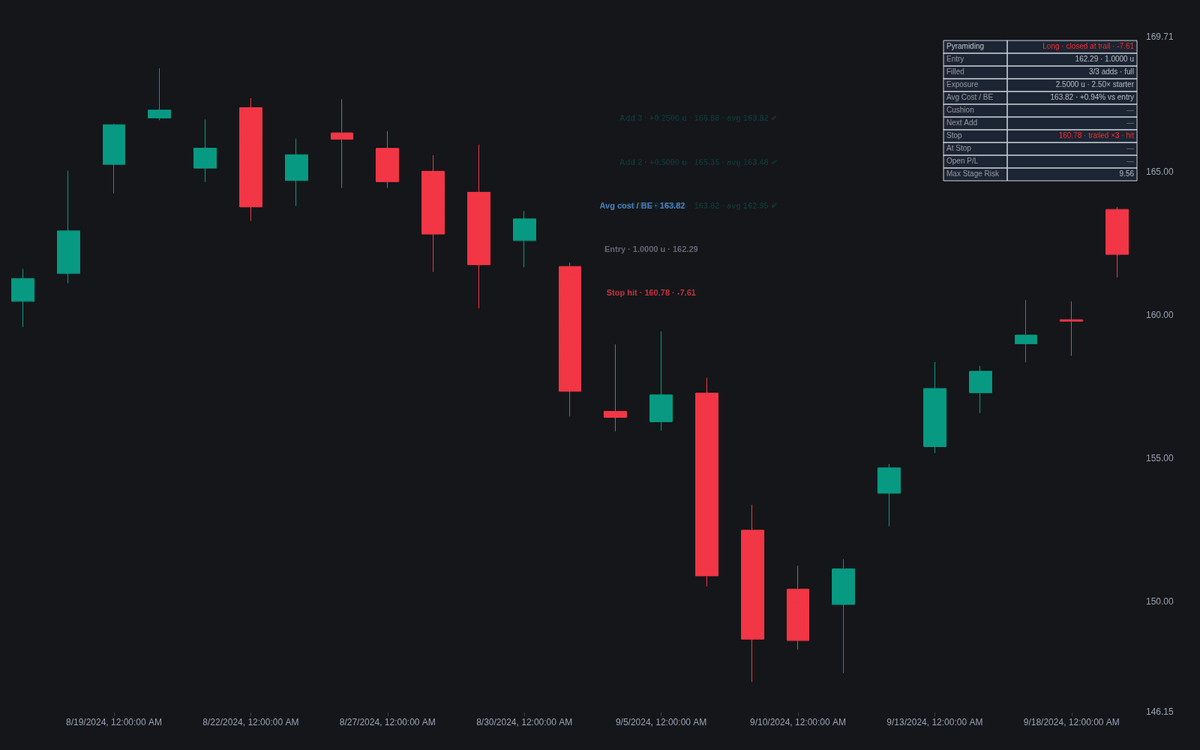
Pyramiding turns a scale-in campaign into an executable map. Anchor the starter entry with a click and the indicator projects the add ladder on the favorable side of the trade, simulates each fill, re-anchors a ratcheting stop two ATR behind the newest unit, and tracks the stack's average cost and aggregate worst case. It formalizes pyramiding on the Turtle template: volatility-spaced adds, a hard unit cap, and a trailed exit that decides when the sequence ends.
How to Trade the Pyramiding?
- Add level filled: exposure steps up and the stop trails behind the fill — alerts fire per level, on any fill, and when the full stack is reached.
- Stop beyond break-even: once the trail ratchets past the stack's average cost, the stop-zone shading flips color and the worst case becomes a locked gain.
- Stop hit: the whole stack closes and the sequence ends per plan.
- Inverted-shape warning: a tranche larger than the one before turns the pyramid upside down — flagged on the dashboard.
Exposure bands shade each segment darker where the stack carries more size.
Pyramiding Settings
- Entry Point and its price (set by clicking when the indicator is added, draggable after).
- Direction (default Long) and Entry Price From (default Clicked Price).
- Initial Size (units) (default 1): the starter tranche; add sizes are multiples of it.
- Stop Basis (default ATR Multiple) with ATR Length (default 20) and Mult (default 2); Manual Initial Stop (default 0) takes a structural level instead.
- Add Levels (default 3) and Add Spacing (default ATR Multiples).
- Add 1-4 (defaults 0.5/1/1.5/2) with × size (defaults 0.75/0.5/0.25/0.25): rung distances and tranche multiples.
- Max Aggregate Risk (currency) (default 0, off): caps the largest stage loss.
- Style and dashboard toggles cover band and zone shading, level labels, and placement.
Frequently Asked Questions
How is pyramiding different from averaging down?
They are opposites. Averaging Down adds to a losing position to improve its average price, while pyramiding adds only on favorable movement — every add is financed by a trade already working, at the cost of dragging break-even toward current price.
Does the indicator place orders?
No. It is a planning and tracking overlay: adds are simulated as resting stop-entry orders, gap-aware, with the stop checked first on any bar touching both. Execution stays with you.
Why cap the number of adds?
A cap fixed before entry keeps maximum exposure known at every step — the Turtle template allowed a starter plus three adds per market. Uncapped, adding turns a trend trade into a bet that the move never pauses.

The Library is free. Quant makes it yours.
Pull any concept or indicator into Quant: rebuild it, retune it, or turn it into a backtested strategy of your own.