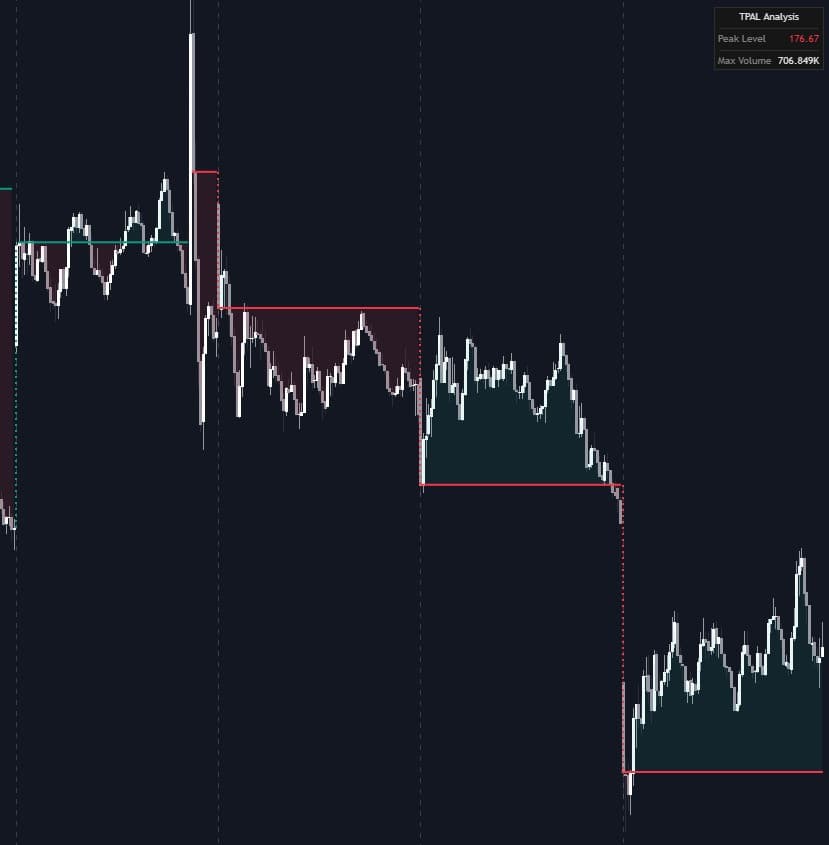
Trailing Peak Activity Level
Mar 20, 2026

The Trailing Peak Activity Level [LuxAlgo] indicator is a session-based trading indicator that highlights the price level tied to the highest volume traded during the current session and keeps that level updated as price moves. By combining volume analysis with an ATR-based volatility filter, this tool helps traders follow meaningful high-activity zones that can behave as dynamic support, resistance, and intraday decision points. It is especially useful for traders who want a cleaner alternative to a full Volume Profile while still tracking where the market is showing the strongest participation.
How to Trade the Trailing Peak Activity Level Indicator
The indicator is built to identify the most important volume-backed price level of the current trading session. Instead of plotting a static historical profile across the whole chart, it focuses on the single highest-volume bar of the day and turns that price into a live reference level. This makes it a practical trading indicator for day traders, scalpers, and intraday swing traders who want to know where market interest is currently concentrated.
Because the level is session-based, it resets with each new trading day. That means traders can start every session with a fresh view of where the strongest activity is building. As the session develops, the line can trail price and adjust when both volume and price displacement justify an update.
Understanding Directional Shifts in Peak Activity
When the peak activity level changes, the script marks that shift visually so traders can quickly interpret whether the market is migrating higher or lower in terms of participation and interest.
- A Green dotted vertical line appears when the peak activity level shifts upward.
- A Red dotted vertical line appears when the peak activity level shifts downward.
These directional changes can be useful for reading market behavior. An upward shift may suggest buyers are accepting higher prices and that volume is following the move. A downward shift may indicate that sellers are gaining control or that the market is discovering value at lower prices. In that sense, the indicator can be used as both a volume indicator and a trend-confirmation tool.
Why the Volatility Filter Matters
One of the biggest challenges with intraday trading indicators is avoiding noise. Small price fluctuations can make support and resistance tools unreliable if they react too often. This indicator solves that problem by using an ATR-based threshold before allowing the peak activity level to update.
The price must move far enough away from the current level, based on the ATR x Sensitivity multiplier, before a new peak can be established. This creates a smoother and more meaningful read of market structure by reducing constant flickering during low-volatility conditions.
For traders, this means:
- Fewer false level changes during choppy markets
- More confidence that a new level reflects meaningful price displacement
- Better identification of strong intraday acceptance zones
Indicator Logic and Trading Strategy Details
The script follows a session-reset model. At the start of each new trading day, all tracking values are cleared, and the first peak activity level is initialized from the opening conditions of the new session. From there, the indicator continuously monitors volume and price behavior.
As bars print, the script checks whether the current bar has produced a new maximum volume for the session. If it has, the indicator then evaluates whether price has moved far enough from the existing peak activity level to satisfy the ATR-based sensitivity requirement. Only when both conditions are met does the horizontal level update.
This logic makes the indicator particularly strong for traders looking to build a rule-based trading strategy around high-volume acceptance areas. Rather than reacting to every burst in volume, it waits for a meaningful combination of participation and price relocation.
Common ways traders may use this include:
- Treating the peak activity level as intraday support in bullish sessions
- Treating the peak activity level as intraday resistance in bearish sessions
- Watching for price rejections or reclaims at the level for entries
- Using directional shifts as confirmation that market interest is moving
- Combining the level with trend, session bias, or other LuxAlgo tools
Using the Peak Activity Level as Support and Resistance
A major benefit of this trading indicator is how clearly it can define important levels during the day. Since the line represents the price associated with the session’s highest volume bar, it often marks an area where the market has shown strong agreement.
When price trades above the peak activity level, that zone may act as support if buyers continue defending it. When price trades below it, the level may behave as resistance if sellers reject rallies back into it. This gives traders a straightforward way to frame entries, exits, and invalidation levels.
Unlike traditional horizontal lines drawn manually, this level is data-driven and responds to the most active part of the current session.
Reading Market Acceptance and Repricing
The movement of the level itself can tell a story. If the peak activity level keeps shifting higher during the day, it can imply that the market is accepting higher prices with strong participation. If it keeps shifting lower, it can suggest that value is being repriced downward.
This makes the tool useful not only as a support and resistance indicator, but also as a market context indicator. Traders can use it to understand whether volume is supporting continuation or hinting at a broader shift in intraday control.
Dashboard Information
An integrated dashboard provides a live summary of the most important session data, making the indicator easier to read at a glance.
- Peak Level: The current price coordinate of the high-volume node.
- Max Volume: The highest volume value recorded in a single bar during the session.
This dashboard helps traders monitor whether the peak level is stable or changing and how significant the leading volume bar is relative to the rest of the session.
Indicator Settings and Customization
The settings are separated into logical groups so traders can quickly tailor the indicator to their market, timeframe, and preferred chart layout.
Core Settings
- Sensitivity: The ATR multiplier used to determine the minimum price displacement required to establish a new peak activity level.
- ATR Length: The lookback period used for the Average True Range calculation.
Increasing Sensitivity can make the indicator more selective and reduce frequent updates. Lowering it can make the indicator more responsive, which may suit faster markets or shorter timeframes. ATR Length can also be adjusted depending on whether traders want the volatility filter to reflect recent or broader session behavior.
Dashboard Settings
- Dashboard: Toggles the visibility of the on-screen information table.
- Position: Determines where the dashboard is located (Top Right, Bottom Right, or Bottom Left).
- Size: Adjusts the scale of the dashboard text and cells.
These appearance settings make it easier to integrate the trading indicator into existing chart layouts without cluttering the screen.
Frequently Asked Questions
What is the Trailing Peak Activity Level indicator?
It is a volume-based trading indicator that tracks the price level associated with the highest volume bar of the current session and updates that level dynamically when price displacement exceeds an ATR-based threshold.
How can traders use the Trailing Peak Activity Level in a trading strategy?
Traders can use it as a dynamic support and resistance level, a confirmation tool for intraday trend direction, or a way to track where the market is showing the strongest participation during the session.
Why does the peak activity level not update on every new high-volume bar?
Because the indicator uses a volatility filter based on ATR and Sensitivity. This helps prevent unnecessary changes when price movement is too small to be meaningful.
Is this indicator better than a traditional Volume Profile?
It serves a different purpose. A traditional Volume Profile gives a broader distribution of traded volume, while the Trailing Peak Activity Level focuses on the single most important high-volume price level of the current session and keeps it actionable throughout the day.
How do I access the Trailing Peak Activity Level indicator?
You can get access on the LuxAlgo Library for charting platforms like TradingView, MetaTrader (MT4/MT5), and NinjaTrader for free.
Trading & investing are risky and many will lose money in connection with trading and investing activities. All content on this site is not intended to, and should not be, construed as financial advice. Decisions to buy, sell, hold or trade in securities, commodities and other investments involve risk and are best made based on the advice of qualified financial professionals. Past performance does not guarantee future results.
Hypothetical or Simulated performance results have certain limitations. Unlike an actual performance record, simulated results do not represent actual trading. Also, since the trades have not been executed, the results may have under-or-over compensated for the impact, if any, of certain market factors, including, but not limited to, lack of liquidity. Simulated trading programs in general are designed with the benefit of hindsight, and are based on historical information. No representation is being made that any account will or is likely to achieve profit or losses similar to those shown.
Testimonials appearing on this website may not be representative of other clients or customers and is not a guarantee of future performance or success.
As a provider of technical analysis tools and strategies, we do not have access to the personal trading accounts or brokerage statements of our customers. As a result, we have no reason to believe our customers perform better or worse than traders as a whole based on any content, tool, or platform feature we provide.
Charts used on this site are by TradingView in which the majority of our technical indicators are built on. TradingView® is a registered trademark of TradingView, Inc. www.TradingView.comTradingView® has no affiliation with the owner, developer, or provider of the Services described herein.
Market data is provided by CBOE, CME Group, BarChart, CoinAPI. CBOE BZX real-time US equities data is licensed from CBOE and provided through BarChart. Real-time futures data is licensed from CME Group and provided through BarChart. Select cryptocurrency data, including major coins, is provided through CoinAPI. All data is provided “as is” and should be verified independently for trading purposes.
This does not represent our full Disclaimer. Please read our full disclaimer.
© 2026 LuxAlgo Global, LLC.