Money Flow Profile
 By LuxAlgoApr 2, 2024
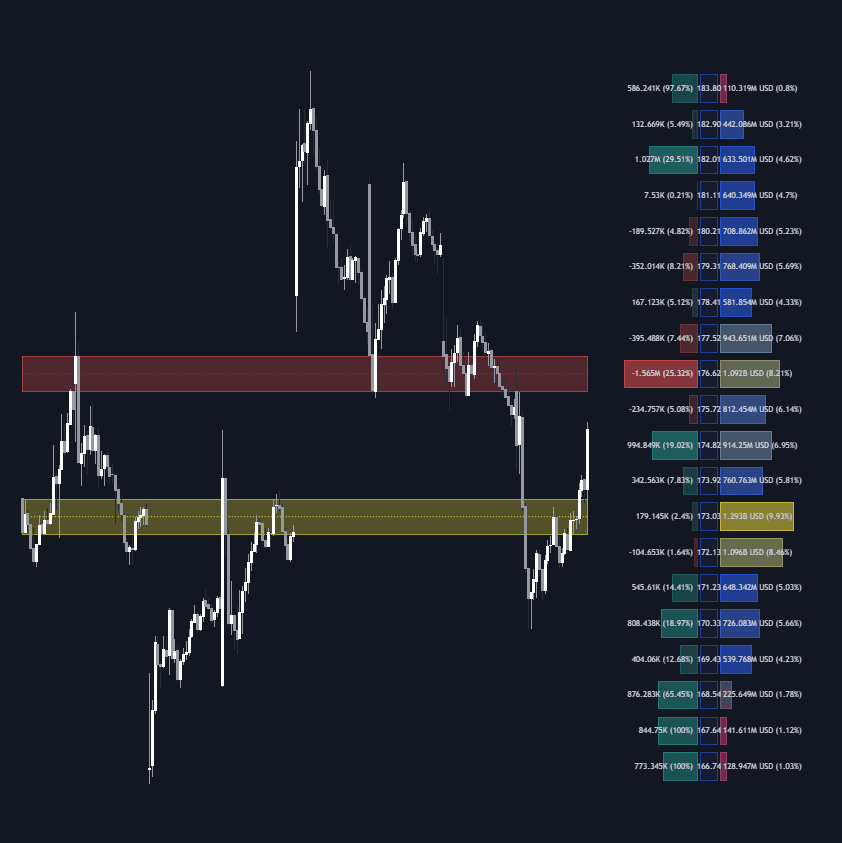
The Money Flow Profile extends classic volume profiling into a three-panel instrument: traded activity histogrammed on the right, a sentiment panel on the left splitting buy from sell dominance at each level — close kin to a delta profile — and the key price levels down the middle. Rows can be sourced from raw volume or money flow, showing where turnover actually concentrated over your chosen range.
How to Trade the Money Flow Profile?
- High-activity nodes: heavily traded rows mark levels where positions concentrate — support/resistance candidates that price gravitates toward and stabilizes around.
- Low-traded nodes: thin rows tend to be crossed quickly or produce fast bounces.
- Sentiment rows: buy or sell dominance at a level shows which side built it.
- Consolidation zones: flagged compression areas help anticipate the breakouts that follow accumulation.
- Annotations: Level of Significance, Point of Control, Highest Sentiment Zone, and Profile Price Levels enrich the read, while the Profile Heatmap accentuates the busiest areas.
Money Flow Profile Settings
- Lookback Length / Fixed Range: the window the profile is built over.
- Profile Source: Volume or Money Flow as the row metric.
- High/Average/Low Traded Nodes: thresholds and colors per activity tier.
- Sentiment Profile and Sentiment Polarity Method: toggle the panel and choose how buy/sell volume is classified.
- Profile Heatmap: heatmap display with source and transparency controls.
- Number of Rows / Profile Width %: histogram resolution and width, plus text-size and offset options for layout.
Frequently Asked Questions
Why combine sentiment with a volume histogram?
Volume alone says a level was busy; the sentiment panel says which side dominated there. That second dimension helps anticipate how price may behave when the level is revisited, rather than treating every node identically.
How does it relate to the Liquidity Sentiment Profile?
The Liquidity Sentiment Profile is a sibling build in the same family, oriented around liquidity zones. Compare the two if you anchor analysis to liquidity rather than money flow — many traders run one of each.
Is the Money Flow Profile free to use?
Yes — it is free via the LuxAlgo Library. Straight from its page, you can also backtest profile-based ideas in LuxAlgo's AI, Quant.
Free indicator
Get free access to this indicator on the platforms below.

The Library is free. Quant makes it yours.
Pull any concept or indicator into Quant: rebuild it, retune it, or turn it into a backtested strategy of your own.