Loss-control Rules
 By LuxAlgoAug 9, 2026
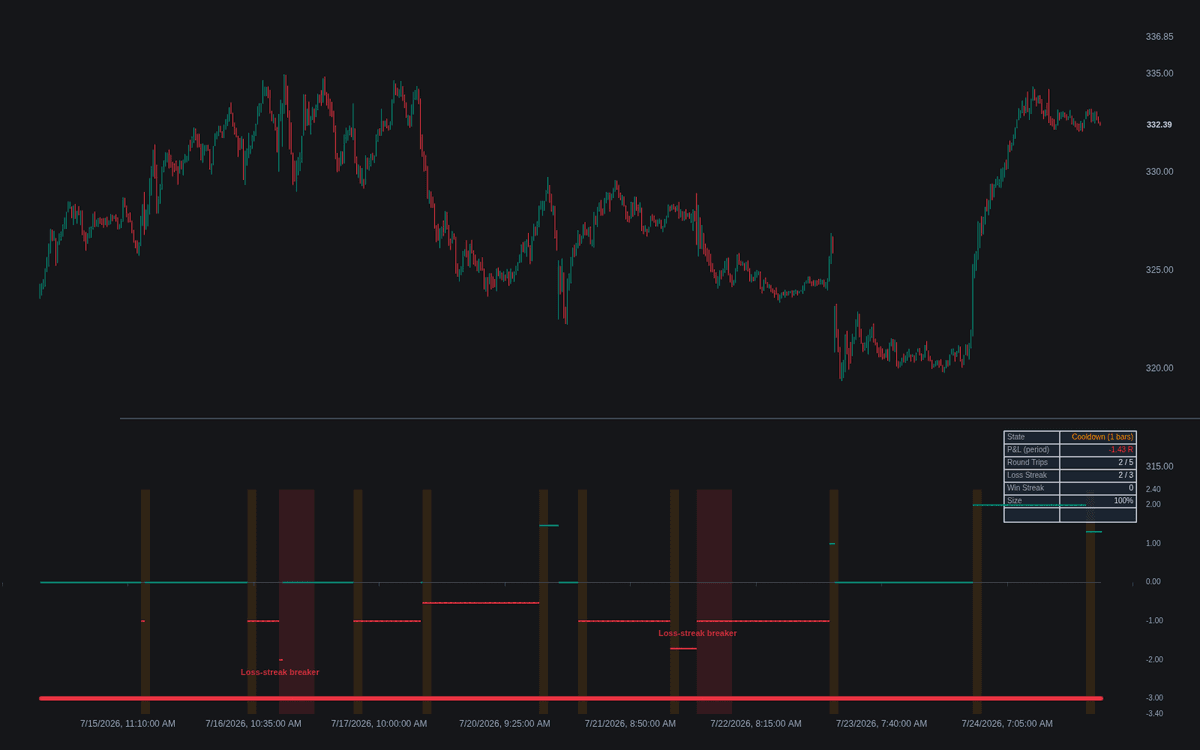
Loss-control Rules enforces loss-control rules as a layer above entry logic: a built-in crossover engine generates round trips purely so the rules have something to govern, every result booked in R, the ATR-defined risk unit fixed at entry. The pane plots the period's realized P&L in R, marks the loss-limit level, and shades the background whenever a rule blocks entries or cuts size.
How to Trade the Loss-control Rules?
- Red halt shading: the loss limit, cap or streak breaker tripped - no entries until the period resets or the breaker window ends.
- Orange shading: a between-trade cooldown is running, or size is throttled until a winning sequence restores it.
- Blocked-signal cross: the engine fired but the rules layer refused the entry; blocks and triggers all carry alerts.
Response decides whether a tripped loss limit or breaker halts entries or throttles size; the cap and cooldown always block. The build sits with the risk and exit tools as pre-commitment made visible.
Loss-control Rules Settings
- Signal MA Type (default EMA), MA Lengths (defaults 9 and 21), Source (close), Longs / Shorts (both on), Exit On Opposite Signal (on): the demo engine.
- Stop: ATR Length / Multiple (defaults 14 / 2) and Target (R) (default 2): the stop defines 1R, the target books +2R.
- Loss Limit / R (default on, 3): circuit breaker on realized losses.
- Consecutive-loss Breaker (default on, 3) with Breaker Cooldown (bars) (default 20).
- Trade Cooldown (bars) (default on, 5): pause after each round trip.
- Round-trip Cap (default on, 5): trades per period.
- Reset Period (default Day): keep the chart timeframe below it.
- Response (default Halt new entries) with Throttle Size Factor (default 0.5) and Winners To Restore (default 2).
- Show Dashboard (default on); style toggles: labels, markers, shading.
Frequently Asked Questions
Why is everything denominated in R?
Rules in R keep their meaning across markets and regimes: a 3R limit reads the same whether one R is forty ticks or four dollars. The distance defining the unit has its own dedicated build in ATR-based Stop Distance.
Does this indicator trade for me?
No. The crossover engine is deliberately ordinary demo logic. The transferable part is the rule layer - alerts on triggers, blocks and re-enables let you enforce the same discipline on your own entries.
Should I choose Halt or Throttle?
Halt blocks entries entirely; Throttle keeps trading at reduced size - half by default - restoring full size after the configured winning streak. The cap and cooldown block under both modes.

The Library is free. Quant makes it yours.
Pull any concept or indicator into Quant: rebuild it, retune it, or turn it into a backtested strategy of your own.