ATR-based Stop Distance
 By LuxAlgoApr 26, 2026
ATR-based Stop Distance is an indicator on Vela, our next-generation charting platform, written in Pine Script®.
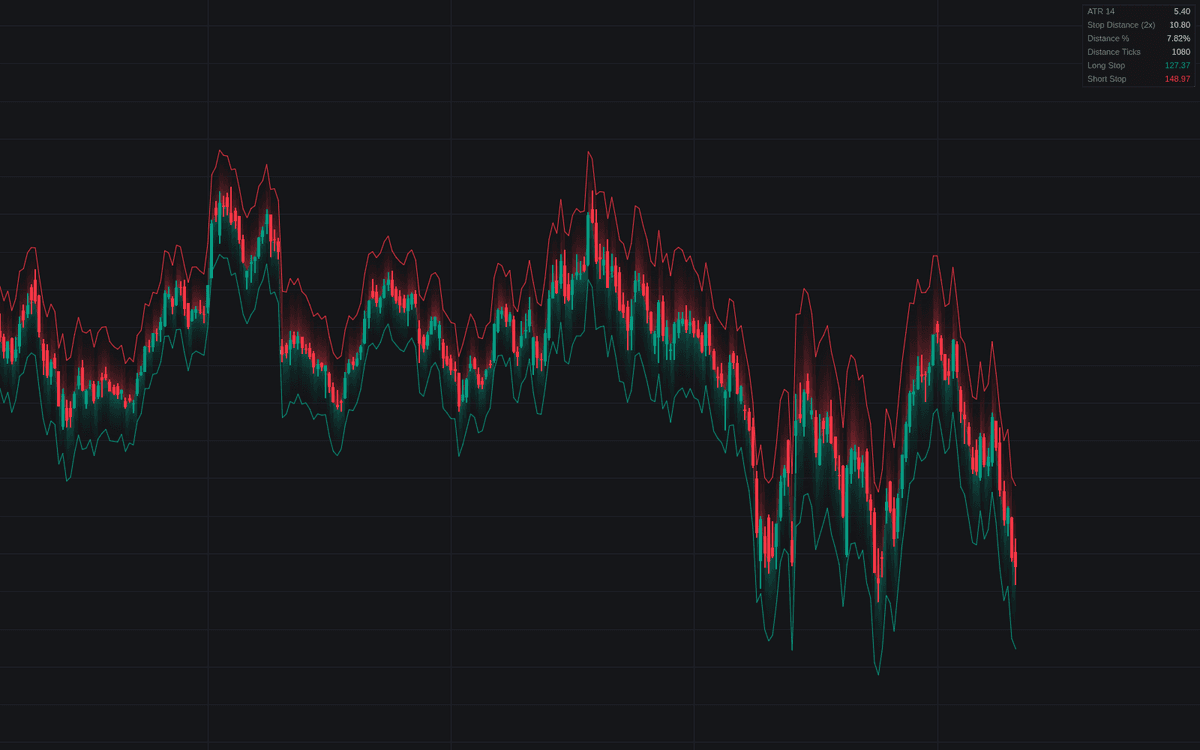

ATR-based Stop Distance puts the volatility-sized stop on the chart before the trade. The build measures the Average True Range with a selectable smoothing and timeframe, multiplies it, and plots the resulting Long Stop and Short Stop levels around an anchor (each bar's close by default, or a fixed entry price for a live position), turning ATR-based stop distance into a placement gauge. Gradient fills show the room each stop allows; the dashboard restates the distance in price, percent and ticks.
How to Trade the ATR-based Stop Distance?
- Close anchor: shows where an ATR stop would sit for an entry at that bar's price, a pre-trade sizing check that adapts with volatility.
- Entry Price anchor: pins both levels to an actual fill; with Freeze ATR at Entry on and an Entry Time set, the distance is measured once on the entry bar so the placed level never widens; without an Entry Time the levels follow the live ATR.
- Stop-hit alerts: fire when price trades to a level as it stood on the prior bar, the order a trader would actually have been holding.
ATR-based Stop Distance Settings
- ATR Length (default 14): the averaging window from Wilder's original work.
- Smoothing (default RMA (Wilder)): RMA reproduces the classic ATR; SMA, EMA and WMA react differently.
- ATR Timeframe (default: chart timeframe): point it one timeframe up when a swing entry wants more room.
- ATR Multiple (default 2.0): the stop distance in ATR units.
- Anchor (default Close), Entry Price (default 0, falling back to the latest close), Entry Time (optional) and Freeze ATR at Entry (default on): the fixed-entry workflow.
- Show Dashboard (on) with Position (Top Right) and Size (Small); style: Long Stop, Short Stop, Entry Line and Gradient Fill (all on), Line Width (default 1).
Frequently Asked Questions
Free to use
Run it on Vela. Go further with a paid plan.
- Up to 500 Custom Alerts, with webhook automation
- Up to 10× the chart history of Free
- Orderflow lookback up to full history
- More Quant usage to customize it, plus extra usage when you need it
- Futures data alongside crypto, stocks, forex and commodities

Related indicators
Run it on Vela. Make it yours with Quant.
Open this indicator free on Vela, our next-generation charting platform. Then ask Quant, our coding agent built into Vela, to retune it or turn it into a backtested strategy of your own.