Scaling Out
 By LuxAlgoMar 21, 2026
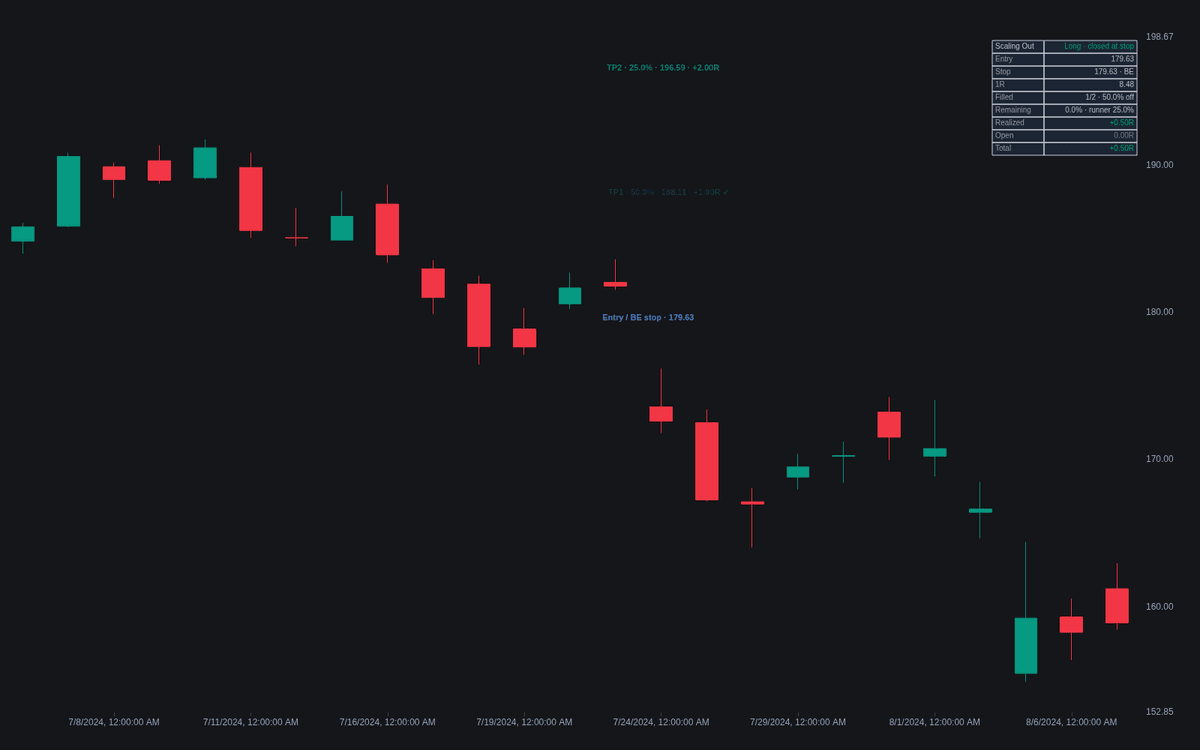
Scaling Out turns scaling out into a drawn, fully accounted plan. Click the chart when adding the indicator to anchor the entry; an ATR-based or manual stop then defines 1R, and up to four take-profit tranches project on the profit side as step lines over a shaded risk zone. A gap-aware fill engine walks forward from the anchor bar, ticks tranches off as price reaches them, and reports realized, open, and total R in a dashboard.
How to Trade the Scaling Out?
- Stop first, ladder second: the entry-to-stop distance is the unit every target and result is measured in; targets space out in R multiples by default.
- Tranche fills: each TP label carries its share, price, and R multiple and gains a check mark when filled, with per-tranche, any-fill, and all-filled alerts.
- Breakeven step: after the first fill the stop steps to the entry on the next bar, collapsing the risk zone — with its own alert.
- The runner: any percentage not assigned to tranches stays open, tracked as open R against the live price.
Part of the risk & exits family, this is a planning overlay rather than a signal tool — it never chooses direction or timing for you.
Scaling Out Settings
- Entry Point (picked by clicking the chart; draggable afterward).
- Direction (default Long) and Entry Price From (default Clicked Price).
- Stop Basis (default ATR Multiple) with ATR Length (default 14) and Mult (default 2); Manual Stop Price applies when selected and on the loss side of the entry.
- Tranches (default 2, up to 4) and Target Spacing (default R Multiples).
- TP1-TP4 (defaults 1, 2, 3, 4 spacing units) with tranche sizes (defaults 50%, 25%, 15%, 10%), clamped so the ladder never exceeds 100%.
- Move Stop to Breakeven After First Fill (default enabled).
- Risk zone shading, reward band shading, level labels, and the dashboard are on by default.
Frequently Asked Questions
How does scaling out relate to pyramiding?
They are mirror-image disciplines. Pyramiding adds size while a position works, concentrating exposure into strength; this tool removes size at pre-planned objectives, converting open gains into banked R.
Is the breakeven stop risk-free?
No. The stop steps to the entry the bar after the first fill, so the rest of the position can no longer lose on paper — but gaps and slippage can still deliver a loss. The fill engine is conservative here: within a bar the stop is checked first.
Why is 25% left over on default settings?
With the default two tranches, 50% comes off at TP1 and 25% at TP2, leaving a 25% runner. Raise Tranches to four and the default ladder sums to exactly 100%.

The Library is free. Quant makes it yours.
Pull any concept or indicator into Quant: rebuild it, retune it, or turn it into a backtested strategy of your own.