Best Platforms for Options Trading (Ranked)
The best options trading platform depends on how you research, evaluate risk, and manage orders. This ranked shortlist compares tastytrade, Interactive Brokers, Charles Schwab, E*TRADE, and Webull by their documented options tools and pricing, with a practical reason to consider each.
Start your market research in Vela with Quant, our coding agent. Develop and test rules for the underlying stock or ETF, then evaluate the actual option contract and submit orders through your broker. A profitable stock-chart backtest does not establish that buying calls or selling puts on that stock will be profitable.
Quick comparison: ranked options platforms
This is an editorial shortlist for self-directed U.S. options trading, based on official product and fee documentation reviewed in September 2026. The order emphasizes options-focused analysis and workflow; it is not a measured ranking of execution quality. Account eligibility, permissions, data subscriptions, and device features can change the best fit.
| Rank and platform | Reason to shortlist | Standard online U.S. options pricing | Important qualification |
|---|---|---|---|
| 1. tastytrade | Options-focused analysis and strategy workflow | Stock/ETF options: $1 per contract to open, $0 to close; opening commission capped at $10 per leg | The cap does not apply to broad-based index options; other fees remain |
| 2. Interactive Brokers | Portfolio risk modeling and configurable trading tools | U.S. options rates depend on plan, volume, and premium; $1 minimum per order | A headline per-contract rate may not equal the order’s total charge |
| 3. Charles Schwab / thinkorswim | Paper trading and modeled options risk | $0 base commission plus $0.65 per contract | Applicable industry fees and product-specific charges can add cost |
| 4. E*TRADE / Power E*TRADE | Visual trade analysis and integrated practice | $0 base plus $0.65 per contract; $0.50 for qualifying active clients | The discount requires at least 30 stock, ETF, or options trades per quarter |
| 5. Webull | Low headline stock/ETF options charges | $0 stock/ETF options commission and contract fee, subject to exceptions | Index and oversized-order contract fees, plus applicable regulatory/exchange fees |
Read each broker’s current schedule before comparing an order. Commissions, contract fees, exchange charges, bid–ask spreads, and margin interest are different costs. A lower commission alone does not prove a better fill.
Research the underlying in LuxAlgo first
Use a native chart workspace to compare the underlying’s trend, volatility, volume, and nearby levels. In a multi-chart layout, select the active chart before changing its symbol, interval, or studies. Sync controls can help keep related charts aligned.
Give Quant a precise price-based rule, such as: “Build a long-only strategy that enters after a close above the previous 20-bar high and exits after a close below the previous 10-bar low. Exclude the current bar from both ranges and expose the lengths as inputs.” Review the generated code, then Run it on the selected chart.
Use the strategy settings and results to examine capital, order size, commission, slippage, drawdown, and individual trades. Test another period before treating the result as evidence of a repeatable setup.
The LuxAlgo indicator library can help define chart conditions in our charting platform, Vela. Do not assume a native Quant script automatically submits brokerage orders to any of the five broker platforms.
For an options trade, add the information the underlying chart cannot supply: strike, expiration, premium, implied volatility, Greeks, settlement terms, and a realistic exit. Historical options testing needs appropriate contract data and assumptions; a stock-price simulation is a different test.
1. tastytrade: options-focused workflow
Shortlist tastytrade when you want to compare option structures and manage positions in an options-oriented interface. Its options tools include Curve View for visualizing a proposed position. Use modeled outcomes to examine the trade, while remembering that prices, volatility, and fills can differ from assumptions.
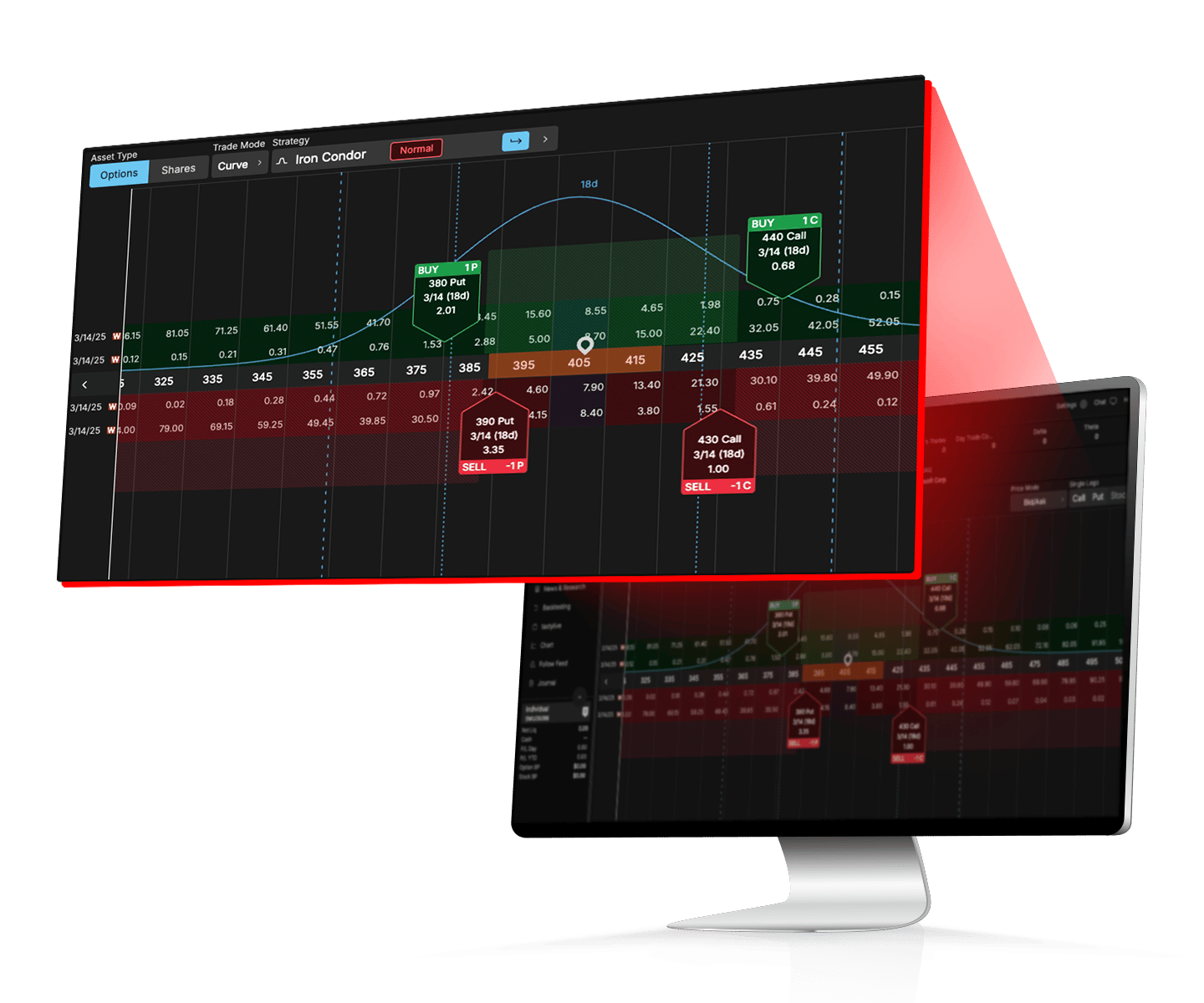
The current fee schedule charges $1 per contract to open stock and ETF options, capped at $10 per leg, with no closing commission. Broad-based index options are $1 to open and $0 to close without that cap. Clearing, exchange, and regulatory fees can still apply on both sides.
Do not apply the equity-options schedule to futures options: standard futures options are $1.25 per contract per side, and micro futures options are $0.75 per contract per side, before other charges.
Its Options Backtesting tool supports historical tests with configurable entry and exit conditions for supported symbols and strategies. This is different from practicing live order entry in a paper account. Confirm that your intended strategy and data range are supported.
2. Interactive Brokers: portfolio risk analysis
Interactive Brokers is worth considering when the options position sits inside a wider portfolio. Risk Navigator supports portfolio analysis and hypothetical scenarios, helping you examine how exposures change together instead of viewing one contract in isolation.
That capability comes with a learning requirement: understand the inputs and assumptions before relying on the output. Confirm the products, account permissions, market data, and interface you need rather than assuming every account has the same access.
The U.S. options schedule distinguishes pricing plans and volume tiers. In the lowest IBKR Pro volume tier, listed rates vary with option premium: $0.65 at premiums of at least $0.10, $0.50 from $0.05 to below $0.10, and $0.25 below $0.05. A $1 order minimum and applicable third-party charges matter, particularly for small orders.
Use an order preview to compare the actual strategy and quantity. A quoted $0.25 rate does not mean a one-contract order necessarily costs $0.25.
3. Charles Schwab: thinkorswim practice and analysis
Schwab moves higher on the shortlist if your priority is rehearsing a workflow before committing money. thinkorswim paperMoney provides simulated trading practice. Use it to build, modify, and close a position, while recognizing that simulated fills cannot prove real-market execution quality.
The Risk Profile tool lets you examine modeled price, time, and volatility scenarios. This is particularly useful when a trade’s expiration payoff looks attractive but an earlier exit could produce a different result.
Schwab’s pricing guide lists $0 online base commission plus $0.65 per options contract. Qualifying buy-to-close transactions priced at $0.05 or less receive a contract-fee waiver; applicable fees and exceptions still need checking.
Before placing a spread, confirm the leg directions, contract multiplier, exercise style, and assignment exposure. A defined expiration payoff does not remove the need to manage an early assignment or a partially closed position.
4. E*TRADE: visual analysis and paper trading
Power E*TRADE combines charts, options analysis, and paper trading. Snapshot Analysis helps visualize modeled risk and reward, while the platform and app support practice without committing real funds.
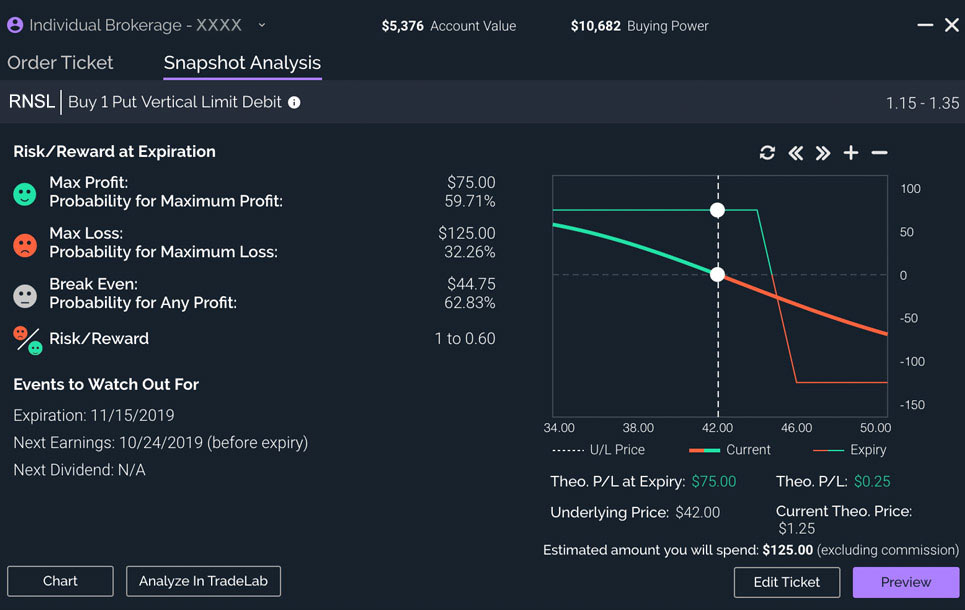
The standard online options rate is $0.65 per contract with no base commission. Clients making at least 30 stock, ETF, or options trades per quarter qualify for $0.50 per contract. The threshold counts trades, not simply the number of contracts in one order.
E*TRADE also waives contract fees on qualifying buy-to-close orders priced at $0.10 or less. Index-option surcharges and other applicable fees remain relevant. Check the exact symbol and order preview instead of applying an old flat surcharge to every index.
5. Webull: compare the full cost of low headline fees
Webull is a candidate for cost-conscious stock and ETF options traders. Its options platform includes multi-leg construction from the options chain, profit/loss diagrams, and options paper trading.
The current schedule advertises zero stock/ETF options commissions and contract fees, with important exceptions: certain index options cost $0.50 per contract, and non-index options orders above 500 contracts incur a $0.10 per-contract oversized-order fee. Relevant regulatory and exchange fees may also apply. Review the full pricing schedule for your account and product.
Try the complete workflow on the device you will use: identify the contract, inspect the spread, enter a limit, review the position, and close it. A convenient mobile screen is useful only if you can confidently check every leg and order instruction.
Compare one realistic trade across platforms
Take five identical stock-option contracts and assume you open and later close all five, with no special closing waiver. At $0.65 per contract on each side, the contract charge is 5 × $0.65 × 2 = $6.50. At tastytrade’s stock-option rate, the opening commission is 5 × $1 = $5, with no closing commission. These figures exclude other fees.
The $1.50 difference is smaller than a $0.01 per-share difference in execution across five standard 100-share contracts: $0.01 × 100 × 5 = $5. This arithmetic does not predict which broker fills better; it shows why spread, order handling, and actual costs belong beside the commission table.
- Define the market setup. Use Vela and Quant to make the underlying-price thesis explicit.
- Select the contract. Compare strike, expiration, premium, liquidity, and volatility at the broker.
- Model adverse outcomes. Examine price and volatility changes, time decay, and assignment requirements.
- Practice the order. Use a supported simulator and learn how to cancel, modify, and close the position.
- Review the result. Record actual fills, charges, and reasons for the trade. Keep market-thesis errors separate from execution errors.
Video: comparing options brokers and platforms
This earlier discussion from Karl Domm – REAL P&L Trading offers a trader’s perspective on platform selection. Treat its rankings and product references as historical opinion; use the current official fee schedules linked above for today’s comparison.
FAQs
Which options trading platform is best for beginners?
Schwab thinkorswim is a useful starting point when paper trading and risk analysis are priorities. Power E*TRADE and Webull also offer options practice tools. Choose a platform where you can explain the contract, model a loss, and confidently close a position before trading with real money.
Is commission-free options trading completely free?
No. Contract fees, index surcharges, regulatory or exchange charges, bid–ask spreads, and financing costs may still apply. Compare the actual product, quantity, opening and closing orders, and account terms rather than relying on the headline commission.
Can LuxAlgo Quant replace an options broker?
Quant helps develop and test price-based rules on Vela. Contract selection, historical options-data requirements, options permissions, and brokerage execution are separate. Use the broker’s chain and risk tools to evaluate the actual option before submitting an order.
Read next