Alert to rails to order.
Point your TradingView alert at it and trades execute at your broker automatically, inside guardrails you set, with every step recorded. Free and self-hosted: your server, your keys, your rules.
POST /webhook/<token>
{ "action": "buy",
"symbol": "{{ticker}}",
"quantity": 1,
"price": "{{close}}" }
auto-detected format
action "buy"
symbol AAPL
sizing { quantity: 1 }
orderType "market"
timeInForce "day"
signalId "tv-8f21"
one shape, four parsers
✓ symbolAllowlist
✓ maxPositionSize (projected)
✓ maxDailyLoss
✓ dedupeWindow · tradingHours
OrderIntent.clientOrderId = "tv-8f21"
8 rails, on by default
{ "status": "filled",
"filledQuantity": 1,
"filledAvgPrice": 100 }
PortOrder: open · filled ·
canceled · rejected · …
simulator · paper · live
flight recorder · raw payload → parsed meaning → per-rule decision → order → broker answer · one SQLite file · one-click replay against paper
Anything that can send a webhook.
TradingView alerts first-class, plus plain JSON, plain text (“BUY 10 AAPL”), and drop-in compatibility with the popular webhook-relay payload formats, auto-detected. Migrating is changing one URL. Endpoints are token-secret, with optional HMAC signatures.
Simulate, then paper, then decide.
The built-in simulator runs the full order vocabulary with zero keys: stops, stop-limits, trailing stops, OCO brackets. Alpaca paper is one config block; Alpaca live requires the typed acknowledgement; the Tradier port stays sandbox-pinned by the open LuxAlgo Broker SDK itself. More accounts ride along watch-only in the dashboard.

[ 01 ]
Set your rules
Which symbols may trade, how big a position can get, how much a day is allowed to lose, and when trading is open. Eight guardrails, on by default.
[ 02 ]
Point your alert at it
TradingView alerts work first-class, and so does anything that can send a webhook. Migrating from another relay is changing one URL.
[ 03 ]
Trades execute, recorded
Orders fill on the built-in simulator, paper, or your live broker, and every step lands in the flight recorder so you can always see why.
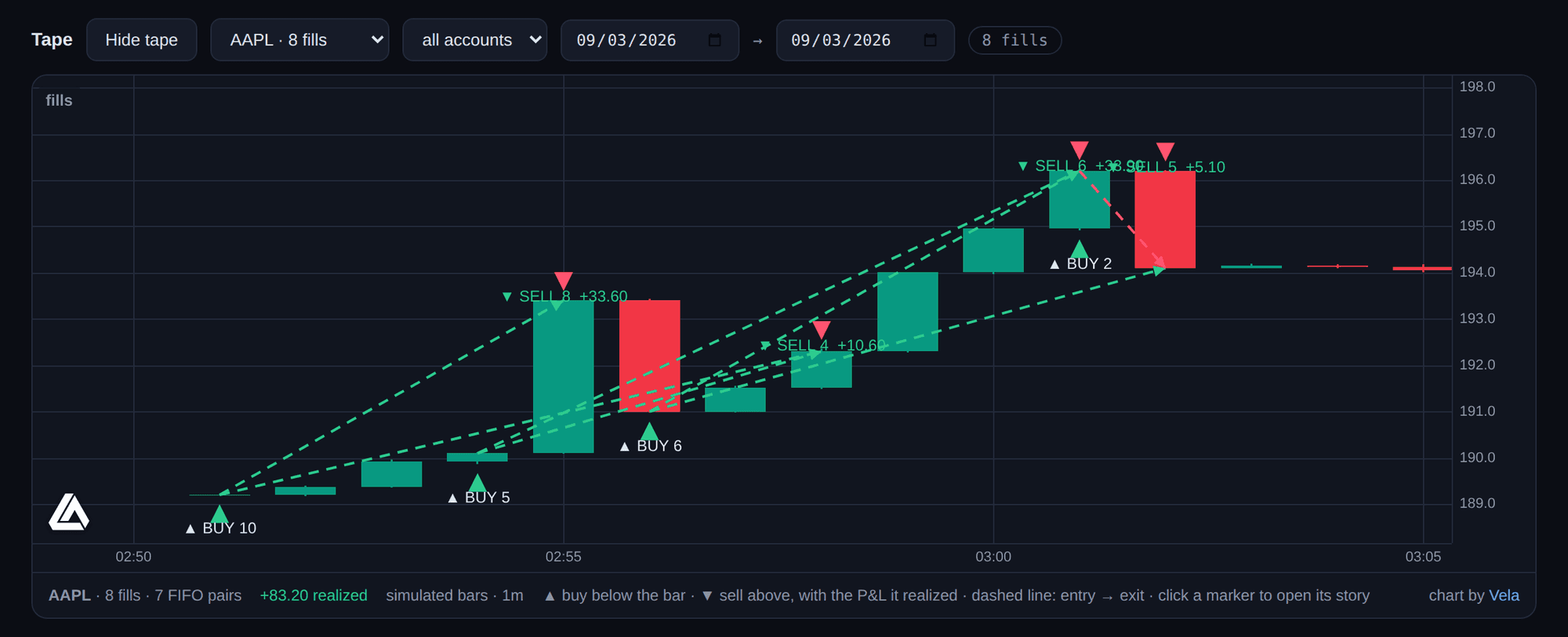
Every fill, on the chart.
The flight recorder tells each signal’s story in text. The Tape panel draws it: buys below the bar, sells above, each with its size, and a dashed line from entry to exit carrying the realized P&L. Click a marker and the signal’s story opens. Candles come from your broker through the Broker SDK where it serves them, from the simulator’s own price walk in the demo, and never from anywhere the relay cannot vouch for. Drawn in your browser by the open-source core of Vela by LuxAlgo, shipped inside the package so nothing loads from a CDN.
The rails are the product.
Automation without guardrails is how accounts die. Every rail here is on by default, and a config that loosens one has to say so out loud, by name: allowAnySymbol, unlimitedPositionSize, noDailyLossLimit. Nothing weakens quietly.
Symbol allowlist
risk.symbolAllowlist
Nothing trades that you didn’t list.
Max position size
risk.maxPositionSize
Checked on the projected post-fill position, and it fails closed.
Max daily loss
risk.maxDailyLoss
A hard cutoff for the day once realized losses cross the line.
Max orders per day
risk.maxOrdersPerDay
Default 100. Runaway loops stop being expensive.
Trading hours
risk.tradingHours
Timezone-aware windows; outside them, signals are rejected.
Duplicate protection
risk.dedupeWindowSec
A 10-second window catches double-fired alerts.
Cooldown
risk.cooldownSec
A minimum quiet period between orders on the same endpoint.
Kill switch
persistent
Survives restarts. Only an explicit resume clears it.
Idempotent by design
The signalId becomes the broker’s client order id: resending the same id can never create a second order.
Exits are privileged
close and flatten skip the allowlist, hours, and cooldowns (each skip recorded), but nothing moves while the kill switch is on.
Live costs a sentence
Live trading requires the exact acknowledgement, typed by you, in config. Never a boolean, never a default, and no tool writes it for you.
“acknowledgeLiveTrading”: “I understand this places real orders with real money”
Agents get rails too.
Your agent can watch the relay, read the flight recorder, and always hit the kill switch. It can never trade until you, a human, switch that on, and when you do, its orders pass through the exact same guardrails as every webhook.
get_status
The relay’s state: kill switch, paused endpoints, accounts, whether MCP trading is enabled.
get_accounts
Equity, cash, and open positions for every execute account, plus watch-only snapshots.
list_orders
Orders at the broker for one execute account.
list_signals
Recent flight-recorder entries, newest first: what arrived, parsed, decided, executed.
get_signal_story
One signal’s complete story by id. The tool for "why did my signal get rejected?"
kill_switch
Turn the global kill switch ON (always allowed: stopping is safe) or OFF (needs allowTrading).
place_order
Only when a human enables it: an order through the identical risk-rail path as a webhook.
flatten
Cancel every open order and close every position on one account (needs allowTrading).
replay_signal
Re-run a captured payload through the whole pipeline. Replay never targets a live account.
One process. One file. Port 8484.
A single Node process and one SQLite database: Docker, docker-compose, and a Railway template ship in the repo. Point a TradingView alert at your endpoint and watch the story appear in the recorder.
// TradingView alert message{ "action": "buy", "symbol": "{{ticker}}", "quantity": 1, "price": "{{close}}"}
Your server. Your keys. Your rails.
Rails on. Always.
MIT-licensed, three runtime dependencies, no hosted version, no custody, no telemetry, and no unofficial broker APIs. The relay refuses the shortcuts so you don't have to.
MIT © LuxAlgo Global, LLC · 3 runtime dependencies · no custody, no telemetry · contribute
Trade Relay routes instructions you configure to accounts you own. It is not investment advice, and automated trading involves substantial risk: simulate first, paper trade second, and verify every order against your broker’s own records.