Adaptive Momentum Oscillator
 By LuxAlgoMay 7, 2025
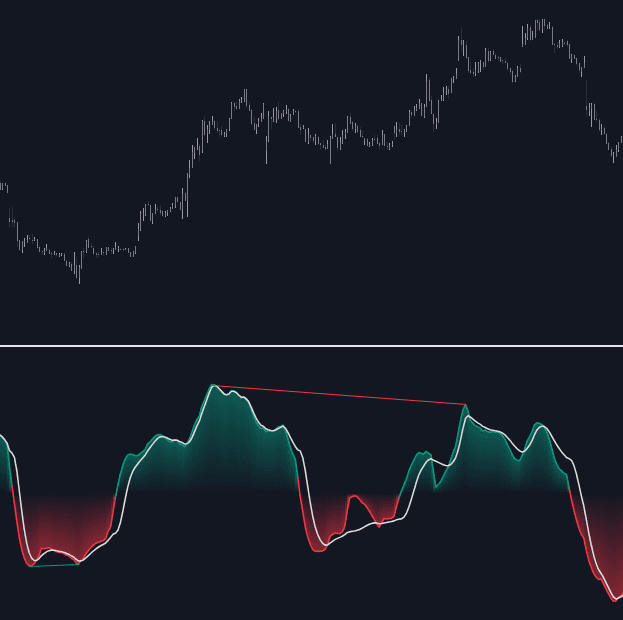
Adaptive Momentum Oscillator turns raw momentum into a histogram you can read at a glance. It gauges the maximum price delta over the chosen period, smooths the series with an adaptive moving average selected for minimal lag, and paints the result as a gradient-colored histogram around zero: above it buyers are pressing, below it sellers are. The plot is unbounded, with no preset ceilings — recent prints set the scale for what counts as stretched — and a signal line rides the histogram to time the shifts.
How to Trade the Adaptive Momentum Oscillator?
- Signal Line through 0: the crossover marks the handover to positive or negative momentum — the primary regime cue.
- Momentum crossing the Signal Line: acceleration when it crosses up, deceleration when it crosses down, useful for timing within an established move.
- Divergences: disabled by default; enable the detector and tune its length — shorter catches frequent small turns, longer isolates the broader reversals.
The Data Length input swings the whole read between short-term and long-term market strength, so one pane serves scalp timing and position context alike. Under the hood, an adaptive smoothing technique keeps the histogram responsive without the jitter a raw delta series would show.
Adaptive Momentum Oscillator Settings
- Data (default closing price): source series for the calculation.
- Data Length: the gathering period — the horizon momentum is measured over.
- Smoothing Length: how heavily the momentum data is smoothed; more length means a cleaner but slower line.
- Divergences: toggle detection and set the divergence length.
Frequently Asked Questions
What does the adaptive moving average actually add?
Less lag for the same smoothness. It helps the histogram separate genuine momentum shifts from single-bar noise without the delay a heavy fixed average would introduce, keeping trend direction clear while turns register sooner.
How does it compare to the Awesome Oscillator?
The Awesome Oscillator takes a fixed spread between two simple moving averages. This tool instead derives momentum from the maximum price delta and smooths it adaptively — then adds the signal line and an optional divergence detector on top.
How do I access the Adaptive Momentum Oscillator?
It is available free in the LuxAlgo Library. This page also lets you run it inside LuxAlgo's AI, Quant, before committing it to your chart layout.
Free indicator
Get free access to this indicator on the platforms below.

The Library is free. Quant makes it yours.
Pull any concept or indicator into Quant: rebuild it, retune it, or turn it into a backtested strategy of your own.