Fair Value Gap
 By LuxAlgoJul 28, 2023
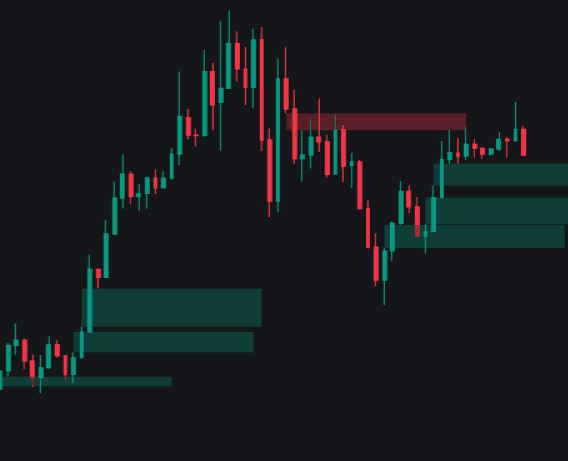
Fair Value Gap finds the voids that aggressive moves leave behind and manages their whole life cycle on the chart. A bullish gap prints when the current low clears the high from two bars back; a bearish gap when the current high stays under the low from two bars back. Each imbalance becomes a box, and the box is deleted the moment price trades back through it — the foundational detection pattern behind the Smart Money Concepts family.
How to Trade the Fair Value Gap?
- Fresh gap prints: one-sided pressure just left a range untraded — treat the box as a zone of interest where price may return before continuing.
- Price re-enters a box: the gap is mitigated and removed; enable Mitigation Levels to leave dashed lines at those prices for later retests.
- Higher-timeframe confluence: run the Timeframe input above the chart — for example 1-hour gaps over a 15-minute chart — and favor setups that align across both.
- Dashboard read: bullish and bearish gap counts with mitigation percentages show how reliably the market has been filling its inefficiencies lately.
Fair Value Gap Settings
- Threshold %: the minimum size a gap must reach to count, with Auto deriving the threshold from average volatility instead.
- Unmitigated Levels: how many of the most recent open gaps stay highlighted.
- Mitigation Levels: draws dashed lines where gaps were filled.
- Timeframe: runs detection on a timeframe independent of the chart.
- Extend / Dynamic: projects boxes forward and lets subsequent price action resize their boundaries; further toggles cover dashboard visibility, corner, and text size.
Frequently Asked Questions
What do the dashboard percentages tell me?
They report the share of detected gaps that price has already returned to fill, separately for bullish and bearish cases. A high fill rate favors waiting for retracement entries; a low one says imbalances are being left behind by a market on the move.
Do I need a separate tool for higher-timeframe gaps?
Not necessarily — the Timeframe setting overlays higher-timeframe gaps on any chart. If you want a build dedicated to that job, HTF Fair Value Gap focuses entirely on higher-timeframe imbalances.
How do I access the Fair Value Gap indicator?
It is free on the LuxAlgo Library — the Use in Quant button on this page loads it into LuxAlgo's AI, where you can run and backtest gap behavior on your preferred symbols.

The Library is free. Quant makes it yours.
Pull any concept or indicator into Quant: rebuild it, retune it, or turn it into a backtested strategy of your own.