Final Flag
 By LuxAlgoOct 9, 2026
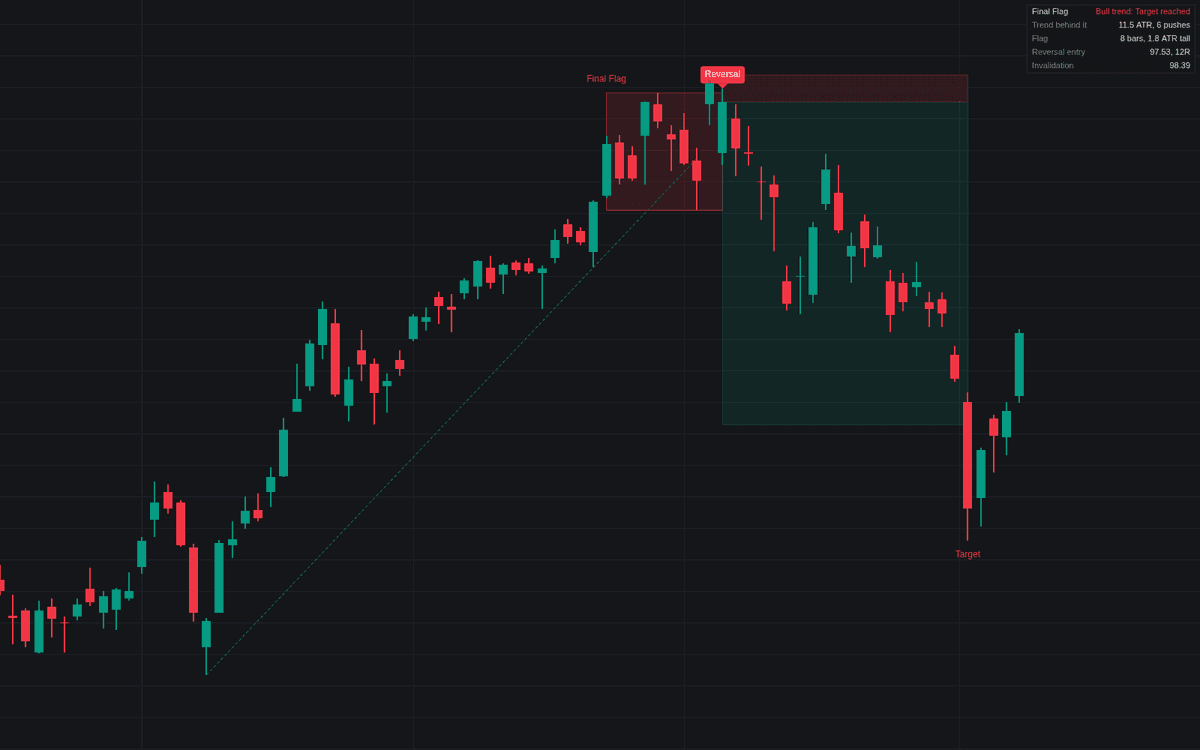

The Final Flag is an advanced technical analysis tool designed to identify potential trend exhaustion by isolating specific, late-stage market consolidation patterns. By monitoring for a protracted trend followed by a tight, horizontal flag, the indicator looks for a "blow-off" style breakout to a new extreme that subsequently fails. This reversal signal helps traders identify high-probability turning points in markets that have reached the end of their current momentum, offering a structured way to play counter-trend moves with defined risk parameters.
How to Trade the Final Flag?
To trade using the Final Flag, you should wait for the indicator to identify a confirmed "Final Flag" signal, which occurs when a breakout to a new trend extreme is quickly rejected. Once the signal appears, the tool automatically plots the entry, stop-loss, and target levels based on the geometry of the flag and the failed breakout.
The entry typically triggers when price confirms the failure, either by closing back within the flag or through the flag, depending on your configuration. The protective stop is placed just beyond the breakout's extreme, effectively using the "failed" high or low as the point of invalidation. The target is usually set either at the opposite side of the flag or back at the start of the final price leg. Because this is a reversal strategy, it is most effective when combined with broader market context, such as identifying if the trend has traveled significantly in terms of ATR and has experienced multiple preceding pushes to new highs or lows.
Final Flag Settings
Late Trend
- Trend Lookback: Determines the number of bars to scan for the trend's origin.
- Minimum Trend Travel (ATR): Sets the required distance the price must have moved in ATR units to be considered a mature, extended trend.
- Minimum Prior Pushes: Specifies the number of price pushes to a new extreme required before the flag can be considered "late."
Flag
- Flag Length: Defines the minimum and maximum number of bars the consolidation must span.
- Maximum Flag Height (ATR): Limits the vertical range of the flag, ensuring the consolidation remains tight.
- Maximum Drift (% of Height): Constrains how much the flag may tilt or slope; lower values ensure a more horizontal, compressed range.
- Require Trendline Break: When active, the flag must breach the established trendline to confirm the exhaustion of the move.
Breakout & Failure
- Failure: Selects between "Back Inside the Flag" or "Through the Flag" to determine when the failure is confirmed.
- Maximum Breakout Extension (ATR): Defines the limit for how far the price can move beyond the flag during the breakout before the setup is invalidated.
- Failure Window (Bars): The maximum number of bars allowed for the breakout to fail; if it takes longer, the signal is ignored.
Trade Plan
- Target: Sets the exit objective to either the beginning of the last leg or the far side of the flag.
- Stop Buffer (ATR): Adds a padding distance to the stop-loss beyond the breakout extreme.
- Failed Failure Window (Bars): The time frame for identifying a "failed failure," which serves as a signal that the original trend is actually resuming.
- Maximum Hold (Bars): The limit on how long a trade will stay open before being timed out.
Frequently Asked Questions
Free on Vela
Run it on Vela. Go further with a paid plan.
- Up to 500 strategy alerts, with webhook automation
- Up to 10× the chart history of Free
- Orderflow lookback up to full history
- Up to 100,000 monthly credits for Quant to customize it
- Futures data alongside crypto, stocks, forex and commodities

Run it on Vela. Make it yours with Quant.
Open this indicator free on Vela, our next-generation charting platform. Then ask Quant, our coding agent built into Vela, to retune it or turn it into a backtested strategy of your own.