Probability Grid
 By LuxAlgoApr 9, 2025
Probability Grid is an indicator on Vela, our next-generation charting platform, written in Pine Script®.
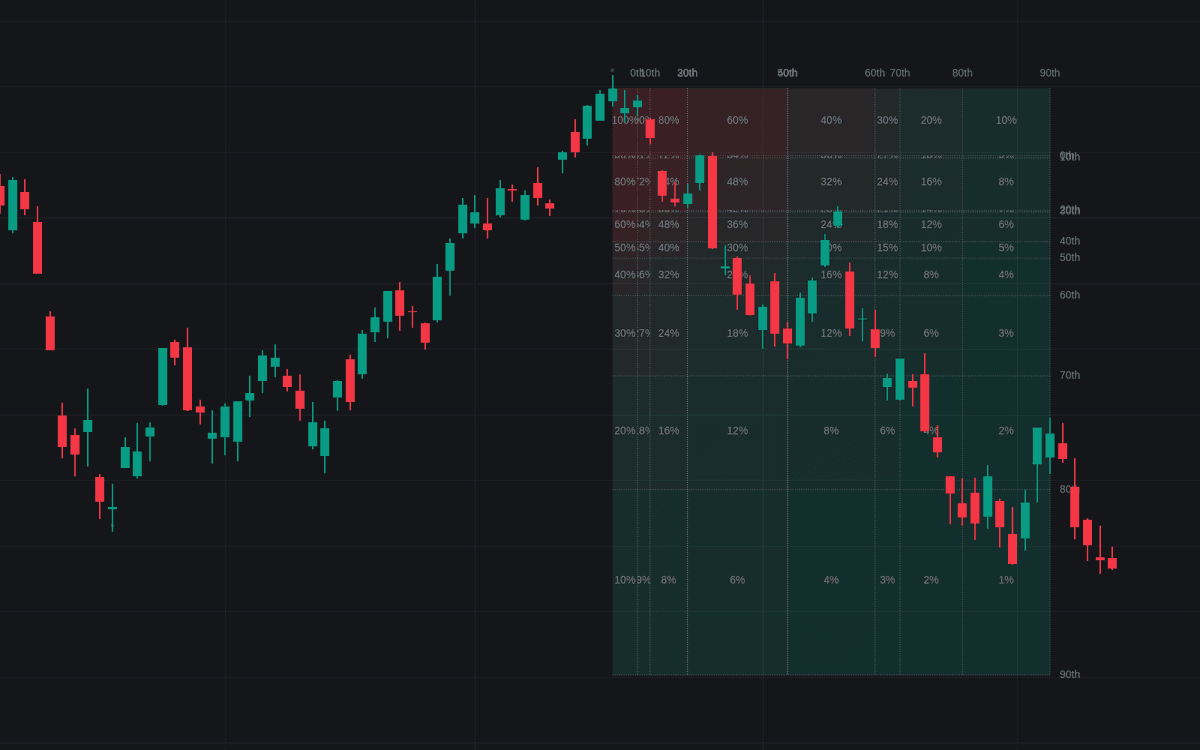

Probability Grid turns the question of when a move ends into measured odds. It profiles the distribution of returns between past reversals, slices that history into percentiles, and projects a 10x10 grid forward from the last confirmed reversal. The further price travels across the grid, the higher the calculated odds that the move ends there. Percentile rows from 0 to 90 display by default, and each can be enabled, disabled, or adjusted, with at least two always active.
How to Trade the Probability Grid?
- Price deep in the grid: in the default Probability Beyond Each Cell mode, a cell marked 9% means an estimated 9% chance that the next reversal comes both further in price and later in time than that cell, a stretched move.
- Probability Within Each Cell: the alternative mode reads odds cell by cell; at default deciles every cell starts near 1%.
- Dashboard mode: the same statistics condensed into a panel in one of three preset locations, for traders who want the numbers without the overlay.
Normalization keeps the math fair: by default the tool works on returns between reversals rather than raw price deltas, so old history stays comparable with recent action. It sits alongside LuxAlgo's other statistics tools as a probability-first way to frame exhaustion.
Probability Grid Settings
- Swing Length: maximum bar length for swing recognition, the reversals that seed the dataset.
- Maximum Reversals: caps how many past reversals feed the calculation.
- Normalize Data: toggle between swing returns (default) and raw price data.
- Probability: choose odds beyond each cell (default) or within each cell.
- Percentiles: enable, disable, or restyle each percentile row.
- Dashboard and styling: dashboard visibility, position, and size, plus grid visibility, text size, colors, and reversal marks.
Frequently Asked Questions
Free to use
Run it on Vela. Go further with a paid plan.
- Up to 500 Custom Alerts, with webhook automation
- Up to 10× the chart history of Free
- Orderflow lookback up to full history
- More Quant usage to customize it, plus extra usage when you need it
- Futures data alongside crypto, stocks, forex and commodities
Also works on

Related indicators
All 5 Distribution-of-returns Profiling indicators
.png&w=3840&q=75)
Run it on Vela. Make it yours with Quant.
Open this indicator free on Vela, our next-generation charting platform. Then ask Quant, our coding agent built into Vela, to retune it or turn it into a backtested strategy of your own.