Role Reversal
 By LuxAlgoOct 9, 2026
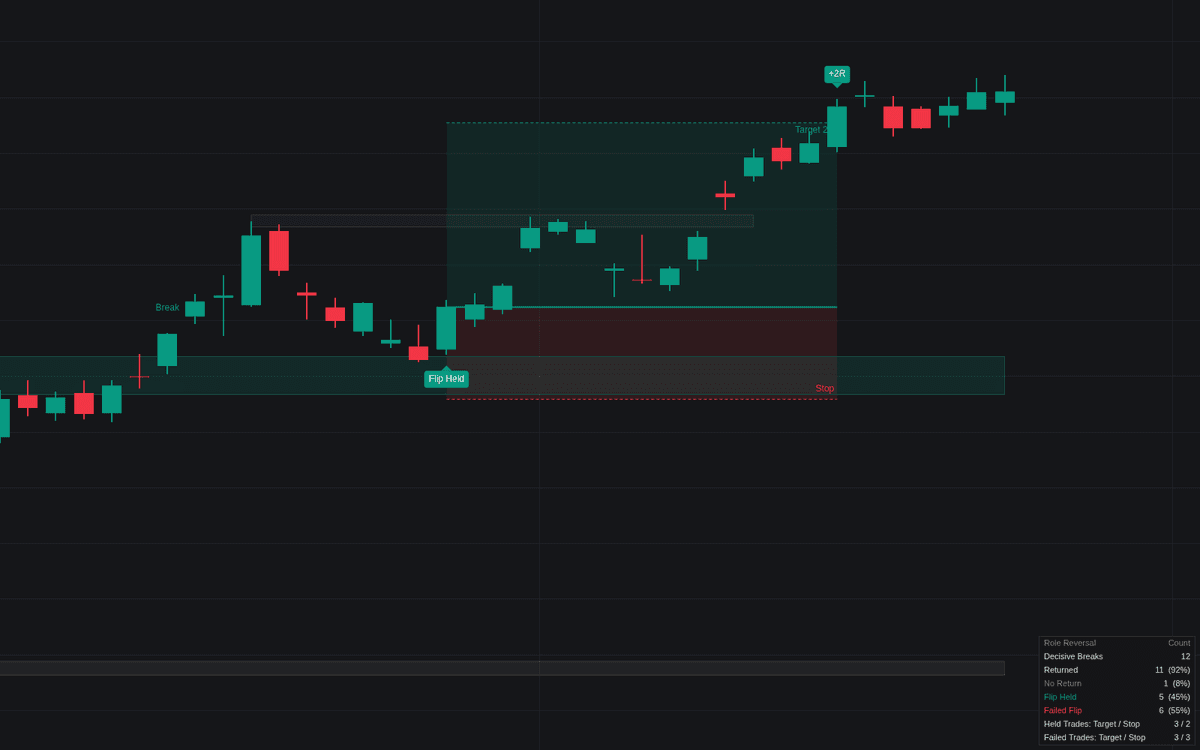

Role Reversal is a technical analysis tool designed to identify and track horizontal support and resistance levels that flip roles after a significant price breakout. By identifying clusters of swings that signify real market interest, the indicator visualizes these areas as zones. When a zone is decisively broken, the indicator monitors for a retest, classifying the subsequent price action as a successful role reversal or a failed break. This provides traders with an objective framework to anticipate trend continuations or reversals based on established market psychology.
How to Trade the Role Reversal?
Focus on the "Flip Held" and "Failed Flip" signals. A "Flip Held" event indicates that a former resistance level has successfully transformed into support, or that support has become resistance, offering a potential entry point for a trend-following trade. Conversely, a "Failed Flip" warns that the breakout may be false, as price is pulled back inside the original range. This suggests the breakout crowd is trapped and often signals a strong move in the opposite direction. Always monitor the suggested risk management parameters, such as the Stop Buffer and Target R, to ensure that entries align with your personal risk tolerance and exit strategies.
Role Reversal Settings
Levels With History
- Swing Length: The number of bars a high or low must dominate to qualify as a pivot.
- Minimum Touches: The number of swings required for a level to be considered significant enough to track.
- Touch Tolerance (ATR): The distance in ATR that a swing can be from a level while still being counted as part of the zone.
- Minimum Zone Width (ATR): The minimum thickness of the level zone.
- Maximum Zone Width (ATR): The maximum thickness the zone will grow to accommodate price activity.
- Levels Tracked: The number of concurrent unbroken levels monitored by the indicator.
Break & Return
- Break Rule: Choose between a full-bodied candle close or any close to confirm a breakout.
- Break Buffer (ATR): The distance price must extend beyond the zone to confirm a breakout.
- Minimum Excursion (ATR): The distance price must travel after a break to validate a subsequent return as a retest.
- Return Window: The duration in bars to watch for a price return to the broken level.
Trade Plan
- Trade Levels: Toggle automatic trade planning based on graded returns.
- Trade Failed Flips: Enables trade signals when a breakout fails and returns to the initial range.
- Stop Buffer (ATR): Extra padding in ATR for stop loss placement.
- Target (R): The desired reward ratio for planned trades.
- Maximum Hold (Bars): The time limit for a trade before it is automatically closed.
Dashboard
- Show Dashboard: Displays statistical tracking of breaks and trade performance.
- Position: Sets the screen location for the dashboard.
- Size: Adjusts the visual scale of the dashboard overlay.
Style
- Show Unbroken Levels: Toggles the visibility of levels before a breakout occurs.
- Event Labels: Shows labels on the chart to mark breaks, flips, and failed attempts.
- Bullish/Bearish/Neutral: Custom colors for marking zone directions and events.
Frequently Asked Questions
Free on Vela
Run it on Vela. Go further with a paid plan.
- Up to 500 strategy alerts, with webhook automation
- Up to 10× the chart history of Free
- Orderflow lookback up to full history
- Up to 100,000 monthly credits for Quant to customize it
- Futures data alongside crypto, stocks, forex and commodities

Run it on Vela. Make it yours with Quant.
Open this indicator free on Vela, our next-generation charting platform. Then ask Quant, our coding agent built into Vela, to retune it or turn it into a backtested strategy of your own.