SMT Divergences
 By LuxAlgoMay 22, 2023323 chart adds
SMT Divergences is an indicator on Vela, our next-generation charting platform, written in Pine Script®.
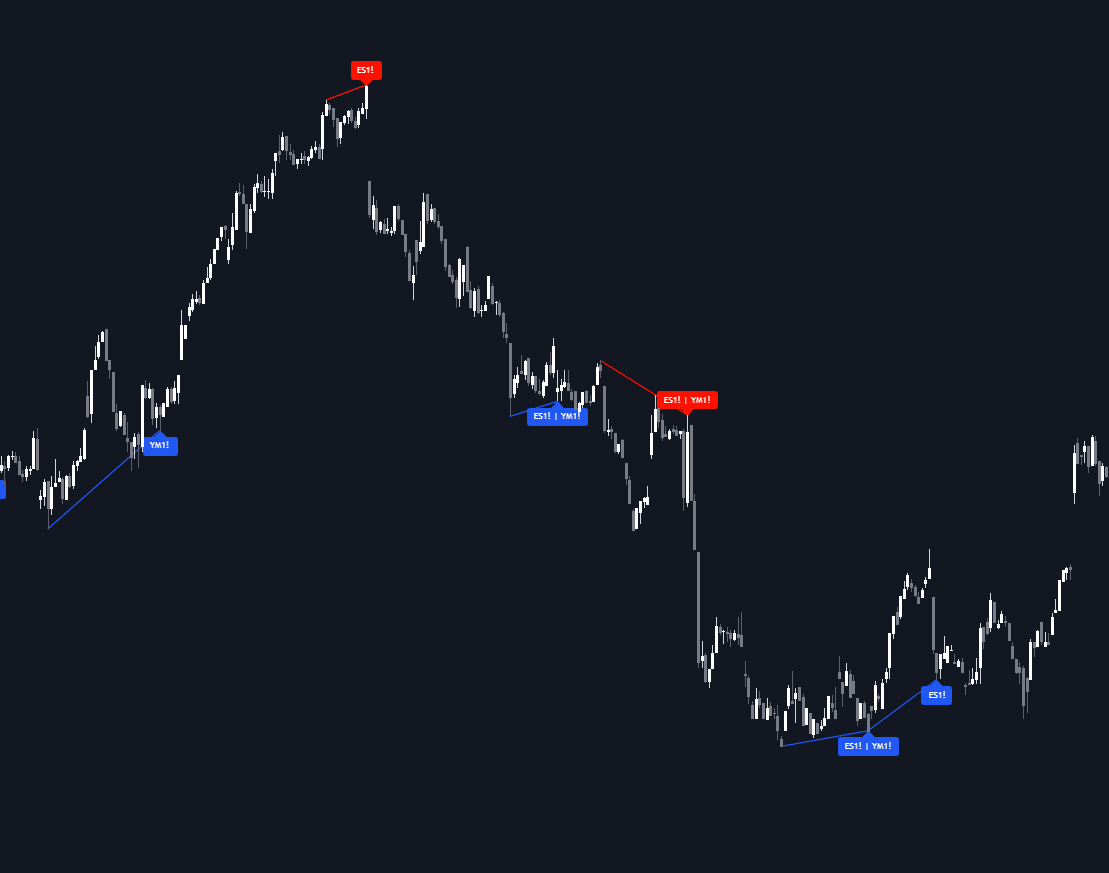
SMT Divergences watches your chart alongside two user-selected comparison tickers (typically ES and YM) and labels every SMT divergence: a matched swing point where one instrument breaks its level while its correlated partner fails to follow. Swings are detected on all series, aligned in time, and compared automatically, so the cracks between markets that stay invisible on a single chart are marked the moment they confirm.
How to Trade the SMT Divergences?
- Divergence labels: printed when a swing on the chart ticker coincides with a swing on a comparison ticker and the two disagree: one making a new extreme, the other holding.
- Swing confirmation: swing points confirm after a set number of candles (3 by default), so labels appear once structure has settled rather than mid-formation.
- Dashboard percentages: show how often swing highs and swing lows have produced SMT divergences against each ticker, a live base rate for the signal you are trading.
Because confirmation is required, the tool lends itself to studying how price behaves after a divergence rather than chasing one tick by tick. Index partners like ES and YM are the classic pairing, but the comparison tickers are yours to choose, so any correlated pair can be monitored.
SMT Divergences Settings
- Pivot Lookback: the number of bars on each side that confirm a swing point (3 by default). Larger values isolate broader, more significant swings.
- Comparison Symbol: the two external symbols (ES1! and YM1! by default) checked for divergences against the chart, each with its own on/off toggle.
- Show Dashboard / Location / Size: toggle the statistics table and control where and how large it renders.
Frequently Asked Questions
Free to use
Run it on Vela. Go further with a paid plan.
- Up to 500 Custom Alerts, with webhook automation
- Up to 10× the chart history of Free
- Orderflow lookback up to full history
- More Quant usage to customize it, plus extra usage when you need it
- Futures data alongside crypto, stocks, forex and commodities
Also works on

Related indicators
Run it on Vela. Make it yours with Quant.
Open this indicator free on Vela, our next-generation charting platform. Then ask Quant, our coding agent built into Vela, to retune it or turn it into a backtested strategy of your own.