Spike and Channel
 By LuxAlgoOct 9, 2026
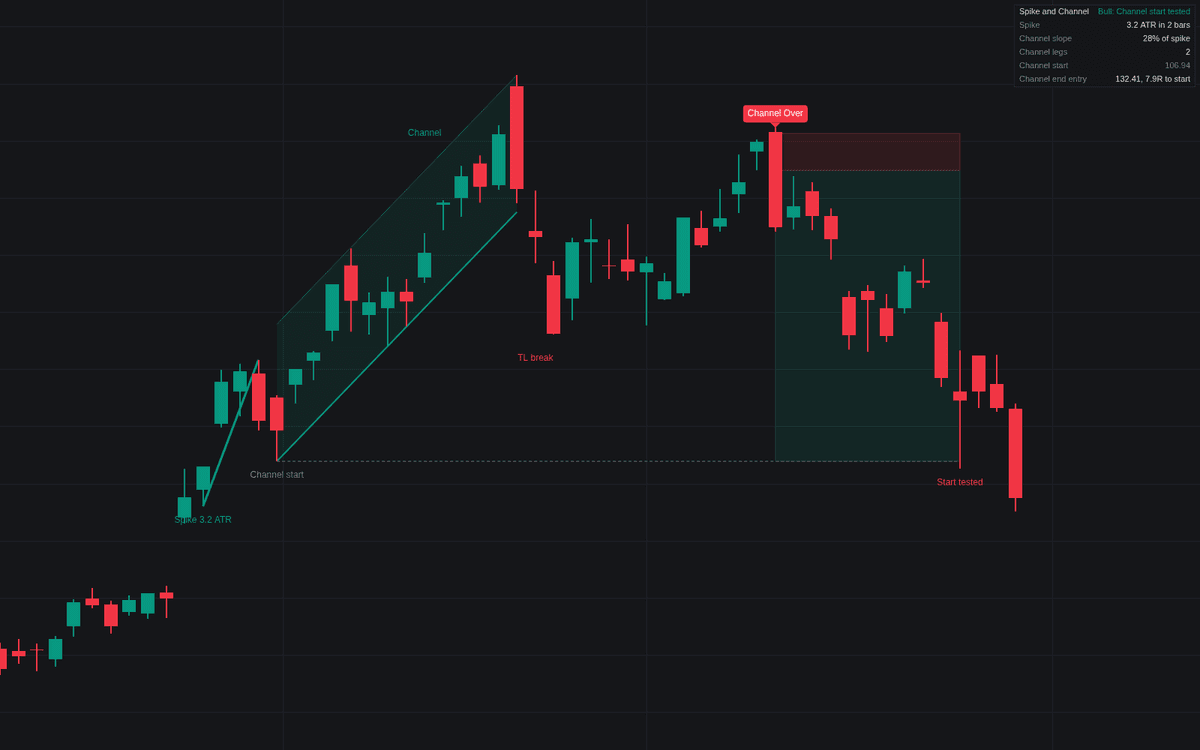

The Spike and Channel indicator identifies powerful price action patterns characterized by an initial impulsive phase followed by a structured corrective channel. By automating the recognition of these trend exhaustion setups, the tool allows traders to visualize the transition from aggressive momentum to a measured, fading trend. It focuses on the mechanics of institutional price action, where a strong "spike" in price leads to a pullback and subsequent channel formation, ultimately providing a framework to identify high probability reversal entries when the channel structure breaks down.
How to Trade the Spike and Channel?
The indicator monitors price action to identify potential trend reversals through a multi-stage process. First, it identifies a "spike," which consists of consecutive, strong trend bars with minimal overlap, indicating high urgency. After the spike, the indicator looks for a pullback and the formation of a "channel," where price moves in a series of legs that respect a trendline.
To trade this setup, wait for the following sequence:
- The Spike: Observe the initial strong move. Do not jump in immediately; wait for the market to establish a clear trend.
- Channel Development: Once the pullback is complete, a channel begins to form. The indicator will label the "Channel Start," which serves as the primary profit target for a potential counter-trend trade.
- Trendline Break: A breach of the channel trendline serves as the first warning sign that the trend is losing steam.
- The Failed Test: After the trendline breaks, watch for a test of the previous trend extreme. If the price fails to make a new extreme and subsequently breaks below (or above) the level of the test, it signals that the channel phase is over.
- Entry: Execute the trade in the opposite direction of the original trend, targeting the "Channel Start" level. Place your stop loss beyond the failed test extreme to protect against continued momentum.
Spike and Channel Settings
Spike
- Minimum Spike (ATR): The required travel of the spike in multiples of the 14-bar ATR.
- Maximum Spike Bars: The maximum number of consecutive bars that can form a valid spike.
- Trend Bar Body (%): The minimum percentage of the bar range that must be represented by the body for it to count as a trend bar.
- Close Near Extreme (%): The maximum distance from the bar extreme that the close must fall within to be considered a strong trend bar.
- Maximum Overlap (%): The maximum allowed overlap between consecutive bars within the spike.
Channel
- Maximum Pullback (% of Spike): The maximum percentage of the spike range that a pullback can retrace.
- Maximum Pullback Bars: The maximum duration for a pullback before the trend must resume.
- Minimum Channel Legs: The number of distinct legs required to confirm a channel.
- Maximum Channel Slope (% of Spike): A filter ensuring the channel is significantly shallower than the initial spike.
- Maximum Channel Bars: The maximum age of a channel before it is considered expired.
- Trendline Break Buffer (ATR): The threshold for a price close to breach the trendline definitively.
- Failed Test Window (Bars): The number of bars allowed for the trend extreme test to fail.
Channel End Trade
- Show Trade the Channel End: Toggles the visualization of potential counter-trend entries.
- Stop Buffer (ATR): The distance from the test extreme to place the stop loss.
- Maximum Hold (Bars): The trade duration limit before the position is closed as timed out.
Dashboard
- Show Dashboard: Toggles the information panel.
- Position & Size: Configures the location and font size of the dashboard.
Frequently Asked Questions
Free on Vela
Run it on Vela. Go further with a paid plan.
- Up to 500 strategy alerts, with webhook automation
- Up to 10× the chart history of Free
- Orderflow lookback up to full history
- Up to 100,000 monthly credits for Quant to customize it
- Futures data alongside crypto, stocks, forex and commodities

Run it on Vela. Make it yours with Quant.
Open this indicator free on Vela, our next-generation charting platform. Then ask Quant, our coding agent built into Vela, to retune it or turn it into a backtested strategy of your own.