Spike Rules
 By LuxAlgoOct 9, 2026
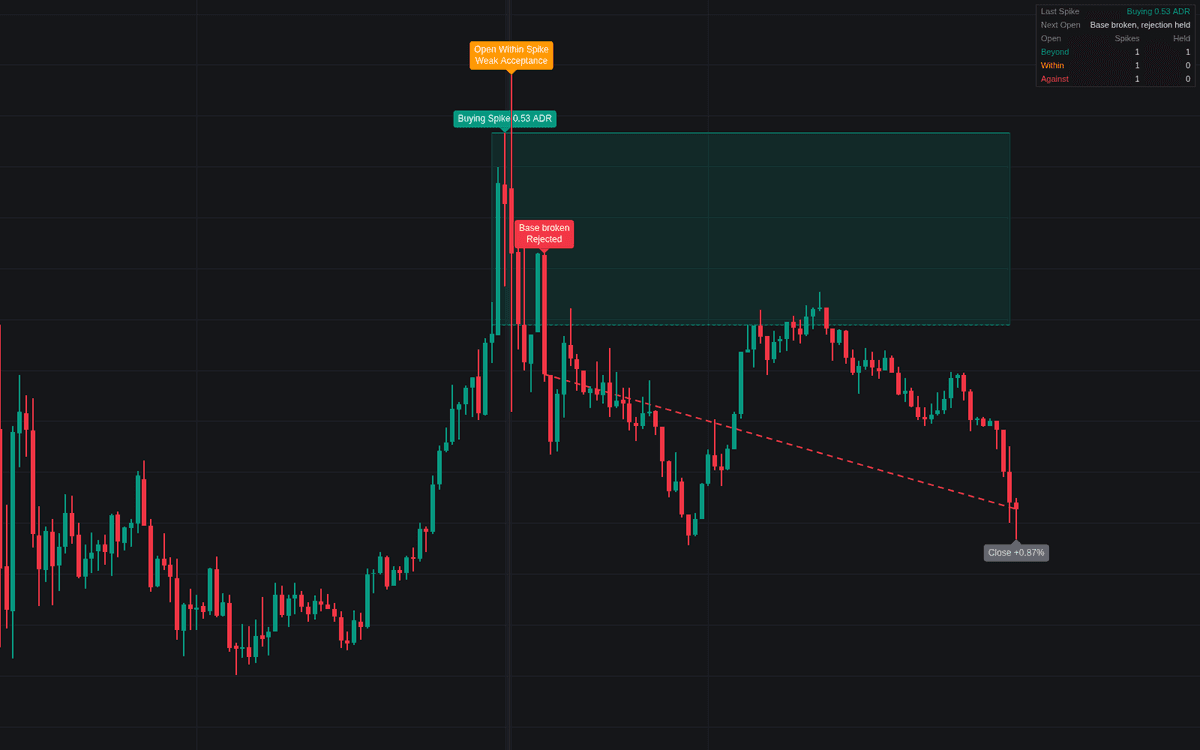

Spike Rules is an automated analytical tool designed to identify late-session price spikes and evaluate how market participants respond to these levels on the following day. By detecting significant breakouts during the final minutes of a session, the indicator helps traders categorize the market intent as either an acceptance of new price extremes or a rejection of the move. It provides a clear framework for monitoring whether subsequent price action confirms or negates the initial spike, offering insights into potential continuation or reversal patterns.
How to Trade the Spike Rules?
Trading with this indicator involves analyzing the relationship between the next session's opening price and the established spike zone. There are three primary scenarios to watch:
- Open Beyond the Spike: When the market opens beyond the spike extreme, the price is considered accepted. Traders often look for continuation in the direction of the spike, using the spike extreme or base as a reference level for stop placement.
- Open Within the Spike: This indicates weaker acceptance. In this scenario, the market is balancing. The spike base serves as a crucial support or resistance level; a period close through the base suggests the spike is being rejected, shifting the bias against the original move.
- Open Against the Spike: If the market opens beyond the spike base, the late-session breakout is deemed rejected. This environment favors trading in the opposite direction of the initial spike, as the breakout failed to hold interest.
The indicator uses a period-based closing logic to filter out noise, ensuring that a single-bar violation does not trigger a false signal. You can track these trades directly on the chart, with the indicator highlighting the entry, failure levels, and the eventual outcome of the session.
Spike Rules Settings
Session
- Regular Session: Defines the time window to be scanned for spikes. The default corresponds to the typical market hours for major indices.
- Timezone: Specifies the time zone for the session, ensuring correct alignment with exchange operating hours.
Spike Detection
- Spike Window (minutes): The final minutes of the session used to detect a breakout.
- Minimum Spike (x average range): Filters out minor price fluctuations to ensure only significant moves are labeled as spikes.
- Close Location in Spike (%): Sets the requirement for where the session must close within the spike, filtering against late-day reversals.
- Average Range Sessions: The number of completed sessions used to calculate the volatility baseline.
Next-Day Rules
- Read On Period Closes (minutes): Defines the timeframe for judging level breaks, preventing whipsaws.
- Level Tolerance (x average range): A buffer applied to levels to confirm a legitimate break.
- Acceptance Fails On: Determines if a read fails at the spike extreme or the spike base.
- Track Next-Day Trades: Toggles the display of lines and labels for visual trade tracking.
Style
- Spikes on Chart: Limits the number of past spikes displayed to maintain a clean workspace.
- Colors: Customizable colors for buying spikes, selling spikes, and neutral readings.
Dashboard
- Show Dashboard: Enables a summary table showing the latest spike status and total trade statistics.
Frequently Asked Questions
Free on Vela
Run it on Vela. Go further with a paid plan.
- Up to 500 strategy alerts, with webhook automation
- Up to 10× the chart history of Free
- Orderflow lookback up to full history
- Up to 100,000 monthly credits for Quant to customize it
- Futures data alongside crypto, stocks, forex and commodities

Run it on Vela. Make it yours with Quant.
Open this indicator free on Vela, our next-generation charting platform. Then ask Quant, our coding agent built into Vela, to retune it or turn it into a backtested strategy of your own.