TICK Arbitrage Toolkit

Feb 18, 2026

Static chart image
Price Action Based
Signals
Patterns
Volatility
Works on the following platforms:
tradingviewSymbolTradingView
For free use on the TradingView platform
ninjatraderNinjaTrader
For free use on the NinjaTrader platform
metatrader4MetaTrader 4/5
For free use on the MetaTrader 4/5 platform
thinkorswimThinkorswim
For free use on the Thinkorswim platform

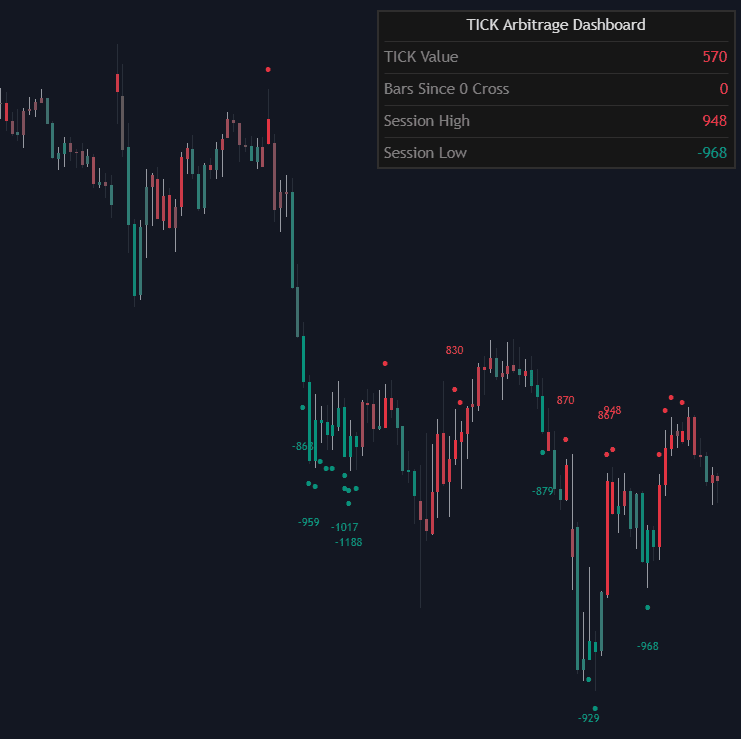
The TICK Arbitrage Toolkit is a professional-grade trading indicator built to monitor real-time market breadth using NYSE TICK and NASDAQ TICKQ data. Designed for index scalpers and mean reversion traders, this tool visualizes internal buying and selling pressure directly on your price chart, helping you identify high-probability reversal zones and short-term arbitrage opportunities in indices like the S&P 500 and Nasdaq 100.

By mapping TICK extremes onto price bars with dynamic color gradients and extension markers, the toolkit allows traders to quickly interpret internal sentiment shifts without relying on a separate indicator pane. This makes it an efficient trading strategy companion for those who rely on market internals to time entries and exits.

How to Trade the TICK Arbitrage Toolkit?

This trading indicator is built around identifying internal exhaustion points where market breadth reaches statistically extreme levels. When TICK readings extend into predefined thresholds, they often signal short-term overbought or oversold conditions that can precede price reversals.

The toolkit defines three extension levels to help traders categorize the intensity of the internal move. These levels can be used to anticipate:

  • Short-term exhaustion in strong directional pushes
  • Liquidity grabs during trend extensions
  • Mean reversion setups after internal blow-offs
  • Scalping opportunities during intraday extremes

Instead of forcing traders to interpret raw TICK values in a separate window, the indicator integrates the data directly onto price bars. A color gradient increases in intensity as internal pressure builds, allowing you to visually gauge momentum shifts in real time.

This makes the tool particularly effective for:

  • Index scalping strategies
  • Intraday mean reversion trading
  • Short-term reversal confirmation
  • Market breadth confirmation during breakouts

Extension Levels and Arbitrage Intensity

The core of this trading indicator revolves around three configurable extension levels (default: 800, 1000, 1200). These thresholds classify how extreme the internal imbalance is.

  • Extension 1:
    Displays a single marker and initiates tracking for potential new session highs or lows. This level signals early internal expansion and the beginning of potential exhaustion.

  • Extension 2:
    Displays two vertical markers, indicating growing internal pressure. At this stage, traders begin preparing for potential fade setups or tightening risk.

  • Extension 3:
    Displays three vertical markers and reaches maximum color opacity. This represents a full internal extreme and signals a potential high-probability arbitrage or mean reversion opportunity.

The stronger the extension, the more stretched the internal breadth becomes. Many professional traders use these extremes to fade price spikes when liquidity becomes one-sided.

Session High and Low Tracking for Institutional Context

The TICK Arbitrage Toolkit automatically tracks session-based internal extremes.

When a New High of Day (NHOD) or New Low of Day (NLOD) occurs in the selected TICK source, the indicator prints a professional label on the chart. This provides additional confirmation when:

  • Internal breadth is breaking to new extremes
  • Price is testing key intraday structure
  • Momentum shifts align with internal expansion

Tracking NHOD and NLOD is critical for understanding whether a move is expanding participation or simply exhausting into a final push.

How the Indicator Processes Real-Time Market Data

One of the most powerful features of this trading tool is its ability to operate at a higher resolution than the visible chart timeframe.

Refresh Frequency for Intrabar Precision

The Refresh Frequency setting allows the script to sample internal data at sub-minute intervals such as 1-second or 5-second resolution. This means the indicator can detect internal spikes that occur within a single chart bar.

For scalpers and short-term traders, this provides:

  • Faster detection of internal surges
  • Early recognition of exhaustion
  • Improved timing for entries and exits

This makes the toolkit especially useful during volatile sessions when TICK values can spike rapidly.

Capturing True Market Stress with High/Low Extremes

When Include High/Low Extremes is enabled, the indicator evaluates the highest and lowest TICK values within the sampling window instead of relying solely on closing values.

This ensures:

  • Brief but significant intrabar spikes are not missed
  • True market stress is captured
  • Internal extremes are measured accurately

This feature enhances the reliability of the extension levels, particularly during fast-moving market conditions.

Indicator Settings Explained

Settings

  • TICK Source:
    Choose between NYSE TICK (ideal for S&P 500 analysis) or NASDAQ TICKQ (ideal for Nasdaq 100 analysis).

  • Refresh Frequency:
    Controls how often the internal data is sampled. Lower values increase intrabar detail and responsiveness.

  • Include High/Low Extremes:
    When enabled, uses the absolute highest or lowest TICK value within the sampling window to capture spikes.

  • Extension 1, 2, 3:
    Customizable numeric thresholds that define arbitrage intensity levels and internal extremes.

Style Customization

  • Positive TICK Color:
    Color for positive internal readings, often associated with overbought or reversal zones.

  • Negative TICK Color:
    Color for negative internal readings, typically associated with oversold or reversal zones.

  • Marker Style:
    Choose between Circles, Triangles, or None to customize how extension levels appear on the chart.

Dashboard Controls

  • Dashboard:
    Toggle the on-screen data table for quick reference to internal values and session statistics.

  • Position:
    Move the dashboard to different corners of the chart for optimal visibility.

  • Size:
    Adjust the dashboard’s scale to match your chart layout.

Why Use TICK Internals in Your Trading Strategy?

Market internals like NYSE TICK and NASDAQ TICKQ measure the number of stocks trading on an uptick versus a downtick at any given moment. Extreme readings often coincide with liquidity imbalances and short-term exhaustion.

By integrating this breadth data directly into price action:

  • You reduce noise from lagging indicators
  • You gain institutional-level context
  • You identify high-probability mean reversion setups
  • You enhance precision for index scalping

The TICK Arbitrage Toolkit transforms raw internal data into actionable visual signals, making it a powerful trading indicator for active traders.

FAQ

What is the TICK Arbitrage Toolkit best used for?

It is best used for index scalping, mean reversion trading, and identifying short-term reversal zones using market breadth data from NYSE TICK or NASDAQ TICKQ.

Does this indicator work on all timeframes?

Yes. It can be applied to any timeframe, but it is especially powerful on lower timeframes where internal extremes often produce rapid reversals.

How does the extension system improve trading accuracy?

The three-level extension system helps categorize the intensity of internal pressure. Stronger extensions often correspond to higher probability exhaustion points.

How do I access the TICK Arbitrage Toolkit?

You can get access on the LuxAlgo Library for charting platforms like TradingView, MetaTrader (MT4/MT5), and NinjaTrader for free.

Trading & investing are risky and many will lose money in connection with trading and investing activities. All content on this site is not intended to, and should not be, construed as financial advice. Decisions to buy, sell, hold or trade in securities, commodities and other investments involve risk and are best made based on the advice of qualified financial professionals. Past performance does not guarantee future results.

Hypothetical or Simulated performance results have certain limitations. Unlike an actual performance record, simulated results do not represent actual trading. Also, since the trades have not been executed, the results may have under-or-over compensated for the impact, if any, of certain market factors, including, but not limited to, lack of liquidity. Simulated trading programs in general are designed with the benefit of hindsight, and are based on historical information. No representation is being made that any account will or is likely to achieve profit or losses similar to those shown.

Testimonials appearing on this website may not be representative of other clients or customers and is not a guarantee of future performance or success.

As a provider of technical analysis tools and strategies, we do not have access to the personal trading accounts or brokerage statements of our customers. As a result, we have no reason to believe our customers perform better or worse than traders as a whole based on any content, tool, or platform feature we provide.

Charts used on this site are by TradingView in which the majority of our technical indicators are built on. TradingView® is a registered trademark of TradingView, Inc. www.TradingView.comTradingView® has no affiliation with the owner, developer, or provider of the Services described herein.

Market data is provided by CBOE, CME Group, BarChart, CoinAPI. CBOE BZX real-time US equities data is licensed from CBOE and provided through BarChart. Real-time futures data is licensed from CME Group and provided through BarChart. Select cryptocurrency data, including major coins, is provided through CoinAPI. All data is provided “as is” and should be verified independently for trading purposes.

This does not represent our full Disclaimer. Please read our full disclaimer.

© 2026 LuxAlgo Global, LLC.