Williams VIX Fix
 By LuxAlgoOct 9, 2026
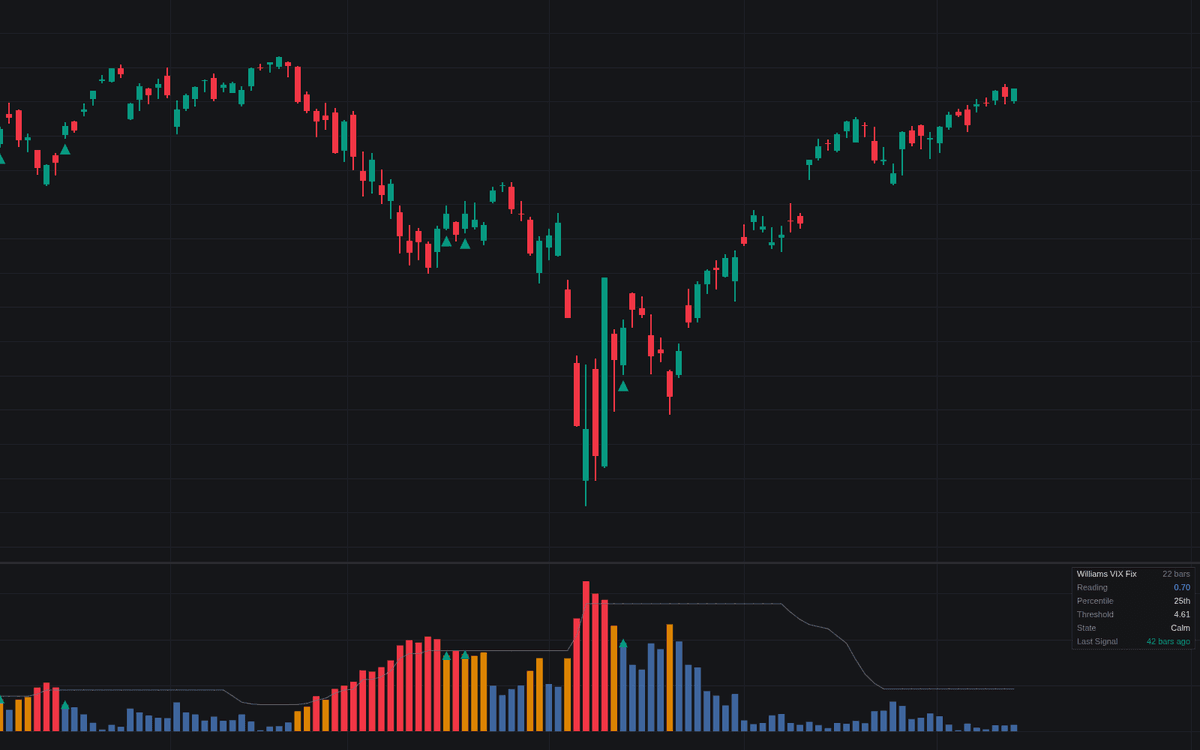

The Williams VIX Fix is a volatility-based indicator designed to identify moments of extreme market fear and subsequent exhaustion. By calculating the percentage distance between the current low price and the highest close over a defined lookback period, this tool quantifies how far price has deviated from its recent highs. This allows traders to identify panic conditions in the market, which are characterized by sharp spikes in volatility, and track the subsequent "unwind" as fear dissipates. By providing a systematic way to monitor these shifts, the indicator helps traders detect potential reversal points when market participants are at their most fearful.
How to Trade the Williams VIX Fix?
Trading with this indicator centers on the "Fear Cycle," which consists of a spike in volatility followed by an exhaustion phase.
- Identify the Spike: When the indicator reaches or exceeds the calculated threshold, it signals a period of elevated fear. This is often associated with a sharp sell-off where market participants are capitulating. Do not necessarily buy simply because a spike has occurred, as extreme volatility can persist.
- Monitor the Unwind: Once a spike has been recorded, the indicator begins to monitor for an "unwind." This occurs when the VIX Fix reading falls back below the threshold, signaling that the initial panic is beginning to cool.
- Confirm with Exhaustion Signals: The indicator generates an exhaustion signal when the VIX Fix drops below the threshold, the price holds above the low established during the spike, and specific price confirmation criteria are met. This is the moment to consider potential entries.
- Utilize Trend Filtering: Enable the trend filter to ensure that you are only taking exhaustion signals that align with the broader market direction, such as buying during a pull-back within an established uptrend.
Williams VIX Fix Settings
VIX Fix
- Highest Close Lookback: Sets the number of bars used to determine the highest closing price for the volatility calculation.
- Percentile Lookback: Defines the lookback period for calculating the percentile rank of the current VIX Fix reading.
Spike Threshold
- Spike Rule: Determines the logic for declaring a spike (e.g., Bollinger Band breach, Range Percentile, or a combination).
- Band Length & Mult: Adjusts the length and standard deviation multiplier when using the Bollinger Band spike rule.
- Range Lookback & Peak %: Configures the sensitivity for the range-based spike detection.
- Fear Floor (Percentile): Sets a minimum percentile threshold to ensure spikes only trigger during unusually high volatility for the selected asset.
Exhaustion Signal
- Show Exhaustion Signals: Toggles the display of reversal signals on the chart.
- Unwind Window: Defines the maximum number of bars after a spike during which an exhaustion signal can be generated.
- Price Confirmation: Selects the required price action (e.g., closing above the prior high) to validate a signal.
- Trend Filter: Enables a simple moving average filter to restrict signals to the direction of the primary trend.
Dashboard & Style
- Show Dashboard: Toggles a data table displaying the current reading, state of the fear cycle, and signal history.
- Colors: Customizes the visual representation of calm, elevated, and spike states, as well as the exhaustion signals.
Frequently Asked Questions
Free on Vela
Run it on Vela. Go further with a paid plan.
- Up to 500 strategy alerts, with webhook automation
- Up to 10× the chart history of Free
- Orderflow lookback up to full history
- Up to 100,000 monthly credits for Quant to customize it
- Futures data alongside crypto, stocks, forex and commodities

Run it on Vela. Make it yours with Quant.
Open this indicator free on Vela, our next-generation charting platform. Then ask Quant, our coding agent built into Vela, to retune it or turn it into a backtested strategy of your own.