SignalStack: Platform Overview

SignalStack is an order router: it takes a webhook alert from a charting platform and turns it into an order at a connected broker or exchange, with no code. It is a TrendSpider company, it lists more than 32 broker and exchange integrations, and its own footer is careful to say what it is not: it offers no alerts, signals, research or advice of its own. That makes it the last link in a chain whose earlier links are the strategy and the alert, and this overview treats it that way. It explains what SignalStack does and how a webhook becomes an order, what a "signal" means on its plans and what they cost in September 2026, how the setup and testing flow works, and where Quant Charts, LuxAlgo's charting and AI platform, fits: Quant, our coding agent, writes and backtests the rule with costs on the chart; the legacy Strategy Alerts can emit the webhook; and no LuxAlgo tool places the order, which is exactly the job a router like SignalStack exists to do.
Key points:
- A router, not a strategy. SignalStack executes whatever a webhook tells it to. The quality of the trade is decided upstream, in the rule and the alert.
- Signals are orders sent, not fills. Plans are metered in signals per month, and a signal counts when the broker accepts the order, whether or not it executes.
- Test before production. Test webhooks and the event log exist to prove the payload and the connection before real money is routed.
- Backtest the leg first. On Quant Charts, Quant writes the strategy, you inspect the code and click Run, and the Backtest Summary shows what the rule is worth with commission and slippage before any webhook exists.
What SignalStack Does
The help centre describes SignalStack as an order-router solution: it captures incoming alerts from charting platforms such as TrendSpider or TradingView and converts them into orders in a connected brokerage or exchange account. Any source that can send an HTTP webhook qualifies, which is why Zapier and IFTTT appear alongside the charting platforms. The product page lists the order types it will send, market, limit, stop, sell to close and stop-limit, and the assets it routes, crypto, stocks, futures, forex, CFDs and stock options, subject to what the connected broker supports. Orders are sent in under 0.45 seconds by the company's own figure, with a 99.99 percent uptime claim; both are vendor statements rather than independent measurements. You can connect as many broker accounts as you like at no extra cost, and both live and simulated accounts appear once a broker is linked, with simulated accounts marked Demo.
The disclaimer is worth reading before the pricing page. It states that safely using the tool requires a level of skill not every individual has, that automation can be risky even for experienced users, and that you are responsible for monitoring your positions and confirming your signals are being processed at all times. The footer adds that SignalStack does not offer alerts, signals, research, analysis or trading advice of any kind. Read together, they describe the product accurately: it is plumbing between an alert and a broker, and it inherits every flaw in the alert.
How a Webhook Becomes an Order
The help centre's overview reduces setup to four steps: sign up, connect a broker or exchange under Brokers & Webhooks, configure the stack, and activate it. Connecting a broker fetches all of its accounts, live and paper. Creating a webhook for an account generates a URL and an example request; you paste the URL into your alert's webhook field and write the order you want as a JSON message. The examples in the TradingView guide are as small as a symbol, an action and a quantity, and the format differs by broker, which is why the account's example request is the reference rather than a generic template.
Two features separate a careful setup from a hopeful one. Test webhooks accept the same payload as production webhooks and report whether the signal arrived and whether it was formatted correctly, without touching an account; the help centre recommends creating one first. The log then records every event with a source IP and timestamp: sign-ins, broker connections, webhook creation and deletion, each received signal and its output, errors, and broker callbacks that may include filled or unfilled information. Clicking a webhook entry shows the request made and the response received. When an automated system misbehaves, this log is the first place to look, and a setup that never reads it is trusting the chain blind.
| Signal source | Where the webhook goes | What the payload carries |
|---|---|---|
| TradingView alert | Notifications tab, Webhook URL | JSON message in the alert; strategy alerts can use TradingView placeholders such as the order action |
| TrendSpider alert | Account & Settings webhook URL, payload in the alert note | JSON, for dynamic or multi-factor alerts |
| TrendSpider Strategy Bot | Separate entry and exit webhook URLs | Entry and exit bodies, so a bot can open and close through the same account |
| Zapier or IFTTT | A webhook action in the workflow, POST as JSON | Whatever the upstream app supplies, for sources that cannot post directly |
Plans and What a Signal Means
The pricing page defines a signal as a trade order successfully sent to a linked broker account. Orders the broker rejects with an error do not count, and a counted signal means the order was received, not that it executed: a limit order that rests unfilled still used a signal. Unused signals expire at the end of each monthly cycle and do not accumulate, there are no refunds, downgrades take effect at the next cycle, and paper accounts are free to trade. The tiers below were listed in September 2026, when a Labor Day promotion offered 50 percent off the first year of any annual plan until 14 September; the list prices are the durable reference.
| Plan | Signals per month | Monthly | Yearly | Intended for |
|---|---|---|---|---|
| Free | 5 | $0 | $0 | Trying the connection |
| Basic | 50 | $27 | $270 | Strategies trading several times a week or month |
| Premium | 250 | $97 | $970 | Strategies trading several times a day |
| Pro | 1,000 | $340 | $3,470 | Higher-frequency strategies |
Because every order sent is a signal, a strategy's trade count sets its plan. A rule that averages two round trips a day uses roughly 80 to 90 signals a month before any bracket exits are counted, which is a Premium plan, not Basic. That number is knowable in advance from a backtest, which is the first practical reason to test the rule before wiring the webhook.
Brokers and Exchanges
The broker directory spans stock brokers such as Alpaca, Charles Schwab, E*Trade, Interactive Brokers, Robinhood, tastytrade, TradeStation, Tradier and Webull, crypto exchanges including Binance, Bybit, Coinbase, Gemini and Kraken, forex and CFD venues including Oanda, Forex.com, Capital.com, cTrader and MetaTrader 5, and futures brokers such as Ironbeam and Optimus Futures. Each integration has its own order-formatting article in the help centre, because a stock ticket, an options ticket and a perpetual-futures ticket do not share a payload. The site also states that SignalStack is not affiliated with or endorsed by any of the brokers it connects to.
Where LuxAlgo Fits
A router needs two things from upstream: a rule worth automating and an alert that carries the order. LuxAlgo supplies both, in different products, and it is worth being precise about which. Quant Charts is where the rule is built and tested. Describe the trade logic to Quant in plain language, entry, exit and risk rules, and it writes a Pine Script strategy; open Code to inspect it, click Run, and the chart marks every entry and exit while the Backtest Summary reports net profit, trade count, win rate, maximum drawdown and profit factor. The strategy Properties hold initial capital, order size, pyramiding, commission, slippage and margin, so the backtest can carry the costs a router will incur, and the full viewer splits performance into longs and shorts and lists every trade. Two numbers from that summary matter directly to SignalStack: the trade count, which sizes the plan, and the net profit after commission and slippage, which decides whether automating the rule is worth paying for at all. Quant Charts does not send orders to a broker; that is by design, and it is why an execution layer sits after it.
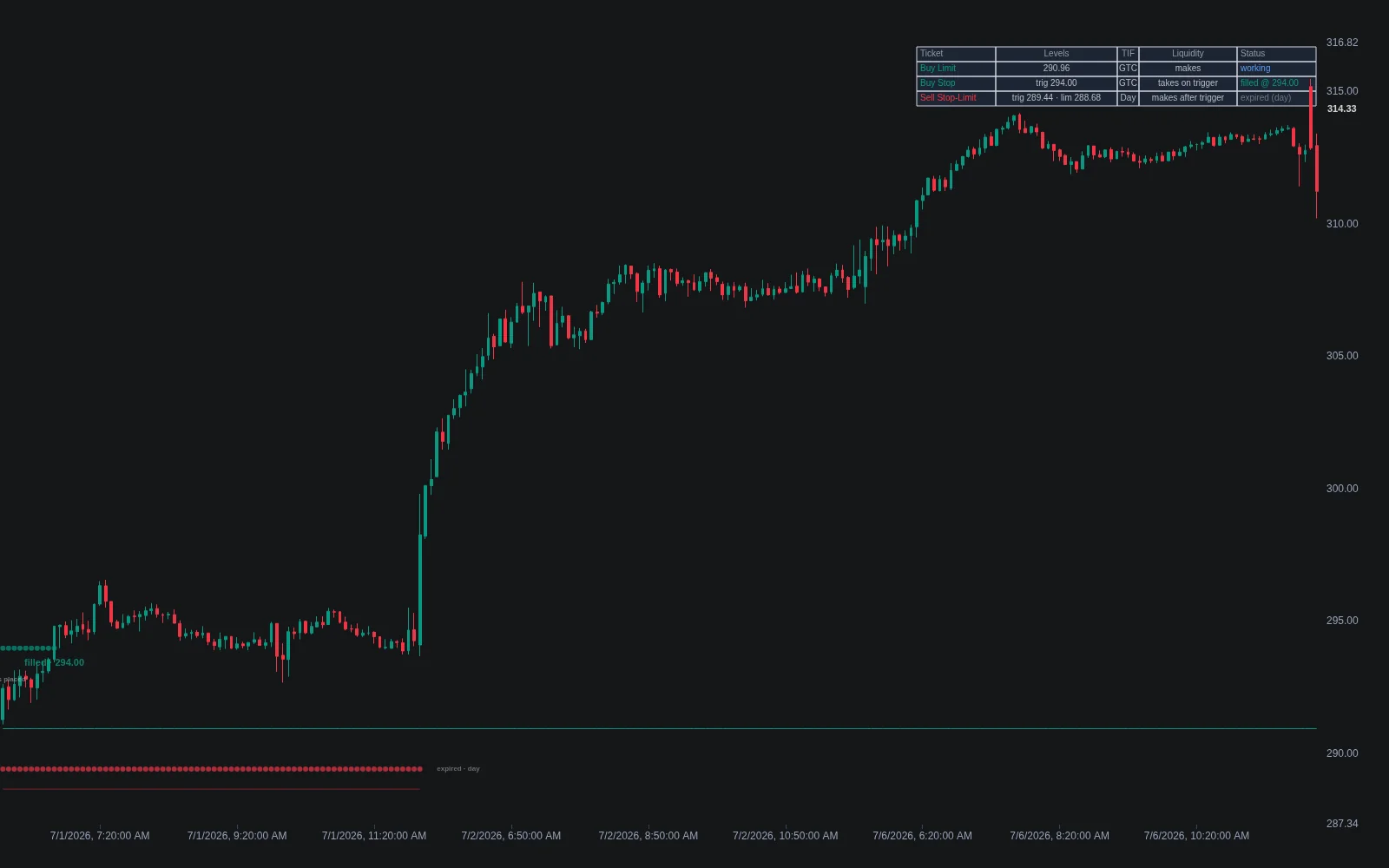
The Library explains the choices a webhook payload encodes. The order types entry frames every type as a trade-off between fill certainty and price certainty: a market order fills but the price is not protected, a limit protects the price but may never fill, a stop-limit adds price control at the risk of missing a gap. Its practical rule is to decide which leg must not fail, and to send the protective exit as a stop-market by default while entries can afford price protection. Brackets and OCO pairs are order constructs built from those primitives, and the execution cost modeling entry, with the indicator of the same name, itemises what a round trip costs in spread, slippage, commission and impact, and why stops chase price once triggered so trigger-price fills make backtests optimistic. Set the slippage in Properties to match.
The alert itself comes from the legacy Strategy Alerts feature, available to Ultimate subscribers and kept for existing users, which sends up to four webhooks per alert with a JSON payload and double-bracket placeholders for the ticker, the strategy event, the order action and the order price, which is the shape a SignalStack payload wants. Its documentation carries a disclaimer that matters here: LuxAlgo alerts are for informational and display purposes, delivery is not guaranteed and delays can occur. That is the honest description of every alert source feeding a router, and the reason the SignalStack log exists.
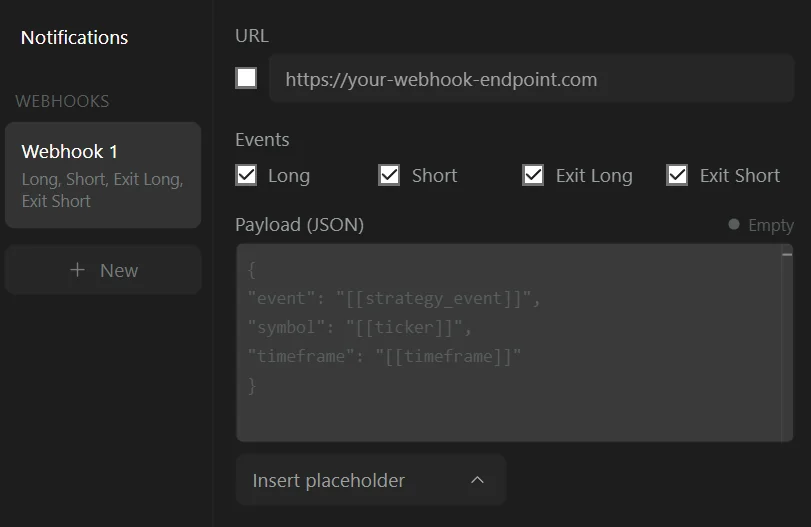
The workflow, then, runs in one direction. Build and cost the rule on Quant Charts until the Backtest Summary earns its keep on the exact symbol and timeframe you will trade, and read the trade count to pick a plan. Recreate the signal on the platform that will emit the alert, and shape the payload to the broker's example request. Send it to a SignalStack test webhook, read the log, then to a paper account, then to production, and keep reading the log. At every step the router is doing what it was told; the work is making sure what it was told is right.
Where Each Tool Stops
SignalStack stops at the broker's door: it sends the order a webhook describes and logs what came back. It does not generate signals, backtest anything or judge the payload, and by its own disclaimer it holds you responsible for monitoring the result. Quant Charts stops at the chart: Quant writes and runs strategies, the Backtest Summary and viewer report costed results, the Library explains order types and execution costs, and nothing on it routes an order. The legacy Strategy Alerts can emit the alert that a router consumes, with delivery expressly not guaranteed. The LuxAlgo platform does not place orders for you; the execution leg is SignalStack's, or a product like it, and the accountability for it is yours.
Conclusion
SignalStack solves one problem well: turning a webhook into a broker order across a wide directory of venues, with a free tier to test on, plans metered by orders sent, and a log detailed enough to debug what went wrong. It also declines, in writing, to solve any other problem, which is the right way to read it. The rule and the alert decide whether automating pays. Build the rule on Quant Charts, where Quant writes the strategy and the Backtest Summary shows the trade count and the net result after commission and slippage; shape the alert on the platform that emits it, using the Library's order-type reasoning for each leg; and let the router do the narrow job it was built for, with the test webhook and the log in the loop before real money is.
Key Takeaways
- SignalStack is an order router: webhook in, broker order out, across more than 32 brokers and exchanges, with no signals or advice of its own.
- A signal is an order the broker accepts, not a fill; plans run from 5 free to 1,000 signals a month at $340, and unused signals expire monthly with no refunds.
- Use a test webhook and the event log before a production webhook, and keep reading the log; the vendor holds you responsible for monitoring positions.
- Quant Charts builds and costs the rule: Quant writes the strategy, Run produces a Backtest Summary with commission and slippage in Properties, and the trade count sizes the plan.
- Legacy Strategy Alerts can emit the webhook; no LuxAlgo tool places orders, and alert delivery is not guaranteed.
FAQs
What is SignalStack?
SignalStack is a no-code order-routing service from TrendSpider that receives webhook alerts from charting platforms or automation tools and converts them into orders at a connected broker or exchange. It lists more than 32 integrations, supports market, limit, stop and stop-limit orders across stocks, options, futures, forex, CFDs and crypto, and states that it offers no alerts, signals or advice of its own.
How much does SignalStack cost?
In September 2026 the pricing page listed a free tier of 5 signals a month, Basic with 50 signals at $27 a month or $270 a year, Premium with 250 at $97 or $970, and Pro with 1,000 at $340 or $3,470, with a promotion of 50 percent off the first year of annual plans. Unused signals expire each month and there are no refunds.
What counts as a signal?
A signal is a trade order successfully sent to a linked broker account. Orders rejected with an error are not counted, and a counted signal means the broker received the order, not that it executed; a resting limit order that never fills still uses a signal. Every order in a strategy, including exits, consumes one.
How do I test SignalStack before trading live?
Create a test webhook, which accepts the same payload as a production webhook and reports whether the signal arrived and was formatted correctly without touching an account. Then route to a paper account, which SignalStack marks Demo and does not charge for, and read the event log, which records each signal, its output, errors and broker callbacks.
Can LuxAlgo alerts be sent to SignalStack?
Yes. The legacy Strategy Alerts feature for Ultimate subscribers sends up to four webhooks per alert with a JSON payload and placeholders. LuxAlgo states these alerts are informational and delivery is not guaranteed, and no LuxAlgo tool places orders itself.
Where does Quant Charts fit with an order router?
Before it. Describe the rule to Quant, inspect the generated Pine Script under Code and click Run; the Backtest Summary shows net profit, trade count, win rate, max drawdown and profit factor with commission and slippage set in Properties. The trade count sizes the SignalStack plan and the costed result decides whether automating is worth it. Quant Charts does not route orders.
References
LuxAlgo Resources
- Quant Charts
- Quant: making strategies
- Strategies and the Backtest Summary
- Library concept: order types
- Library concept: order constructs
- Library concept: execution cost modeling
- Library: Order Types indicator
- Library: Execution Cost Modeling indicator
External Resources
Read next