Anchored Clusters Volume Profile
 By LuxAlgoFeb 17, 2026
Anchored Clusters Volume Profile is an indicator on Vela, our next-generation charting platform, written in Pine Script®.
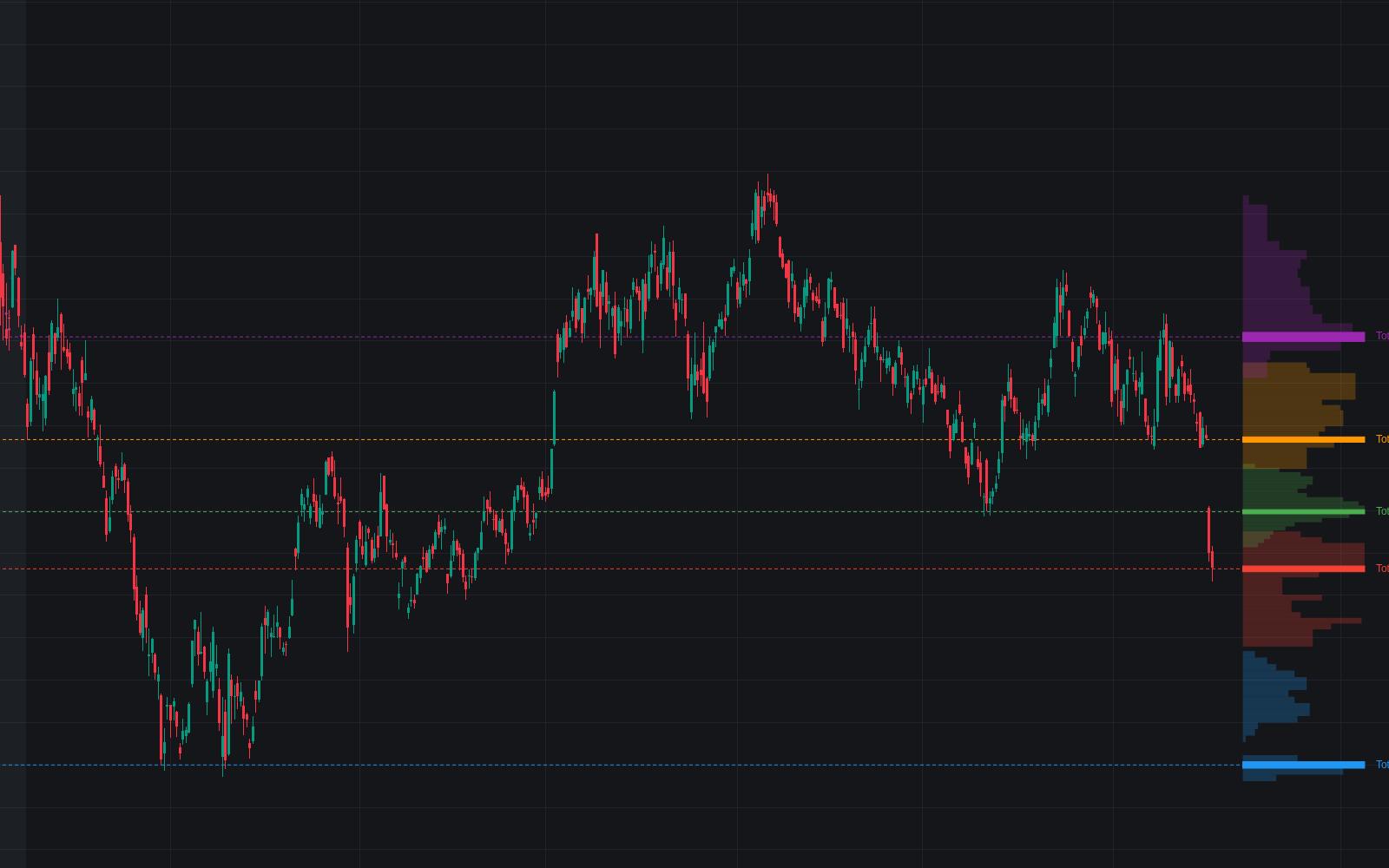

Anchored Clusters Volume Profile runs K-Means clustering over a time range you anchor on the chart and draws an independent volume profile for every price regime it finds, rather than one aggregated histogram. Each color-coded cluster carries its own point of control and total-volume label, exposing the separate value areas a single profile blurs together.
How to Trade the Anchored Clusters Volume Profile?
- Cluster POCs: dashed lines mark where the most volume traded inside each regime; price revisiting a high-volume POC frequently reacts: support in bullish structure, resistance in bearish.
- Cluster geometry: overlapping clusters point to balance and range conditions, while vertically separated clusters with thin gaps between them show acceptance at new prices; a fresh cluster forming away from the rest often accompanies a breakout.
- Volume conviction: compare the Total labels. A break into a high-volume cluster carries more weight than one into a thin cluster.
Because bars are grouped by price proximity instead of strict chronology (the same instinct behind level clustering), the tool also frames risk: stops belong beyond a cluster's full range, targets at the POC of the next cluster above or below.
Anchored Clusters Volume Profile Settings
- Start Time / End Time: the analysis window, selectable directly on the chart; Range Highlight shades it.
- Number of Clusters: 2 to 10. Fewer for broad regimes, more for finer structural detail.
- K-Means Iterations: refinement cycles; higher values produce more stable cluster separation.
- Rows per Cluster VP / Max VP Width (Bars) / VP Offset: vertical resolution, histogram width, and spacing from price.
- Highlight Price Dots / Dot Size: per-bar markers showing cluster assignment.
Frequently Asked Questions
Free to use
Run it on Vela. Go further with a paid plan.
- Up to 500 strategy alerts, with webhook automation
- Up to 10× the chart history of Free
- Orderflow lookback up to full history
- More Quant usage to customize it, plus extra usage when you need it
- Futures data alongside crypto, stocks, forex and commodities
Also works on

Related indicators
All 30 Volume Profile indicators
.png&w=3840&q=75)
Run it on Vela. Make it yours with Quant.
Open this indicator free on Vela, our next-generation charting platform. Then ask Quant, our coding agent built into Vela, to retune it or turn it into a backtested strategy of your own.