Arbitrage Matrix

Jan 14, 2026

Static chart image
Correlation
Liquidity
Volatility
Works on the following platforms:
tradingviewSymbolTradingView
For free use on the TradingView platform
ninjatraderNinjaTrader
For free use on the NinjaTrader platform
metatrader4MetaTrader 4/5
For free use on the MetaTrader 4/5 platform
thinkorswimThinkorswim
For free use on the Thinkorswim platform

The Arbitrage Matrix is an advanced trading indicator designed to give traders a clear, real-time overview of price and volume discrepancies across the entire crypto and forex marketplace. As a natural evolution of the Arbitrage Detector, this tool aggregates data from multiple exchanges and brokers into a single visual dashboard, making it easy to compare how the same asset is valued across different markets and identify potential arbitrage opportunities.

By presenting spreads in a structured matrix format, the Arbitrage Matrix helps both beginners and experienced traders understand market inefficiencies, spot mispricings, and refine their trading strategies using objective, data-driven insights.

USAGE

indicator image

Arbitrage is a trading strategy that exploits price differences for the same asset across multiple markets. When an asset trades at different prices on different exchanges or brokers, traders can potentially buy at a lower price and sell at a higher one to capture the spread.

For beginners, the Arbitrage Matrix acts as a simplified snapshot of global market pricing, helping visualize how different platforms value the same instrument at the same time.

For advanced traders, it functions as a powerful arbitrage scanner, highlighting where the largest price or volume discrepancies exist so opportunities can be identified quickly in fast-moving markets.

Arbitrage opportunities are often short-lived, but they can be highly profitable. By continuously comparing data across sources, this trading indicator helps traders:

  • Understand real-time market inefficiencies
  • Avoid entering trades at unfavorable prices
  • Identify potential arbitrage and relative-value trading opportunities

By default, the tool automatically scans all enabled sources for the asset on your chart. Crypto assets pull data from supported crypto exchanges, while non-crypto assets use data from available forex brokers.

All information is displayed inside a single dashboard, which serves as the indicator’s main visual interface.

Traders can enable or disable individual exchanges or brokers directly from the settings panel, allowing full customization of the data universe.

Displayable Data

indicator image

The Arbitrage Matrix allows traders to choose between four different data types, depending on their trading strategy and analysis needs:

  • Last Price
  • Last Volume
  • Average Price
  • Average Volume

If price or volume data is not available for a specific asset at a given source, that source will not be displayed in the matrix.

As shown in the example image, each chart can display a different data type for the same asset. In this case, ETHUSDT is used to illustrate how pricing and volume differ across exchanges.

How to Read the Arbitrage Matrix

indicator image

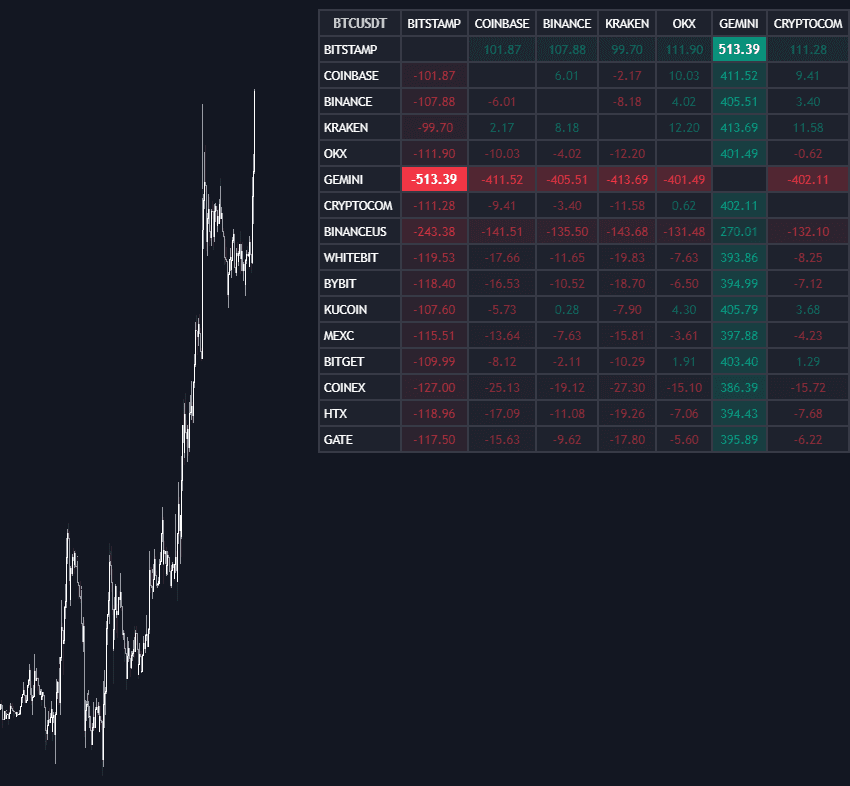
The matrix is read in a row-by-column format.

For example, assume you are analyzing BTCUSDT on the daily timeframe. The row represents Exchange A, and the column represents Exchange B. If the selected data type is average price and the value displayed is 100, with an average length of 20, it means:

The average BTCUSDT price over the last 20 periods is $100 higher on Exchange A than on Exchange B.

If the value were -100, it would indicate that the average price on Exchange A is $100 lower than on Exchange B.

This structure allows traders to instantly compare relative pricing or volume between any two sources in the matrix.

Matrix Style and Customization

indicator image

The Arbitrage Matrix is fully customizable to match different trading workflows and visual preferences.

Traders can:

  • Adjust bullish and bearish colors
  • Enable or disable the background gradient (enabled by default)
  • Fine-tune the dashboard position on the chart
  • Resize the dashboard for better visibility

These options make it easy to integrate the indicator seamlessly into any chart layout.

SETTINGS

  • Sources: Choose between crypto exchanges, forex brokers, or automatic source selection based on the asset.
  • Average Length: Define the lookback period used for price and volume averages.
  • Crypto Exchanges: Enable or disable individual crypto exchanges.
  • Forex Brokers: Enable or disable individual forex brokers.

Dashboard

  • Data: Select which data type to display in the matrix.
  • Position: Choose the dashboard location on the chart.
  • Size: Adjust the overall dashboard size.

Style

  • Bullish: Set the bullish color.
  • Bearish: Set the bearish color.
  • Background Gradient: Toggle the background gradient on or off.

FAQ

What is the Arbitrage Matrix trading indicator used for?
The Arbitrage Matrix is used to compare price and volume data for the same asset across multiple exchanges or brokers, helping traders identify arbitrage opportunities and market inefficiencies.

Is the Arbitrage Matrix suitable for beginners?
Yes. Beginners can use it to understand how different markets price the same asset, while advanced traders can use it as a real-time arbitrage and relative-value scanning tool.

How can I access the Arbitrage Matrix?
You can get access on the LuxAlgo Library for charting platforms like TradingView, MetaTrader (MT4/MT5), and NinjaTrader for free.

Trading & investing are risky and many will lose money in connection with trading and investing activities. All content on this site is not intended to, and should not be, construed as financial advice. Decisions to buy, sell, hold or trade in securities, commodities and other investments involve risk and are best made based on the advice of qualified financial professionals. Past performance does not guarantee future results.

Hypothetical or Simulated performance results have certain limitations. Unlike an actual performance record, simulated results do not represent actual trading. Also, since the trades have not been executed, the results may have under-or-over compensated for the impact, if any, of certain market factors, including, but not limited to, lack of liquidity. Simulated trading programs in general are designed with the benefit of hindsight, and are based on historical information. No representation is being made that any account will or is likely to achieve profit or losses similar to those shown.

Testimonials appearing on this website may not be representative of other clients or customers and is not a guarantee of future performance or success.

As a provider of technical analysis tools and strategies, we do not have access to the personal trading accounts or brokerage statements of our customers. As a result, we have no reason to believe our customers perform better or worse than traders as a whole based on any content, tool, or platform feature we provide.

Charts used on this site are by TradingView in which the majority of our technical indicators are built on. TradingView® is a registered trademark of TradingView, Inc. www.TradingView.comTradingView® has no affiliation with the owner, developer, or provider of the Services described herein.

Market data is provided by CBOE, CME Group, BarChart, CoinAPI. CBOE BZX real-time US equities data is licensed from CBOE and provided through BarChart. Real-time futures data is licensed from CME Group and provided through BarChart. Select cryptocurrency data, including major coins, is provided through CoinAPI. All data is provided “as is” and should be verified independently for trading purposes.

This does not represent our full Disclaimer. Please read our full disclaimer.

© 2026 LuxAlgo Global, LLC.