Buy Sell Calendar
 By LuxAlgoJan 23, 2023
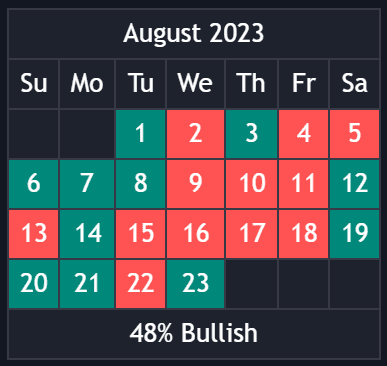
The Buy Sell Calendar projects sentiment onto a calendar panel, grading every day or month as bullish or bearish so recurring day-of-week effects and monthly tendencies surface at a glance. Three interchangeable methods score each period from its closing prices, and the panel also reports the percentage of bullish days or months across the longer frame: seasonality tooling at its most compact.
How to Trade the Buy Sell Calendar?
- Green and red cells: green marks periods graded bullish, red bearish. The checkerboard itself is the tendency map.
- Bullish percentage: the share of bullish days in a month, or bullish months in a year, quantifies the broader lean.
- Period lines: color-coded vertical lines mark each new day or month, and a line's color can update retrospectively as that period's sentiment resolves.
Sentiment depends on your chosen method. Linreg fits least-squares lines between consecutive periods and calls a positive slope bullish; Accumulated Deltas nets the bullish and bearish price changes within each period; Max/Min reads price against trailing extremes. Results can vary with the chart timeframe feeding the calculation, so pick it deliberately.
Buy Sell Calendar Settings
- Frequency: Daily or Monthly cells.
- Sentiment Method: Linreg, Accumulated Deltas, or Max/Min.
- Timezone Offset: aligns period boundaries with your UTC offset.
- Limit Date: confines the analysis to dates inside the chosen limit.
- Show Calendar / Location / Size: panel visibility, placement on the chart, and sizing.
Frequently Asked Questions
Free on Vela
Run it on Vela. Go further with a paid plan.
- Up to 500 strategy alerts, with webhook automation
- Up to 10× the chart history of Free
- Orderflow lookback up to full history
- Up to 100,000 monthly credits for Quant to customize it
- Futures data alongside crypto, stocks, forex and commodities
Also works on

Run it on Vela. Make it yours with Quant.
Open this indicator free on Vela, our next-generation charting platform. Then ask Quant, our coding agent built into Vela, to retune it or turn it into a backtested strategy of your own.