Fixed Time Cycles
 By LuxAlgoJun 2, 2026
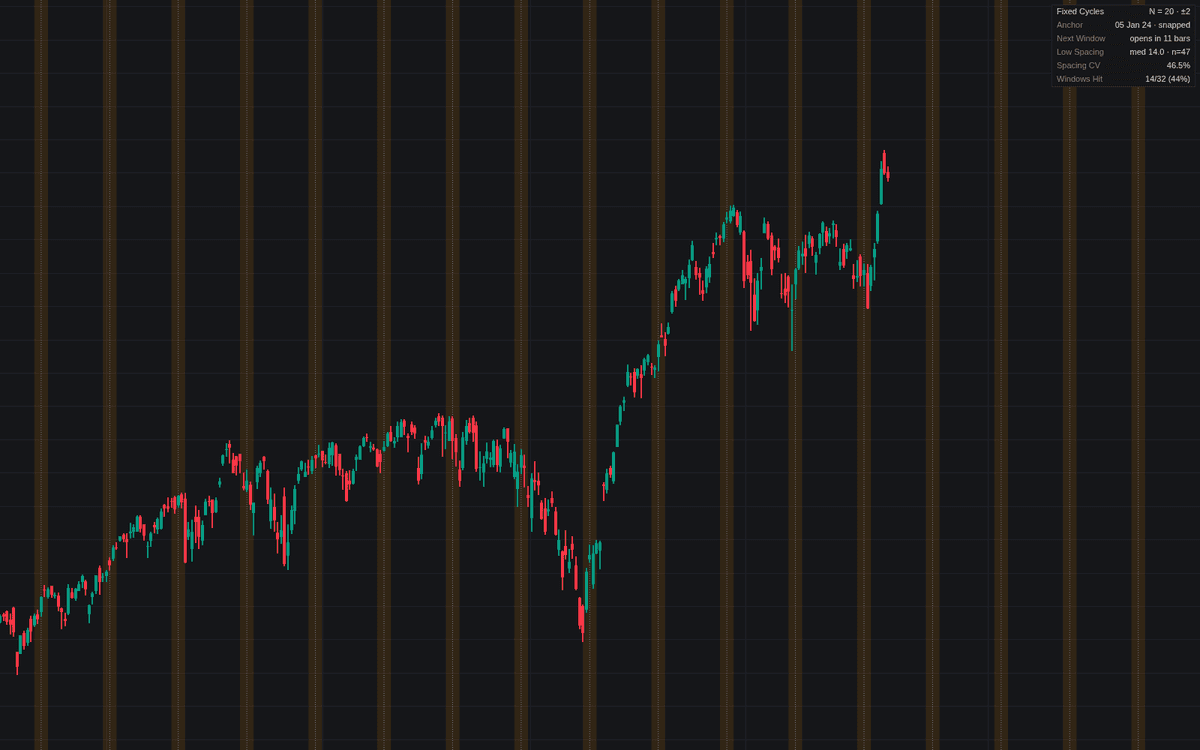

Fixed Time Cycles is the definitive clean build of fixed time cycles: from a chosen anchor (classically a major swing low) a vertical line projects at every Nth bar, past and future, each wrapped in a shaded window where a turn is “due” under the model. The period never adapts; that is the model's point and its weakness, so the projection ships with an audit of whether the chart actually keeps the rhythm.
How to Trade the Fixed Time Cycles?
- Turn window opens: the model calls a turn due, never in a known direction. Demand a price trigger inside the window and pass on any where nothing sets up.
- Turn Confirmed In Window: a swing turn confirming inside a window is the time-price agreement the method trades; dedicated alert.
- Dashboard audit: a median swing spacing near N with low variability supports the chosen period; scattered spacings or a weak hit rate mean the lines mostly mark noise.
Fixed counts are the strictest model in the time and seasonality family, useful because the audit can prove them wrong.
Fixed Time Cycles Settings
- Anchor Point: origin of the count, selected on the chart; draggable afterwards.
- Cycle Length (bars) (default 20): the fixed period N between projected lines.
- Turn Window (± bars) (default 2): half-width of the window; 0 keeps just the lines.
- Future Cycles (default 6): lines projected past the newest bar.
- Snap Anchor To Swing Turn (default on): snaps the selected time to the nearest confirmed swing within one cycle length.
- Swing Length (default 5): pivot strength defining a turn, confirmed this many bars late.
- Turn Swings (default Swing Lows): which swings count for snapping, audits, markers and alerts.
- Show Dashboard (default on); Turn Window Shading (default on) and Mark Turns In Windows (default off) cover the visuals.
Frequently Asked Questions

Original indicatorBuilt in-house by LuxAlgo
The Library is free. Quant makes it yours.
Pull any concept or indicator into Quant: rebuild it, retune it, or turn it into a backtested strategy of your own.