Run Pine Script® on a chart you own.
Vela™ is our open-source charting library. Vela-PineTS runs native Pine Script® v5 and v6 on it through PineTS, our open-source runtime. The indicators your users already know, in your app, on your infrastructure. Three packages, one afternoon.
// © LuxAlgo · CC BY-NC-SA 4.0//@version=6indicator("Volumetric Order Flow Structure", overlay = true, max_boxes_count = 500, max_lines_count = 500, max_labels_count = 500) color BULL_COLOR = #089981color BEAR_COLOR = #f23645color POC_COLOR = #ff9800 type OrderBlock array<box> profileBoxes array<box> histBoxes float high float low float volume bool isBullish array<int> rowWeights array<label> manipBubbles array<label> manipTexts pivotLenInput = input.int(3, "Pivot Length", minval = 1, group = "Detection")volLookbackInput = input.int(20, "Volume Lookback", minval = 1, group = "Detection")maxObsInput = input.int(5, "Max Recent Blocks", minval = 1, group = "Visuals")showManipulationInput = input.bool(true, "Show Manipulation Bubbles", group = "Manipulation") ph = ta.pivothigh(pivotLenInput, pivotLenInput)pl = ta.pivotlow(pivotLenInput, pivotLenInput)// … 220 more lines: volumetric break bars, 15-row volume profiles,// manipulation bubbles, BOS and CHoCH labels. Full source in the Library.
The full script is in the LuxAlgo Library: user-defined types, arrays of boxes and labels, volume profiles. It runs unmodified.
Three steps
Lifted from the docs. Nothing here is pseudocode.
Step 1
Create the chart
A container, a timeframe, and either your own bars or a symbol with a registered provider. Candles paint immediately. No engine is required for a chart to be a chart.
import { Vela } from '@luxalgo/vela'; const chart = new Vela('#chart', { data: myBars, // OHLCV[] you already have; time in epoch ms timeframe: '1h', theme: 'dark',});
Step 2
Register the Pine engine
Vela™ ships no scripting engine, which is why its license stays Apache-2.0 and the bare chart stays light. Vela-PineTS is the official addon: PineEngine on the main thread, or PineWorkerEngine in a Web Worker, with identical Pine semantics.
import { PineWorkerEngine } from '@luxalgo/vela-pinets'; chart.registerEngine('pine', new PineWorkerEngine());// registerEngine returns the chart, so it chains from construction
Step 3
Add the script
Pass the source. The handle comes back synchronously; the plots land when execution resolves. Every input.* declaration becomes the settings dialog. request.security() resolves through the chart’s own cached feed.
const ema = chart.addIndicator(`//@version=6indicator("EMA", overlay=true)plot(ta.ema(close, input.int(20, "Length")), "EMA", color.orange)`); ema.on('ready', () => console.log('EMA rendered'));ema.on('error', ({ error }) => console.error(error));
The proof
The most-used indicator on TradingView, executing outside it. Same source, same levels.
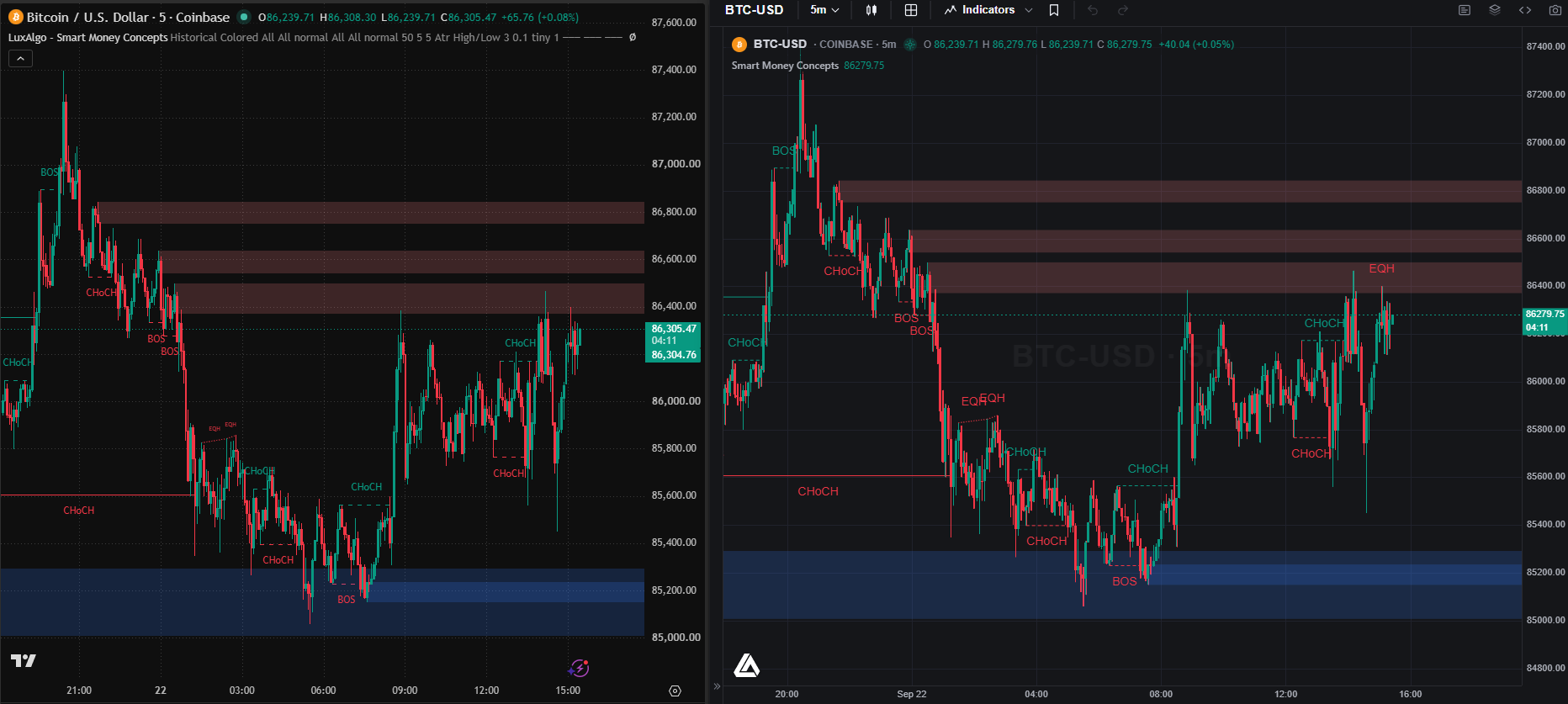
The Library, unmodified
The LuxAlgo Library holds the most popular indicators ever published on TradingView. Every one of them runs through PineTS, on LuxAlgo charts and in Vela™ Pro, every day.
800+ functions, on a public table
The coverage tables list every implemented function across ta, math, array, matrix, map, str, request, strategy and the drawing namespaces, with tests.
A runtime, not a converter
Converters translate syntax and lose the semantics. PineTS executes the bar-by-bar model, series indexing and na rules as the language defines them.
What your users get
Everything they expect from Pine Script®, on your chart.
Pine Script® v5 and v6, unmodified
Native source, no conversion step. The bar-by-bar execution model, series indexing, var and varip, na handling and barstate behave as the language defines them.
800+ API functions, tested
ta, math, array, matrix, map, str, request, strategy and the drawing namespaces, each entry tracked on the public coverage tables.
Inputs become the settings dialog
Every input.* declaration is read as a schema. The chart renders the dialog; your users change lengths and sources without touching code.
request.security() through the chart
Higher, lower and cross-symbol data resolves through Vela™’s cached feed. The engine never fetches candles itself.
Live, bar by bar
Persistent engine sessions with stable series identities: every tick patches the exact series in place. No teardown, no flicker.
Strategies and alerts
strategy() scripts emit trade markers the renderer draws; alert() and alertcondition() fire as events your host receives.
Off the main thread
PineWorkerEngine runs scripts in a Web Worker spawned from an inlined Blob, or from a worker file you host under a strict Content-Security-Policy.
Built for editors and agents
Structured errors, injected execution and read-only state snapshots for tools that write Pine Script® on the fly. Quant, our coding agent, is built on the same port.
Two engines, one port
Identical Pine semantics on the main thread or in a Web Worker. Wire it once for every chart in your app.
PineEngineMain threadSimplest setup; light overlays and a handful of indicators.PineWorkerEngineWeb WorkerHeavy scripts, many indicators, or a workspace grid where painting must never block.import { VelaWorkspace } from '@luxalgo/vela/workspace';import { PineWorkerEngine } from '@luxalgo/vela-pinets'; new VelaWorkspace('#app', { layout: '4', symbol: 'BTCUSDT', engines: { pine: () => new PineWorkerEngine() }, indicators: [{ name: 'EMA Ribbon', enabled: true, script: source }],});
import { registerDefaultEngine } from '@luxalgo/vela/plugin';import { PineWorkerEngine } from '@luxalgo/vela-pinets'; // every chart built afterwards can run Pine Script®registerDefaultEngine('pine', () => new PineWorkerEngine()); // strict CSP that blocks blob:? host the worker file instead// new PineWorkerEngine({ workerUrl: '/vela-pine-worker.js' })
Who ships this
Anything your users already run as Pine Script®, your product can now run natively.
Brokers and exchanges
Ship the scripts your traders wrote elsewhere, on your chart, against your feed. Every input is a settings dialog; every alert is an event your order router can hear.
Indicator vendors
Your catalogue runs unmodified. The commercial seat clears the LuxAlgo Library for your product too: hundreds of production indicators, licensed, from day one.
Agents and editors
Structured errors, injected execution and worker-safe state snapshots are built for tools that write Pine Script® for the user.
Two licenses, both on the page
The chart · @luxalgo/vela
Apache-2.0
Free forever, commercial use included, a small attribution mark that any paid license removes. Fork it, vendor it, ship it. Contains no Pine code, so its license stays clean.
The engine · vela-pinets + pinets
AGPL-3.0
Free for anyone who open-sources their stack. Installing the addon brings the AGPL obligations into your deployment; decide that deliberately, or take a seat.
Closed source · Developer License
$1,199 per developer per year
One seat, three licenses: Vela™ Pro, the PineTS commercial license, and the LuxAlgo Library cleared for your product. Pro ships the runtime built in with a Pine Script® editor. Business $20,000 per year flat, unlimited developers, white label.
Pine Script® on Vela™, in questions
Your users' scripts. Your chart.
Three packages, one afternoon, and the whole Pine Script® ecosystem runs on a chart you own. Start with the docs, star the repos, or take an indicator from the Library and paste it in.
Vela™ on GitHub
Apache-2.0. The chart, the workspace, the plugin SDK and the scripting port.
PineTS on GitHub
AGPL-3.0. The runtime that executes Pine Script® v5 and v6 in Node.js and the browser.
The LuxAlgo Library
The largest indicator library in trading. Every entry is Pine Script® source that runs here.
Vela™ is a trademark of LuxAlgo Global, LLC. Vela runs Pine Script® through the independently developed PineTS engine and is not affiliated with, sponsored by, endorsed by, or in any way officially associated with TradingView, Inc. “Pine Script”, “TradingView” and “Lightweight Charts” are trademarks or registered trademarks of TradingView, Inc. Third-party details are taken from the vendors' public documentation and may change; corrections are welcome at LuxAlgo.