Golden Cross
 By LuxAlgoApr 8, 2026
Golden Cross is an indicator on Vela, our next-generation charting platform, written in Pine Script®.
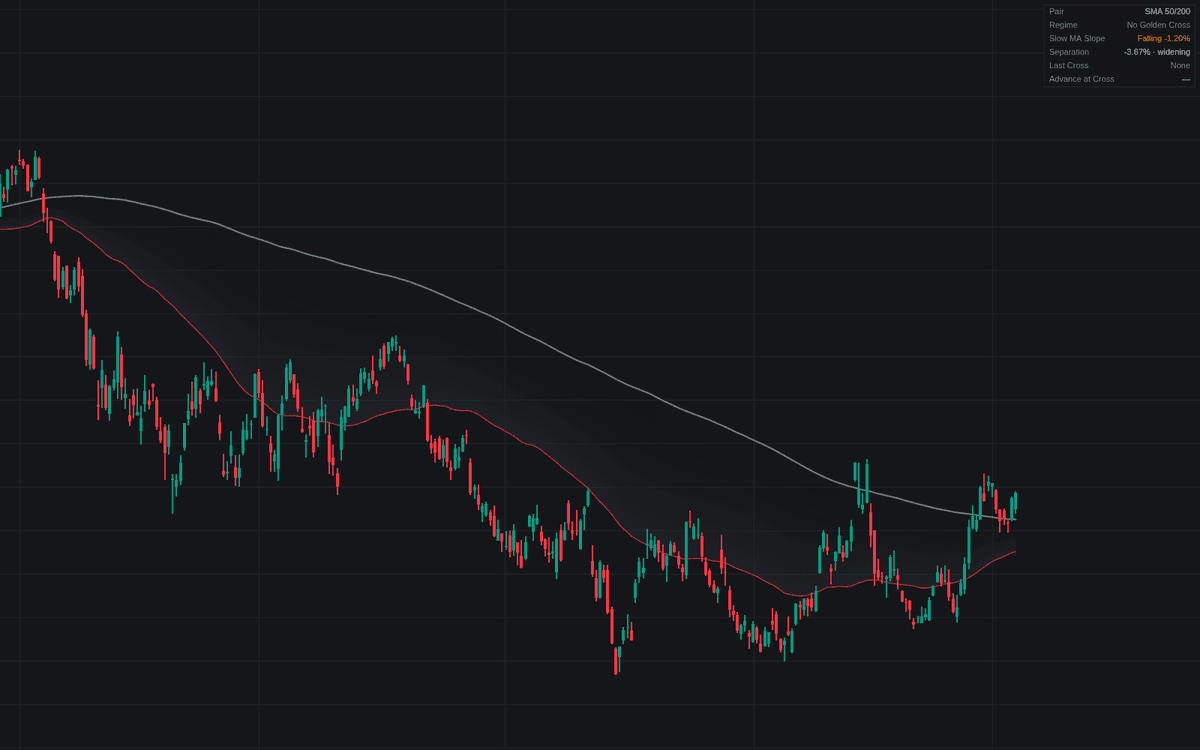

Golden Cross is the definitive clean build of the golden cross regime event: it plots fast and slow moving averages (50/200 SMAs by default), marks where the fast one closes above the slow one, and grades each cross by the slow MA's slope over 20 bars. A flat or rising slow average prints the bullish color, a still-falling one the caution color. An x-cross marks the re-cross that ends a standing golden cross, and a fill between the averages shades the regime.
How to Trade the Golden Cross?
- Bullish-graded cross: the slow MA is flat or rising at the cross, the cleaner regime statement, covered by the Clean Golden Cross alert.
- Caution-graded cross: the slow MA is still falling; treat the read as weaker until the slope turns.
- Invalidation Mark: the fast MA closed back under the slow one, ending the standing cross; within the whipsaw window this is the classic failure mode.
- Dashboard separation: widening says the regime is strengthening; narrowing warns of braiding.
Each cross label's tooltip reports the slow MA slope and the advance from the preceding regime low. This is a lagging regime statement, not a timing entry.
Golden Cross Settings
- Fast Length (default 50): the shorter average of the pair.
- Slow Length (default 200): the long-term base.
- MA Type (default SMA): or EMA; exponential weighting can shift cross dates.
- Source (default close): price series both averages use.
- Slow MA Slope Lookback (default 20): bars used to grade the slope.
- Whipsaw Window (default 20): a re-cross within this many bars is flagged as a whipsaw.
- Show Dashboard (default enabled): pair, regime, slope, separation and last-cross context.
- Style toggles: cross markers, invalidation marks and the regime fill, all on by default.
Frequently Asked Questions
Free to use
Run it on Vela. Go further with a paid plan.
- Up to 500 Custom Alerts, with webhook automation
- Up to 10× the chart history of Free
- Orderflow lookback up to full history
- More Quant usage to customize it, plus extra usage when you need it
- Futures data alongside crypto, stocks, forex and commodities

Related indicators
Run it on Vela. Make it yours with Quant.
Open this indicator free on Vela, our next-generation charting platform. Then ask Quant, our coding agent built into Vela, to retune it or turn it into a backtested strategy of your own.