





Hot Zone Radar
Feb 19, 2026
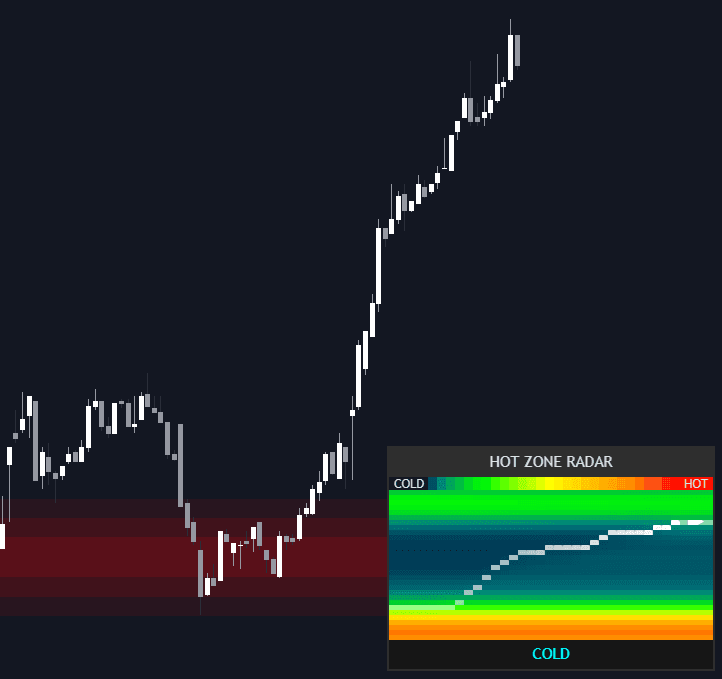
The Hot Zone Radar indicator is an advanced trading indicator designed to visualize market liquidity in real time using a dynamic heatmap dashboard and projected gradient support and resistance zones. By transforming raw volume data into a thermal “weather map” of price density, this tool helps traders identify high-liquidity friction zones and low-liquidity breakout areas, making it ideal for both trend-following and mean-reversion trading strategies.
How to Trade the Hot Zone Radar Trading Indicator?
The Hot Zone Radar combines two powerful components into a single liquidity-driven trading system:
- A dynamic Radar Dashboard that tracks evolving volume distribution.
- On-chart Gradient Support & Resistance Zones that highlight actionable price levels.
This dual-structure makes it more than a standard volume profile. It becomes a complete trading strategy framework for identifying liquidity clusters, breakout zones, and institutional supply/demand areas.
The Radar Dashboard
The Radar Dashboard acts as a rolling, high-resolution volume heatmap that shifts over time. Unlike static volume profile tools, this trading indicator continuously updates its internal liquidity matrix, allowing traders to see how volume nodes evolve.
Price Trace & Current Position
- The current price is plotted directly onto the heatmap using marker dots (●) and a final pointer (▶).
- This overlay shows precisely where price sits relative to historical High-Volume Nodes (HVNs) and Low-Volume Nodes (LVNs).
- Traders can instantly evaluate whether price is approaching resistance, sitting in consolidation, or moving through a liquidity void.
Thermal Color Scale
The heatmap uses a gradient-mapped color model:
- Deep Blue / Cyan → Cold Zones (Low Liquidity)
- Bright Red → Hot Zones (High Liquidity)
This color transition makes it easy to visually identify:
- Liquidity hubs (potential consolidation or reversal zones)
- Liquidity vacuums (potential breakout acceleration areas)
Market Status Indicator
A simplified market status bar provides immediate context for your trading strategy:
- HOT: Price is oscillating inside a major liquidity hub (range-bound conditions likely).
- WARM: Price is trending toward a high-volume cluster (potential magnet effect).
- COLD: Price is inside a low-volume vacuum (momentum breakouts possible).
- STABLE: Neutral volume conditions.
This classification helps traders quickly adapt their approach between breakout trading and mean-reversion trading.
On-Chart Gradient Support & Resistance Zones
Beyond the dashboard, the indicator automatically extracts the most significant liquidity clusters and projects them directly onto the price chart as gradient-filled boxes.
These dynamic zones:
- Represent high-volume institutional areas.
- Act as adaptive support and resistance levels.
- Highlight areas of likely reaction, consolidation, or rejection.
When price enters a zone:
- The gradient shifts to indicate active interaction.
- Traders can anticipate potential reversals or compression before a breakout.
- Scalpers and swing traders can refine entry and exit timing.
This feature transforms the Hot Zone Radar from a visualization tool into a complete liquidity-based trading system.
Indicator Details & Internal Logic
The Hot Zone Radar is powered by a rolling Volume Profile engine feeding into a 2D historical matrix.
Thermal Data Engine
At its core, the indicator:
- Calculates volume distribution across a user-defined price range.
- Divides the range into vertical resolution bins.
- Updates the matrix as each new bar forms.
- Ages out old data to maintain a rolling liquidity history.
This creates the signature horizontal “flow” of the radar, showing not just where volume exists — but how long it has persisted.
This time-weighted liquidity insight is critical for:
- Identifying strong structural support and resistance.
- Spotting newly forming liquidity nodes.
- Detecting weakening zones before they break.
Diffusion Blur Algorithm
To improve clarity and usability, a Diffusion Blur algorithm smooths raw volume spikes into cohesive thermal structures.
Benefits include:
- Clearer visualization of major liquidity clouds.
- Reduced noise from minor spikes.
- Better identification of structurally important zones.
This smoothing enhances both aesthetics and trading decision accuracy.
Settings & Customization
The Hot Zone Radar trading indicator includes extensive configuration options for different trading styles, timeframes, and assets.
Radar Logic
- Profile Lookback: Number of historical bars used to compute volume distribution.
- Resolution (Heatmap Grid): Controls vertical bins and horizontal steps. Higher resolution = more detail, higher processing cost.
- Diffusion Blur: Adjusts smoothing intensity.
- Intensity Gamma: Controls color sensitivity. Lower values make “Hot” zones appear more frequently.
These settings allow traders to fine-tune the indicator for scalping, intraday trading, or swing trading.
Support/Resistance Zones
- Show Gradient S/R Zones: Enable or disable projected liquidity boxes.
- S/R Sensitivity %: Sets the volume threshold required to display a zone. Higher values filter for only the strongest liquidity hubs.
- Gradient Steps: Controls the layered glow effect for visual emphasis.
Higher sensitivity settings are ideal for longer-term structural trading, while lower thresholds suit short-term breakout strategies.
Dashboard Styling
- Position: Top Right, Bottom Right, or Bottom Left.
- Overall Panel Size: Scale the dashboard UI for your screen resolution.
This ensures the tool integrates seamlessly into your existing trading workflow.
Why Use the Hot Zone Radar in Your Trading Strategy?
The Hot Zone Radar stands out among trading indicators because it:
- Combines volume profile logic with historical liquidity evolution.
- Provides actionable on-chart support and resistance zones.
- Distinguishes between consolidation zones and breakout vacuums.
- Works across stocks, crypto, forex, futures, and indices.
- Supports both trend-following and mean-reversion trading strategies.
By understanding where liquidity accumulates — and where it disappears — traders gain a structural edge in anticipating market behavior.
FAQ
What is the Hot Zone Radar trading indicator?
It is a liquidity-based trading indicator that visualizes evolving volume distribution as a dynamic heatmap and projects significant high-volume zones as gradient support and resistance areas on the chart.
How does it help with breakout trading?
When price moves into “Cold” low-volume zones, the indicator highlights liquidity vacuums that often allow faster, momentum-driven breakouts.
Is this indicator suitable for scalping and swing trading?
Yes. By adjusting the lookback, resolution, and sensitivity settings, the Hot Zone Radar can be optimized for short-term scalping or longer-term structural swing trading strategies.
How do I access the Hot Zone Radar?
You can get access on the LuxAlgo Library for charting platforms like TradingView, MetaTrader (MT4/MT5), and NinjaTrader for free.
Trading & investing are risky and many will lose money in connection with trading and investing activities. All content on this site is not intended to, and should not be, construed as financial advice. Decisions to buy, sell, hold or trade in securities, commodities and other investments involve risk and are best made based on the advice of qualified financial professionals. Past performance does not guarantee future results.
Hypothetical or Simulated performance results have certain limitations. Unlike an actual performance record, simulated results do not represent actual trading. Also, since the trades have not been executed, the results may have under-or-over compensated for the impact, if any, of certain market factors, including, but not limited to, lack of liquidity. Simulated trading programs in general are designed with the benefit of hindsight, and are based on historical information. No representation is being made that any account will or is likely to achieve profit or losses similar to those shown.
Testimonials appearing on this website may not be representative of other clients or customers and is not a guarantee of future performance or success.
As a provider of technical analysis tools and strategies, we do not have access to the personal trading accounts or brokerage statements of our customers. As a result, we have no reason to believe our customers perform better or worse than traders as a whole based on any content, tool, or platform feature we provide.
Charts used on this site are by TradingView in which the majority of our technical indicators are built on. TradingView® is a registered trademark of TradingView, Inc. www.TradingView.comTradingView® has no affiliation with the owner, developer, or provider of the Services described herein.
Market data is provided by CBOE, CME Group, BarChart, CoinAPI. CBOE BZX real-time US equities data is licensed from CBOE and provided through BarChart. Real-time futures data is licensed from CME Group and provided through BarChart. Select cryptocurrency data, including major coins, is provided through CoinAPI. All data is provided “as is” and should be verified independently for trading purposes.
This does not represent our full Disclaimer. Please read our full disclaimer.
© 2026 LuxAlgo Global, LLC.