Initial Balance Volume Deficit
 By LuxAlgoApr 2, 2026
Initial Balance Volume Deficit is an indicator on Vela, our next-generation charting platform, written in Pine Script®.
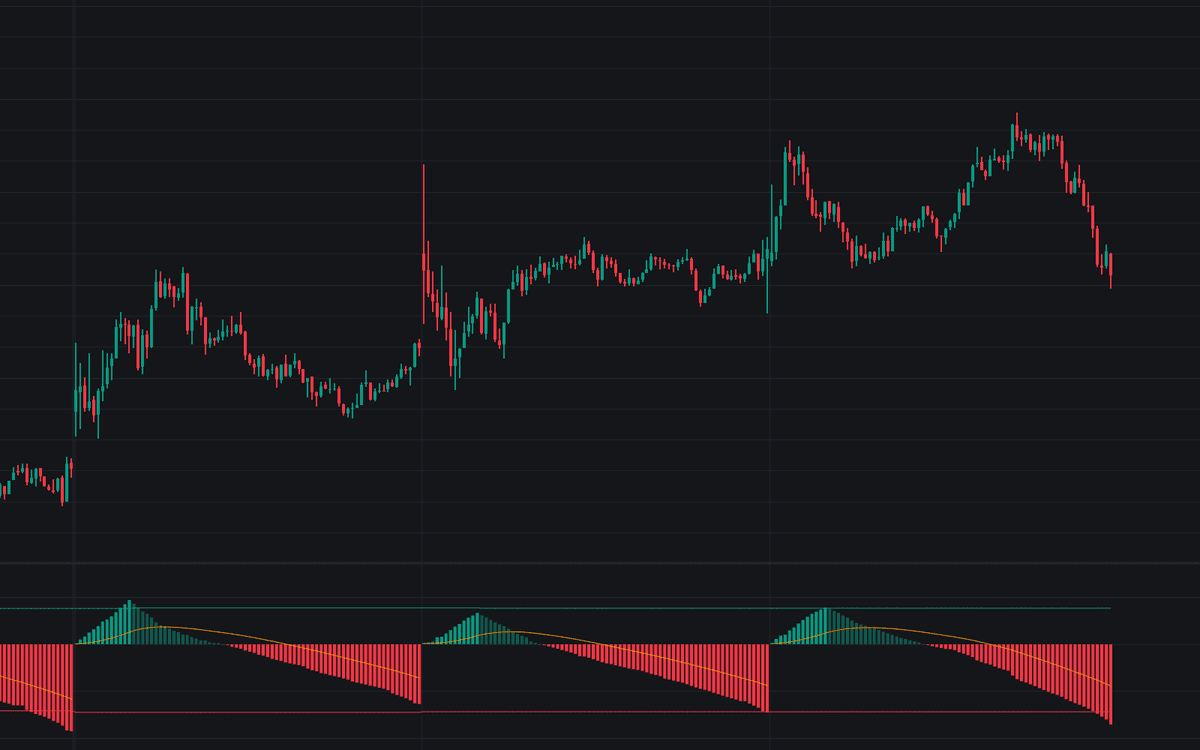

Initial Balance Volume Deficit asks a blunt question of every session: did the market keep trading after the open, or did it spend its energy early? The oscillator accumulates volume through the Initial Balance (IB) (the first 60 minutes) then subtracts each bar of volume that follows, so its position against zero shows whether the rest of the day out-traded the opening hour.
How to Trade the Initial Balance Volume Deficit?
- Cross below zero (Volume Deficit): post-IB volume has overtaken the open. Participation kept building, the behavior healthy trend days tend to show.
- Deep negative close: stronger later-session conviction, supportive context for continuation and breakout trades.
- No Deficit session: the line never crosses zero and the opening bar of the next session is shaded, a loud open with quiet follow-through that can precede exhaustion or range-bound trade.
- Oscillator against the AMA: holding above the session-anchored moving average during the IB shows volume building quickly; slipping below it afterward shows volume being consumed faster than the session's average pace.
- Benchmark lines: a push above the dashed Tops Average marks an unusually active open, while a close below the Bottoms Average marks stronger-than-usual trend participation.
Read the session in stages: how fast the line climbs during the IB, whether it drops sharply or flattens afterward, and where it finishes: deep negative for trend participation, near zero for balance, positive for a quiet close.
Initial Balance Volume Deficit Settings
- Moving Average Length: smoothing period of the Anchored Moving Average; lower values track session volume momentum more closely.
- Tops/Bottoms Average Length: how many prior sessions build the two benchmark lines.
- Style group: bullish, bearish, and MA colors.
Frequently Asked Questions
Free to use
Run it on Vela. Go further with a paid plan.
- Up to 500 strategy alerts, with webhook automation
- Up to 10× the chart history of Free
- Orderflow lookback up to full history
- More Quant usage to customize it, plus extra usage when you need it
- Futures data alongside crypto, stocks, forex and commodities
Also works on

Related indicators
Run it on Vela. Make it yours with Quant.
Open this indicator free on Vela, our next-generation charting platform. Then ask Quant, our coding agent built into Vela, to retune it or turn it into a backtested strategy of your own.