





Liquidity Delta Profiler
May 4, 2026
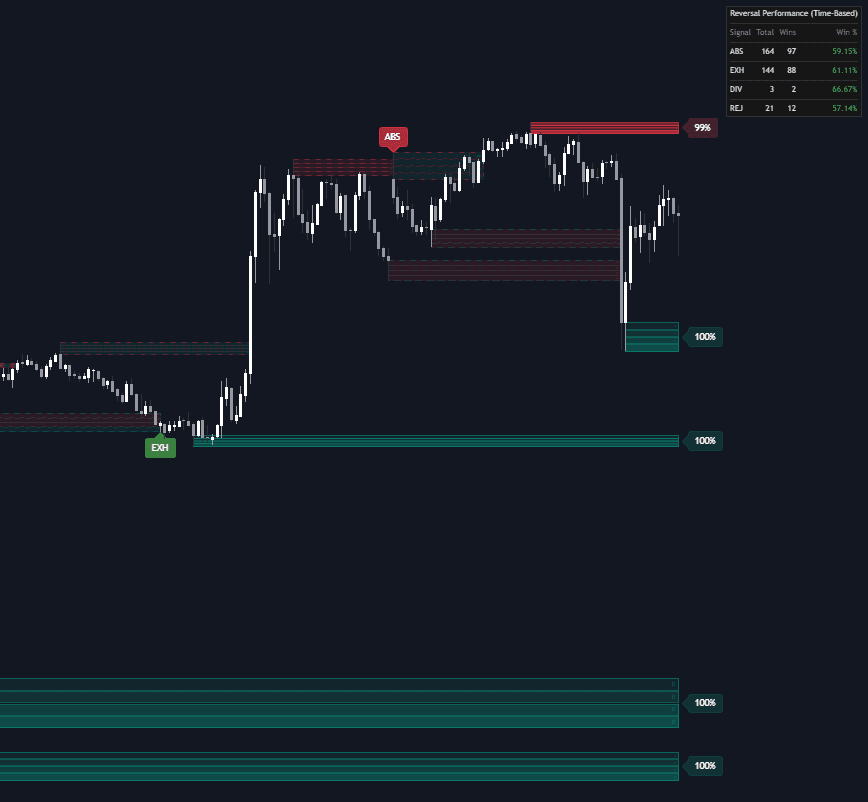
The Liquidity Delta Profiler is a trading indicator designed to help traders identify major buy-side liquidity and sell-side liquidity zones while also showing what is happening inside those levels through volume delta analysis. By combining liquidity zones, buyer/seller pressure, sweep detection, reversal signals, zone health, and a performance dashboard, this trading tool gives traders a more complete way to analyze liquidity sweeps, stop hunts, and potential reversal setups.
How to Trade with the Liquidity Delta Profiler Indicator
The Liquidity Delta Profiler detects significant swing highs and swing lows to plot liquidity zones on the chart. These zones represent areas where stop-loss orders, breakout orders, and trapped liquidity are likely to be clustered.
A swing high creates a potential Buy-Side Liquidity (BSL) zone, while a swing low creates a potential Sell-Side Liquidity (SSL) zone. Traders can use these levels to anticipate where price may move next, where liquidity may be swept, and where potential reversals could form after a breakout attempt fails.
This makes the indicator useful for Smart Money Concepts, liquidity trading strategies, reversal trading, breakout analysis, and price action confirmation.
Reading Volume Delta Quadrants
Unlike standard liquidity indicators that only draw a horizontal level or box, the Liquidity Delta Profiler splits each liquidity zone into four horizontal quadrants. As price trades through these sections, the script calculates volume delta for each specific price slice.
Volume delta measures the difference between buying pressure and selling pressure. This helps traders see whether buyers or sellers were more aggressive inside each part of the liquidity zone.
- Buy Delta Fill: Indicates aggressive buyers were more active in that specific price slice.
- Sell Delta Fill: Indicates aggressive sellers dominated that section.
- Intensity: The color's opacity represents the relative magnitude of the volume delta compared to other sections of the zone.
These delta-filled quadrants allow traders to analyze not just where liquidity exists, but how market participants behave when price interacts with that liquidity. For example, if price sweeps a buy-side liquidity zone but strong sell delta appears near the top of the zone, it may suggest sellers are absorbing the move and a bearish reversal could develop.
Spotting Liquidity Sweeps and Reversal Signals
The Liquidity Delta Profiler includes an advanced reversal detection system that identifies unusual volume behavior during liquidity sweeps. These signals are plotted as bubbles with hoverable tooltips, helping traders quickly understand the type of reaction occurring at a key liquidity level.
- ABS (Absorption): Occurs when aggressive market orders at the extreme edge of a zone are absorbed by large limit orders in the opposite direction.
- EXH (Exhaustion): Occurs when a sweep happens on very low relative volume, suggesting no follow-through.
- DIV (Divergence): Identified when high volume pushes into the edge of a zone (FOMO) but price fails to close outside the level.
- REJ (Snapback Rejection): Triggered when a sweep candle shows high delta in the opposite direction of the sweep and closes back inside the zone.
These reversal signals can help traders identify potential failed breakouts, liquidity grabs, stop hunts, and exhaustion moves. Instead of reacting to every breakout, traders can use the indicator to study whether the breakout has strong continuation pressure or whether the move is likely trapping late buyers or sellers.
Using the Time-Based Performance Dashboard
To evaluate signal reliability, the indicator includes a real-time dashboard that tracks the historical performance of each reversal signal type using time-based validation logic.
A "Win" is recorded if, within the Eval Window, the price reverses from the sweep and remains in profit on the correct side of the signal entry for a specific number of consecutive bars, called the Hold Time.
This helps filter out weak signals that only create temporary wicks. Instead, the dashboard focuses on signals that lead to sustained directional pressure after a liquidity sweep.
Traders can use this dashboard to compare which reversal signal types are working best under current market conditions. For example, absorption signals may perform better in ranging markets, while exhaustion signals may be more useful near the end of extended trends.
Understanding Zone Decay and Liquidity Health
Active zones include a Health percentage label. This shows how much liquidity may remain in the zone based on the cumulative volume traded within it.
As more volume is transacted at a liquidity level, the zone is considered more "consumed," and the health percentage drops toward 0%.
This feature helps traders avoid treating all liquidity zones equally. A fresh liquidity zone with high health may still attract price and generate a meaningful reaction, while a heavily consumed zone may have less remaining liquidity and lower potential impact.
How the Liquidity Delta Profiler Works
The indicator uses a pivot-based detection system to identify important swing highs and swing lows.
When a swing high is confirmed, a Buy-Side Liquidity (BSL) zone is created. When a swing low is confirmed, a Sell-Side Liquidity (SSL) zone is created.
These zones are then monitored as price returns to them. The indicator tracks price interaction, internal volume delta, liquidity consumption, sweep behavior, and potential reversal conditions.
The script also includes Filter Overlaps logic to improve chart clarity. If a new, more significant pivot forms within the range of an existing active zone, the tool can automatically update to the most relevant level. This helps prevent clutter from multiple overlapping boxes and keeps the chart focused on the most important liquidity areas.
Settings for the Liquidity Delta Profiler
Main Settings
- Pivot Length: Lookback/lookforward period for detecting swing highs and lows.
- Max Zones per Type: Maximum number of active and historical zones to keep on the chart.
- Show Swept Zones: Keeps zones visible with dashed outlines after they have been breached.
- Filter Overlapping Zones: Prevents the creation of new zones that overlap with existing active zones.
The main settings control how sensitive the trading indicator is when detecting liquidity zones. A shorter pivot length may identify more frequent liquidity levels, while a longer pivot length may focus on larger, more meaningful market structure.
Decay and Reversal Settings
- Show Zone Decay: Toggles the health percentage labels.
- Zone Volume Capacity: Multiplier for average volume to determine how much volume a zone can absorb.
- Enable Reversal Detection: Toggles the signal bubbles for reversal patterns.
These settings allow traders to decide whether they want to focus only on liquidity zones or also include deeper information such as zone health, volume absorption, and potential reversal signals.
Dashboard Settings
- Show Dashboard: Toggles the performance tracking table.
- Eval Window (Bars): The maximum number of bars the script waits for a reversal to manifest.
- Hold Time (Bars): The number of consecutive bars price must stay in profit to be considered a successful reversal.
- Position/Size: Customizes the UI placement and scale of the dashboard.
The dashboard settings are useful for traders who want to evaluate how specific liquidity sweep signals have performed historically. This can help refine a trading strategy by showing which signal types are currently producing stronger follow-through.
Style Settings
- Colors: Customize colors for BSL/SSL outlines and the positive/negative volume delta fills.
Style settings allow traders to adjust the appearance of liquidity zones, delta fills, and visual elements to match their preferred chart layout.
Why Use the Liquidity Delta Profiler?
The Liquidity Delta Profiler is useful for traders who want more context around liquidity levels instead of simply marking highs and lows. By combining liquidity zones with volume delta quadrants, reversal signal detection, and zone decay, the indicator provides a deeper view of how buyers and sellers interact around key market levels.
This can help traders:
- Identify buy-side and sell-side liquidity zones.
- Analyze liquidity sweeps and stop hunts.
- Spot potential reversal trading opportunities.
- Understand whether buyers or sellers are dominating inside a zone.
- Track zone health as liquidity gets consumed.
- Evaluate historical reversal signal performance.
- Build a more informed liquidity-based trading strategy.
FAQ
What is the Liquidity Delta Profiler?
The Liquidity Delta Profiler is a trading indicator that identifies buy-side and sell-side liquidity zones while displaying internal volume delta activity inside each zone. It helps traders analyze liquidity sweeps, potential stop hunts, and reversal setups.
How does the indicator use volume delta?
The indicator divides each liquidity zone into four horizontal quadrants and calculates buyer versus seller pressure within each section. This helps traders see where aggressive buying or selling occurred inside the zone.
What are BSL and SSL zones?
BSL stands for Buy-Side Liquidity and typically forms above swing highs. SSL stands for Sell-Side Liquidity and typically forms below swing lows. These areas often contain clustered stop-loss or breakout orders.
What do ABS, EXH, DIV, and REJ mean?
ABS means Absorption, EXH means Exhaustion, DIV means Divergence, and REJ means Snapback Rejection. These are reversal signal types that help identify different forms of liquidity sweep behavior.
How does zone health work?
Zone health measures how much volume has traded inside a liquidity zone compared to its estimated capacity. As more volume is traded, the zone becomes more consumed and the health percentage decreases.
Can this indicator be used in a trading strategy?
Yes. Traders can use the Liquidity Delta Profiler as part of a trading strategy for liquidity sweeps, failed breakouts, reversals, Smart Money Concepts, and volume delta confirmation.
How can I access the Liquidity Delta Profiler?
You can get access on the LuxAlgo Library for charting platforms like TradingView, MetaTrader (MT4/MT5), and NinjaTrader for free.
Trading & investing are risky and many will lose money in connection with trading and investing activities. All content on this site is not intended to, and should not be, construed as financial advice. Decisions to buy, sell, hold or trade in securities, commodities and other investments involve risk and are best made based on the advice of qualified financial professionals. Past performance does not guarantee future results.
Hypothetical or Simulated performance results have certain limitations. Unlike an actual performance record, simulated results do not represent actual trading. Also, since the trades have not been executed, the results may have under-or-over compensated for the impact, if any, of certain market factors, including, but not limited to, lack of liquidity. Simulated trading programs in general are designed with the benefit of hindsight, and are based on historical information. No representation is being made that any account will or is likely to achieve profit or losses similar to those shown.
Testimonials appearing on this website may not be representative of other clients or customers and is not a guarantee of future performance or success.
As a provider of technical analysis tools and strategies, we do not have access to the personal trading accounts or brokerage statements of our customers. As a result, we have no reason to believe our customers perform better or worse than traders as a whole based on any content, tool, or platform feature we provide.
Charts used on this site are by TradingView in which the majority of our technical indicators are built on. TradingView® is a registered trademark of TradingView, Inc. www.TradingView.comTradingView® has no affiliation with the owner, developer, or provider of the Services described herein.
Market data is provided by CBOE, CME Group, BarChart, CoinAPI. CBOE BZX real-time US equities data is licensed from CBOE and provided through BarChart. Real-time futures data is licensed from CME Group and provided through BarChart. Select cryptocurrency data, including major coins, is provided through CoinAPI. All data is provided “as is” and should be verified independently for trading purposes.
This does not represent our full Disclaimer. Please read our full disclaimer.
© 2026 LuxAlgo Global, LLC.