Machine Learning: Anchored Gaussian Process Regression
 By LuxAlgoNov 2, 2023
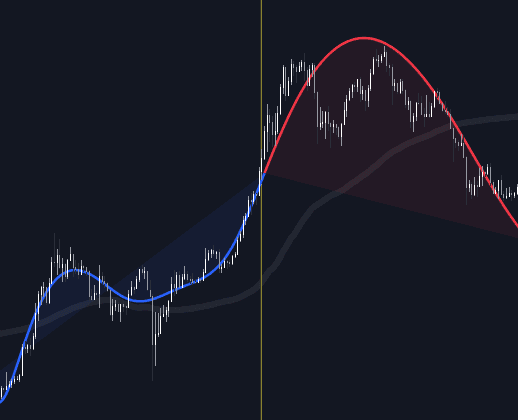

Machine Learning: Anchored Gaussian Process Regression hands you control of the training set: place two anchors on the chart and the model fits a kernel-based regression to the price data between them, drawing the fit as a blue line and extending a red forecast beyond it. Anchoring makes experimentation honest: you can see exactly which regime the estimate learned from and how each setting reshapes the projection.
A faint silver line marks the mean average price inside the Training Window, a simple benchmark for judging how far the forecast deviates from the window's average.
How to Trade the Machine Learning: Anchored Gaussian Process Regression?
- Blue line: the model's fit across the window defined by Anchor 1 and Anchor 2.
- Red line: the forward projection computed from that window, a trend scenario, never a standalone entry trigger.
- Forecast versus mean line: comparing the two shows at a glance how far the projection strays from the window's average price.
- Regime testing: re-anchor across different market phases to compare how your Smooth and Sigma choices hold up.
The Training Window has an internal size cap: anchors set too far apart draw up to the limit and stop, with the red forecast taking priority. Anchor order does not matter: placing Anchor 2 before Anchor 1 works fine.
Machine Learning: Anchored Gaussian Process Regression Settings
- Anchor 1 / Anchor 2: the start and end points of the Training Window.
- Forecasting Length: how many bars ahead the forecast extends.
- Smooth: higher values produce smoother, longer-term trend estimates.
- Sigma: controls noise variance; values near zero increase sensitivity and amplify the forecast.
Frequently Asked Questions
Free indicator
Get free access to this indicator on the platforms below.

The Library is free. Quant makes it yours.
Pull any concept or indicator into Quant: rebuild it, retune it, or turn it into a backtested strategy of your own.