Money Flow Profile
By LuxAlgoApr 2, 2024

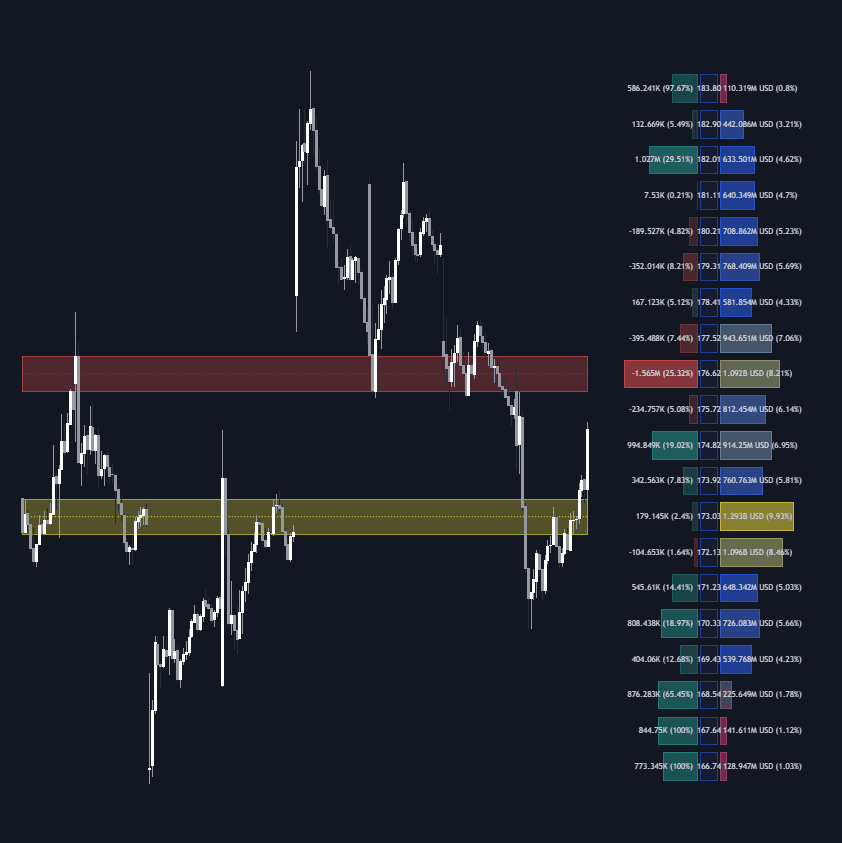
The Money Flow Profile is an advanced charting tool that provides unique insights into trading behavior by revealing how money flows at various price levels over a designated time period. By evaluating the interaction between asset prices and trader interest, it helps traders uncover dominant price levels and assess trading dynamics within a specific market range. This tool integrates a volume/money flow profile, sentiment analysis, and critical price levels to deliver a comprehensive market view.
Comprising a three-part profile, the indicator shows traded activity on the right side, sentiment on the left, and price levels in the middle. This helps traders visualize trading dynamics, market sentiment, and price interactions at a glance.
How to Trade the Money Flow Profile?
Leveraging a volume/money flow profile, traders can see where most trading activity has occurred, aiding in identifying significant support or resistance zones. The sentiment profile further distinguishes dominance between buy and sell volumes at these price levels.
Each row of the profile showcases specific volume and money flow data relevant to particular price levels, enabling targeted analysis.
High volume/money flow nodes often mark areas of intense activity, acting as potential future support or resistance. Prices may gravitate towards these nodes and stabilize. Conversely, low-volume nodes are perceived as areas less visited by price, where quick bounces are expected. The "Profile Heatmap" option accentuates trading activity areas.
By assessing trading activity across price levels, the Money Flow Profile can reveal consolidation and distribution zones, crucial for anticipating breakouts following accumulation.
Additional profile features include Level of Significance, Point of Control, Highest Sentiment Zone, and Profile Price levels, offering traders nuanced market insights.
SETTINGS
The tool accommodates user-defined parameters, with detailed guidance accessible via the tooltip for each setting input.
Profile Generic Settings
- Lookback Length / Fixed Range: Determines the temporal scope for analysis.
- Profile Source: Selects between Volume or Money Flow basis for the profile.
Profile Presentation Settings
- Volume/Money Flow Profile: Activates the visibility of the profile.
- High Traded Nodes: Configures threshold and color for heavily traded nodes.
- Average Traded Nodes: Adjusts color settings for commonly traded nodes.
- Low Traded Nodes: Sets threshold and coloration for least traded nodes.
Sentiment Profile Settings
- Sentiment Profile: Switches on/off the sentiment profile layer.
- Sentiment Polarity Method: Defines calculation mode for buy/sell volume.
- Bullish Nodes: Customizes color for bullish nodes.
- Bearish Nodes: Customizes color for bearish nodes.
Profile Heatmap Settings
- Profile Heatmap: Controls the visualization of the heatmap.
- Heatmap Source: Chooses between Volume/Money Flow or Sentiment Profile for heatmap data.
- Heatmap Transparency: Adjusts heatmap visual transparency.
Other Presentation Settings
- Level of Significance: Shows or hides the significance marking line/zone.
- Consolidation Zones: Controls the visibility of consolidation zones.
- Consolidation Threshold, Color: Sets criteria and appearance for consolidation zones.
- Highest Sentiment Zone: Toggles the display of peak sentiment areas.
- Profile Price Levels, Color, Size: Customizes the display of price levels including color and label size.
- Profile Range Background Fill: Manages the background fill of profile ranges.
Other Settings
- Number of Rows: Defines the row count for profile histograms.
- Profile Width %: Modifies histogram row width relative to profile length.
- Profile Text Size: Adjusts text size; 'Auto' fits text within confines.
- Profile Horizontal Offset: Adjusts profile placement on the horizontal axis.
RELATED SCRIPTS
Explore more insightful scripts at LuxAlgo-Scripts.
FAQ
How can I access the Money Flow Profile indicator?
You can get access on the LuxAlgo Library for charting platforms like TradingView, MetaTrader (MT4/MT5), and NinjaTrader for free.
What makes the Money Flow Profile stand out in trading analysis?
The Money Flow Profile uniquely combines volume insights with sentiment analysis, allowing traders to discern critical price points and sentiment dominance effectively.
Why should traders consider using a sentiment profile?
Incorporating sentiment profiles helps traders understand the underlying sentiment driving market movements, offering a strategic edge in anticipating market shifts.
Free indicator
Get free access to this indicator on the platforms below.
Unlock the entire LuxAlgo Library
Every indicator, every strategy, full charts, and complete access to Quant — our AI agent.