POC Sweep Reclaim
 By LuxAlgoFeb 18, 2026
POC Sweep Reclaim is an indicator on Vela, our next-generation charting platform, written in Pine Script®.
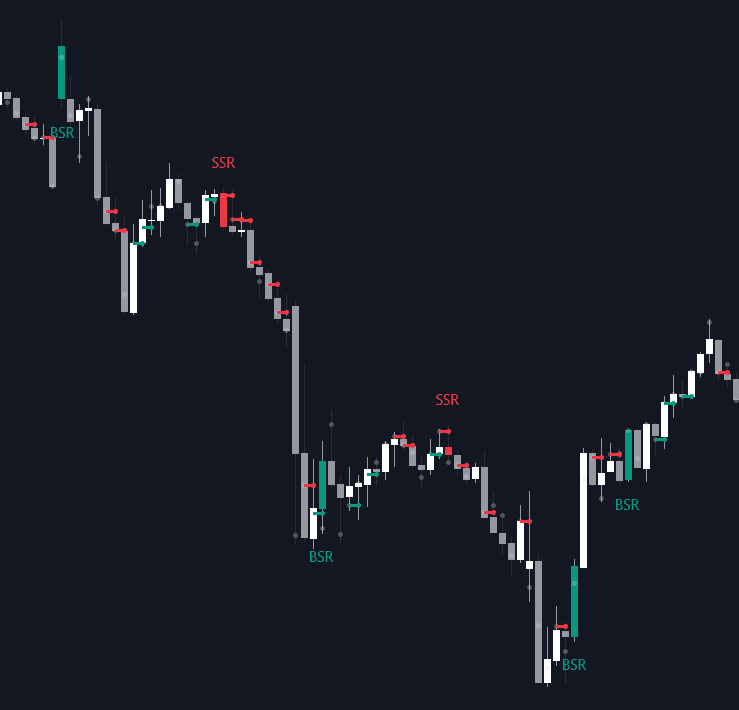
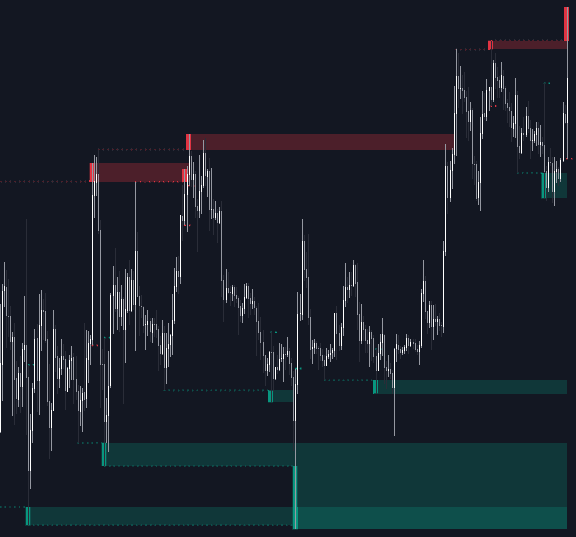
POC Sweep Reclaim builds each candle's Point of Control from lower-timeframe volume, then watches how the next bar treats it. The model demands two events in sequence: a sweep, where price wicks through the prior candle's POC but the body fails to close beyond it, and a reclaim, where the very next candle closes decisively past that same level. Rejection followed by acceptance: the signature of traders trapped on the wrong side of a high-volume price.
How to Trade the POC Sweep Reclaim?
- Buyside Sweep: a wick above the previous POC with a close back below, a failed push higher, the kind of liquidity grab that strands late buyers.
- Sellside Sweep: the mirror image below the POC; sellers probed lower and could not hold the level.
- BSR (Buyside Reclaim): after a buyside sweep, the next candle closes above the swept POC, a bullish signal that trapped participants may fuel continuation higher.
- SSR (Sellside Reclaim): after a sellside sweep, the next candle closes below the swept POC, the bearish counterpart.
A sweep alone identifies the trap, not the direction; the reclaim is the confirmation. Setups suit breakout continuation, intraday reversals, and liquidity-based scalping, with invalidation naturally placed at the swept POC.
POC Sweep Reclaim Settings
- Lower Timeframe for POC: granularity of the volume aggregation. Finer timeframes sharpen the POC estimate.
- Show POC: plots the calculated POC dots for each candle.
- Show Sweep Dots: marks wick rejections that never achieved a body close beyond the level.
- Show BSR (Buyside Reclaim) / Show SSR (Sellside Reclaim): toggle the confirmed bullish and bearish reclaim signals.
Frequently Asked Questions
Free to use
Run it on Vela. Go further with a paid plan.
- Up to 500 strategy alerts, with webhook automation
- Up to 10× the chart history of Free
- Orderflow lookback up to full history
- More Quant usage to customize it, plus extra usage when you need it
- Futures data alongside crypto, stocks, forex and commodities
Also works on

Related indicators
All 4 Point of Control indicators
Run it on Vela. Make it yours with Quant.
Open this indicator free on Vela, our next-generation charting platform. Then ask Quant, our coding agent built into Vela, to retune it or turn it into a backtested strategy of your own.