





Price-Point Volume Oscillator
 by LuxAlgo · Feb 18, 2026
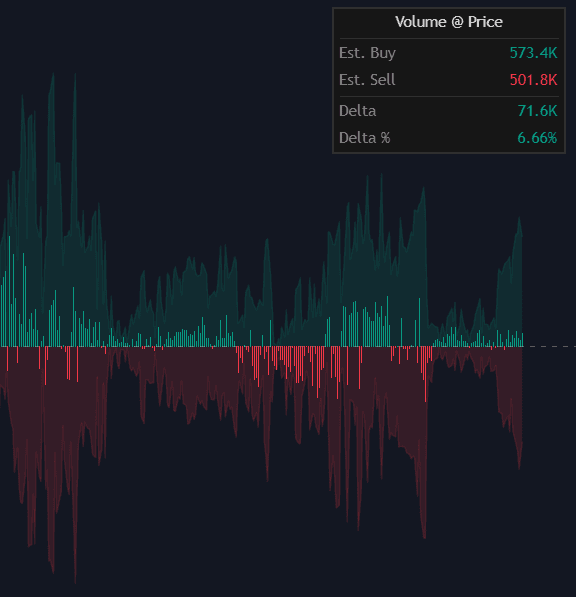
The Price-Point Volume Oscillator is a powerful trading indicator designed to estimate how much buying and selling volume has historically occurred at the exact current price level. Instead of analyzing total volume per candle, this tool isolates and aggregates only the volume from past bars that intersect with the current market price. The result is a highly focused volume analysis that helps traders identify hidden supply and demand zones, confirm support and resistance levels, and refine trade entries with precision.
How to Trade the Price-Point Volume Oscillator?
Unlike traditional volume indicators that measure activity per bar or session, this oscillator answers a more specific question:
“When price was here before, was it dominated by buyers or sellers?”
By filtering historical price action to include only bars that intersect with the current price, the indicator builds a dynamic estimate of historical volume distribution at that precise level.
This makes it especially useful for:
- Confirming key support and resistance levels
- Validating breakout strength
- Identifying absorption or exhaustion zones
- Refining entries during pullbacks
- Filtering false breakouts
Understanding the Visual Components
The Price-Point Volume Oscillator consists of three core elements that together create a complete trading strategy framework.
Buy/Sell Volume Areas
- Green Area: Estimated buying volume accumulated at the current price.
- Red Area: Estimated selling volume accumulated at the current price.
These background areas represent how much bullish or bearish pressure historically existed at this specific price point.
If the green area dominates, it suggests strong historical demand. If the red area dominates, it signals persistent selling pressure at that level.
Volume Delta Histogram
The central histogram displays the Volume Delta, which is the net difference between estimated buy and sell volume.
- Green Histogram: Net positive delta → Buying pressure dominates.
- Red Histogram: Net negative delta → Selling pressure dominates.
This histogram provides a clean and immediate bias reading:
- Strong positive delta near support may confirm a bounce.
- Strong negative delta near resistance may confirm rejection.
- A flattening histogram may indicate balance and potential consolidation.
Real-Time Dashboard
The integrated dashboard displays:
- Estimated Buy Volume
- Estimated Sell Volume
- Net Delta
- Delta Percentage
This allows traders to quantify the imbalance instead of relying solely on visual interpretation.
For example, a +35% Delta Percentage indicates significant buyer dominance at the current level.
Using the Indicator for Support and Resistance Confirmation
One of the strongest applications of this trading indicator is validating key technical levels.
Scenario 1: Confirming Support
If price revisits a prior low and the oscillator shows:
- Strong positive delta
- High estimated buy volume
- Increasing green histogram
This suggests historical demand was strong at that level, increasing the probability of a bounce.
Scenario 2: Confirming Resistance
If price approaches a previous high and the oscillator displays:
- Strong negative delta
- Elevated selling volume
- Expanding red histogram
This indicates sellers historically defended this price, reinforcing resistance.
Scenario 3: Breakout Validation
When price breaks through a key level:
- If delta flips strongly positive during an upside breakout → Higher probability continuation.
- If delta flips strongly negative during a downside breakout → Increased bearish momentum confirmation.
This makes the Price-Point Volume Oscillator highly effective when combined with trend-following strategies or market structure analysis.
How the Price-Point Volume Oscillator Works
The logic behind this trading indicator is both elegant and practical.
Historical Price Intersection Filtering
The script loops through a user-defined lookback window. For each historical bar:
- It checks whether the current close price falls within that bar’s High–Low range.
- If it does, that bar’s volume is considered relevant to the current price.
- That volume is then allocated to either buying or selling estimates.
This process creates a dynamic historical volume profile specifically centered on the present price.
Buy vs Sell Volume Allocation
To differentiate between buying and selling pressure, the script uses a ratio based on where the historical bar closed within its range:
- Close near the high → Larger portion attributed to Buy Volume
- Close near the low → Larger portion attributed to Sell Volume
This proportional method provides a realistic approximation of directional pressure without requiring tick-level order flow data.
Indicator Settings Explained
Settings
- Lookback Window:
Defines how many historical bars are analyzed for price intersections.- Smaller window → Faster response, more recent context
- Larger window → Broader historical perspective
A longer lookback improves statistical stability but increases computational load.
Visual Customization
- Show Dashboard: Enables or disables the real-time statistics panel.
- Position: Choose between Top Right, Bottom Right, or Bottom Left chart placement.
- Size: Adjusts text and table dimensions to match your screen resolution and layout.
These options ensure the oscillator integrates cleanly into any trading workspace.
Why This Trading Indicator Is Unique
Most volume indicators measure activity over time. The Price-Point Volume Oscillator measures activity at price.
This distinction makes it particularly powerful for:
- Scalpers analyzing micro-level reactions
- Day traders confirming intraday support/resistance
- Swing traders validating higher timeframe levels
- Traders who want volume context without full volume profile tools
It acts as a hybrid between an oscillator and a localized volume profile, making it an adaptable tool for multiple trading strategies.
Frequently Asked Questions
What makes the Price-Point Volume Oscillator different from traditional volume indicators?
Traditional indicators measure volume per candle or session. This tool measures historical volume specifically at the current price level, providing a focused view of supply and demand imbalance.
Can this indicator be used for all markets?
Yes. It works on stocks, forex, crypto, and futures markets, as long as volume data is available.
Is it suitable for both scalping and swing trading?
Absolutely. Shorter lookback settings work well for scalpers and intraday traders, while larger windows provide broader context for swing traders.
How do I access the Price-Point Volume Oscillator?
You can get access on the LuxAlgo Library for charting platforms like TradingView, MetaTrader (MT4/MT5), and NinjaTrader for free.

Unlock Unlimited Access to the LuxAlgo Library
Upgrade your plan to get all indicators, strategies, charts, and full access to Quant, our AI agent.
Trading & investing are risky and many will lose money in connection with trading and investing activities. All content on this site is not intended to, and should not be, construed as financial advice. Decisions to buy, sell, hold or trade in securities, commodities and other investments involve risk and are best made based on the advice of qualified financial professionals. Past performance does not guarantee future results.
Hypothetical or Simulated performance results have certain limitations. Unlike an actual performance record, simulated results do not represent actual trading. Also, since the trades have not been executed, the results may have under-or-over compensated for the impact, if any, of certain market factors, including, but not limited to, lack of liquidity. Simulated trading programs in general are designed with the benefit of hindsight, and are based on historical information. No representation is being made that any account will or is likely to achieve profit or losses similar to those shown.
Testimonials appearing on this website may not be representative of other clients or customers and is not a guarantee of future performance or success.
As a provider of technical analysis tools and strategies, we do not have access to the personal trading accounts or brokerage statements of our customers. As a result, we have no reason to believe our customers perform better or worse than traders as a whole based on any content, tool, or platform feature we provide.
Charts used on this site are by TradingView in which the majority of our technical indicators are built on. TradingView® is a registered trademark of TradingView, Inc. www.TradingView.com TradingView® has no affiliation with the owner, developer, or provider of the Services described herein.
Market data is provided by CBOE, CME Group, BarChart, Massive, CoinAPI. Select U.S. equities data is provided through Massive. CBOE BZX real-time U.S. equities data is licensed from CBOE and provided through BarChart. Real-time futures data is licensed from CME Group and provided through BarChart. Select cryptocurrency data, including major coins, is provided through CoinAPI. All data is provided “as is” and should be verified independently for trading purposes.
This does not represent our full Disclaimer. Please read our full disclaimer.
© 2026 LuxAlgo Global, LLC.