





Price-Volume-Volatility Cube
Feb 19, 2026
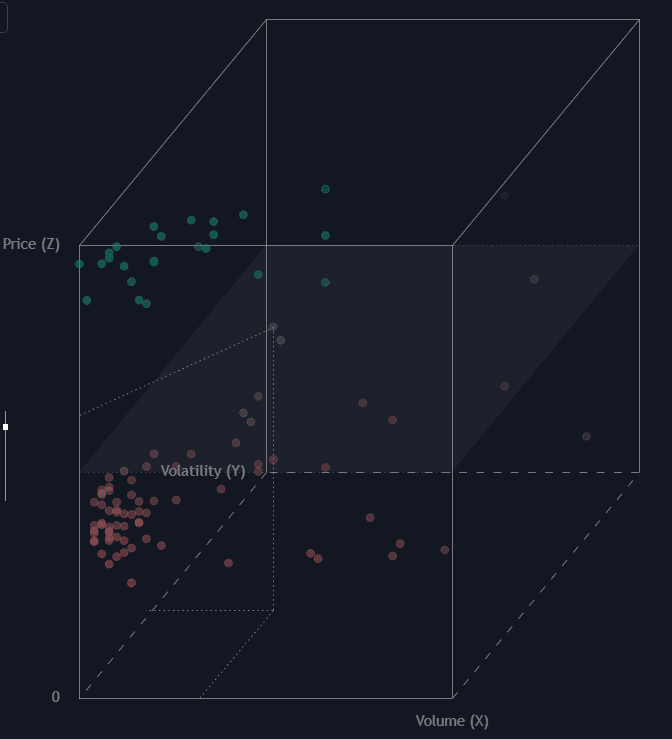
The Price-Volume-Volatility Cube indicator is an advanced trading indicator that transforms three essential market variables—price, volume, and volatility—into a normalized 3D visualization directly on your chart. Using a Cabinet Oblique projection, this tool helps traders see how market conditions cluster, expand, and shift over time within a defined lookback window. Instead of analyzing these dimensions separately, you can observe their interaction as a unified structure, making it easier to identify breakout conditions, compression phases, and abnormal market behavior.
By mapping price, volume, and volatility into a cube-shaped framework, this trading strategy tool offers a high-level yet intuitive view of market structure. Whether you are trading stocks, crypto, forex, or futures, this visualization reveals the internal “character” of recent price action in a way that traditional 2D indicators cannot.
How to Trade the Price-Volume-Volatility Cube Indicator?
The indicator renders a wireframe cube representing the boundaries of the selected lookback period. Inside the cube, each historical bar is plotted as a colored sphere, forming a dynamic 3D cloud of market activity.
This visual cluster allows traders to:
- Detect regime shifts (low volatility to high volatility transitions)
- Identify volume expansion near price extremes
- Spot outlier conditions before breakouts or reversals
- Understand whether the current bar is statistically “normal” or extreme
When the cloud begins clustering tightly in one section of the cube, it often signals consolidation. When points expand toward edges—especially in volume and volatility—it can indicate trend acceleration or breakout potential.
The 3D Axes Explained
The cube uses three axes to position every bar within the lookback window:
-
Volume (X-Axis):
Represents the bar’s relative volume. Points further right indicate stronger participation. High-volume clusters near price extremes can confirm conviction behind a move. -
Volatility (Y-Axis):
Represents True Range (TR), projected as depth. Points that appear deeper in the cube signal higher volatility. Rising volatility clusters often precede expansion phases. -
Price (Z-Axis):
Represents the normalized closing price. Higher points indicate price near the period high, while lower points represent proximity to the period low.
Together, these axes create a multidimensional trading view that helps you analyze momentum, liquidity, and expansion in one structured space.
Reading the Data Path and Current Market State
The current bar is emphasized with projection lines connecting it to the cube’s floor and axes. This feature makes it easy to evaluate whether the market is:
- High price + high volume + high volatility (trend expansion)
- High price + low volume + low volatility (potential exhaustion)
- Low price + high volume (possible accumulation)
- Inside a dense cluster (balanced, rotational environment)
Color transitions further enhance clarity. Points shift from red (near period low) to green (near period high), giving an immediate visual cue of price positioning regardless of cube orientation.
This makes the indicator especially useful for traders who rely on contextual confluence rather than single-variable signals.
Advanced Visualization Mechanics
The script uses a Cabinet Oblique projection to convert 3D coordinates into 2D chart space. This method preserves the X and Z axes proportions while scaling the Y-axis (depth) by half at a 45-degree angle. The result is a visually balanced and distortion-controlled cube that maintains clarity even with dense data.
To ensure structural consistency, the cube automatically calculates vertical height based on the Cube Base Width, maintaining a strict 1:1:1 aspect ratio. No matter how your chart is scaled horizontally, the geometry remains a true cube.
The vertical position of the cube is also auto-adjusted to keep the visualization centered and fully visible in the indicator pane.
Normalization for Accurate Market Comparison
All values—price, volume, and volatility—are normalized between 0 and 1 based on the minimum and maximum values within the selected lookback period.
This ensures:
- The cube always reflects relative behavior
- Market structure is comparable across different assets
- The visualization adapts dynamically to changing volatility regimes
Normalization makes this trading indicator flexible across markets like equities, crypto, forex, and commodities without requiring manual recalibration.
Trading Applications and Strategy Ideas
The Price-Volume-Volatility Cube can be integrated into multiple trading strategies:
- Breakout Confirmation: Look for price moving toward the top of the cube with increasing volume and volatility.
- Compression Detection: Identify tight clustering in low volatility zones before expansion.
- Reversal Signals: Watch for extreme price positioning with declining volume.
- Regime Classification: Use clustering density to distinguish trending markets from ranging environments.
This makes it a powerful complementary tool alongside trend-following systems, liquidity analysis, or volatility-based trading strategies.
SETTINGS
Cube Settings
- Lookback Period:
Defines the number of bars used to calculate normalization ranges and determines how many points are plotted inside the cube. A shorter lookback makes the cube more reactive, while a longer one smooths regime detection.
Visual Controls
- Cube Base Width (Bars):
Controls horizontal scaling and automatically determines vertical height to preserve the 1:1:1 cube ratio.
Positioning
- Horizontal Offset (Bars):
Allows you to shift the cube left or right relative to the most recent bar for optimal chart visibility.
FAQ
What makes this different from traditional trading indicators?
Most trading indicators analyze price, volume, or volatility independently. The Price-Volume-Volatility Cube combines all three into a single multidimensional visualization, helping traders identify structural relationships and market clustering effects that are not visible in standard oscillators.
Can this be used for all markets?
Yes. Because the data is normalized within a lookback window, the indicator adapts automatically to stocks, cryptocurrencies, forex pairs, futures, and commodities.
How do I access the Price-Volume-Volatility Cube indicator?
You can get access on the LuxAlgo Library for charting platforms like TradingView, MetaTrader (MT4/MT5), and NinjaTrader for free.
Trading & investing are risky and many will lose money in connection with trading and investing activities. All content on this site is not intended to, and should not be, construed as financial advice. Decisions to buy, sell, hold or trade in securities, commodities and other investments involve risk and are best made based on the advice of qualified financial professionals. Past performance does not guarantee future results.
Hypothetical or Simulated performance results have certain limitations. Unlike an actual performance record, simulated results do not represent actual trading. Also, since the trades have not been executed, the results may have under-or-over compensated for the impact, if any, of certain market factors, including, but not limited to, lack of liquidity. Simulated trading programs in general are designed with the benefit of hindsight, and are based on historical information. No representation is being made that any account will or is likely to achieve profit or losses similar to those shown.
Testimonials appearing on this website may not be representative of other clients or customers and is not a guarantee of future performance or success.
As a provider of technical analysis tools and strategies, we do not have access to the personal trading accounts or brokerage statements of our customers. As a result, we have no reason to believe our customers perform better or worse than traders as a whole based on any content, tool, or platform feature we provide.
Charts used on this site are by TradingView in which the majority of our technical indicators are built on. TradingView® is a registered trademark of TradingView, Inc. www.TradingView.comTradingView® has no affiliation with the owner, developer, or provider of the Services described herein.
Market data is provided by CBOE, CME Group, BarChart, CoinAPI. CBOE BZX real-time US equities data is licensed from CBOE and provided through BarChart. Real-time futures data is licensed from CME Group and provided through BarChart. Select cryptocurrency data, including major coins, is provided through CoinAPI. All data is provided “as is” and should be verified independently for trading purposes.
This does not represent our full Disclaimer. Please read our full disclaimer.
© 2026 LuxAlgo Global, LLC.